Quote:
|
Originally Posted by jordi.c
What do you mean with
Note: Don't create new disc from scratch, it will not work
|
Don't unpack the whole map disc, you only need the DB files.
Quote:
|
E.g. I have already a disc with POI's using the software PimpMyNav, because i don't know how to do add this in the Navigation DVD so the POI's will be visible in the Mini Cooper. Can I use this disc with POI's already?
|
OK, Make and image of you map disc (I used the 2009-1 Euro HIGH disc, the 2007-2008 VDO cd also works)
Make 2 dirs in the C:\\POISon dir ; 1 called "C:\\POISon\DB" and the other called "C:\\POISon\DB1"
Open the image with UltraIso and drag the 2 DB files (BD_0 and DB_1) into the "C:\\POISon\DB" dir along with all the other files in the top DB dir, see hlighted files in pic
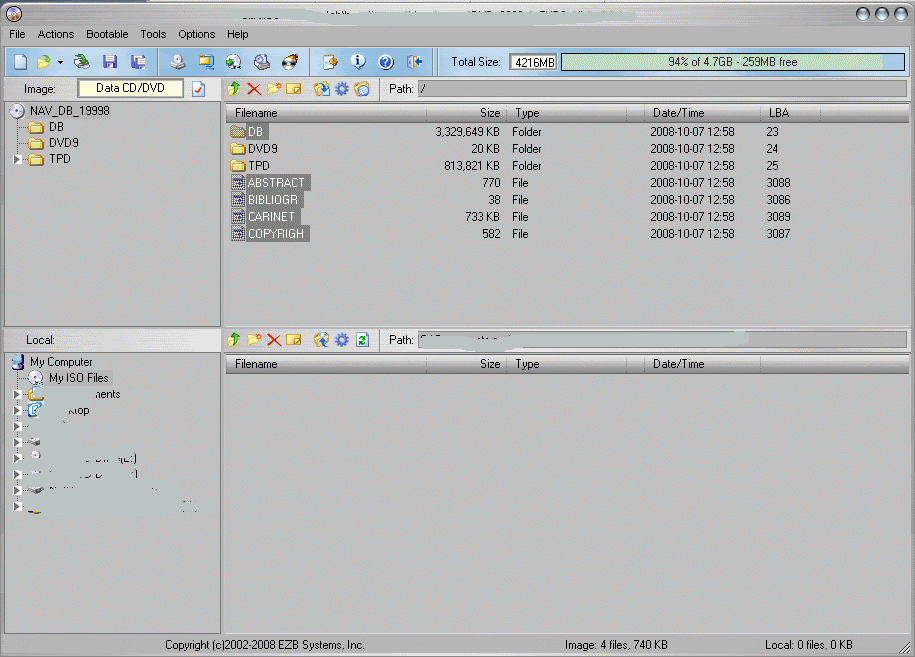
Run the poison.exe and press the forward button, select the map DB in "C:\\POISon\DB" and then open, the forward, then select the import
Select map to modify (if possible, use CD map, not DVD or DVD-DL).
On the edit page click 'Import' button and select file "tomtom.asc" then save modified database in DB1.
Drag and drop the now modified database files back to CD/DVD map image.
Save the map image to something like 2009-2-Sound.iso.