So I am still trying to do this but having the same issue. When I try the new CD with the new version of the SW I get this screen:
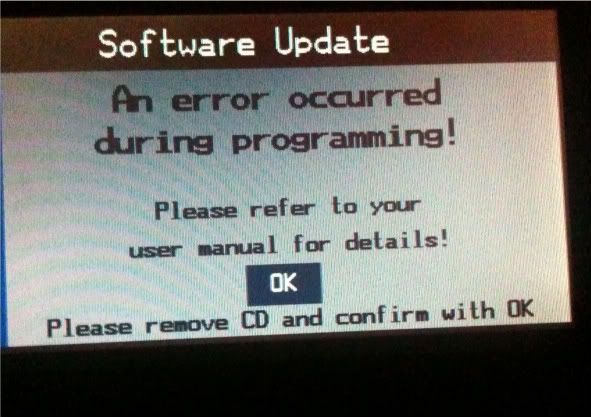
Here is what I am doing:
Opening ISO of V32 using MagicISO.
Pulling out the NAVBOOT file from V_2 > RR > 0101 > BMWC01S > APP_SW folder.
Opening the NAVBOOT file in NavTweak 2.6
Going to Images > rombitmaps > image 14 and replacing it with a new picture (I have tried 2 of them, both working .gifs of the correct size from the splash screen thread)
Saving the NAVBOOT file with NavTweak, then replacing it in the ISO image in MagicISO.
Then I am taking out the SW_REL.TBL and LNG_REL.TBL files from the BMWC01S folder in the image.
Opening PSPad, opening one of the files in it. Right click > hex edit mode.
Editing the file like so:
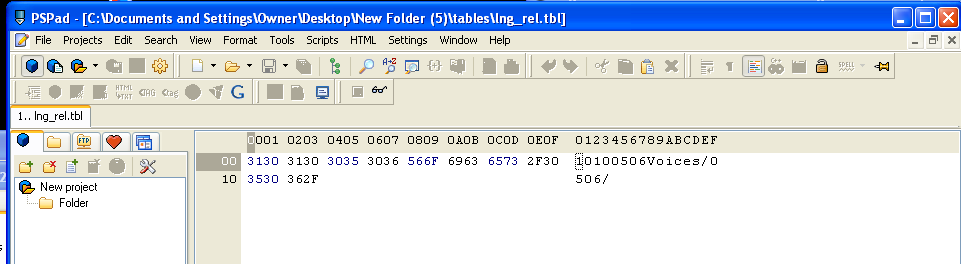
Doing this for both the language and the SW file.
Saving these to the BMWC01S folder in the image.
Saving the image using MagicISO, then burning it at 1x on ImgBurn.
When I go to update the car, I see the SW version update as 10.10, so that looks good. Then I get the screen I showed above. Then the screen is black and the Nav is dead until I use a stock V31 disk that I have to bring it back to life.
Am I missing something or doing anything wrong that would cause this?
Thanks guys