
|
|
|
|
||||||||||
| Xoutpost server transfer and maintenance is occurring.... |
| Xoutpost is currently undergoing a planned server migration.... stay tuned for new developments.... sincerely, the management |
 |
|
|
LinkBack | Thread Tools | Display Modes |
|
#1
 02-15-2012, 12:58 AM
|
|||
|
|||
|
Newbie X5 4.8is - BMW Bluetooth Phone help needed
I have a question for you all, regarding the bluetooth BMW motorola phone that is installed in my truck. It has no battery, and I wanted to get a replacement but I'm struggling finding out what bettery it takes. Can any of you help by giving a link or part number for it? I have attached pics below of the phone and inside with the sticker. If any of you have the same phone, could you take a quick look for me? 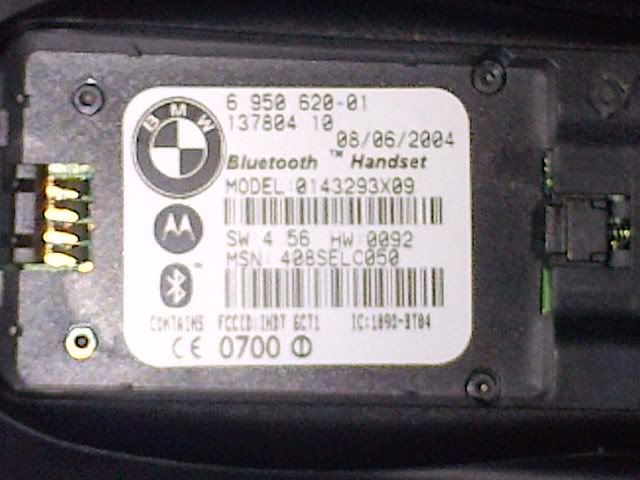  Also, the sim card tray is snapped, where can I get a replacement? It is dealer only? would the dealer just be able to supply this part, or would it be the whole cradle? thanks 
|
| Sponsored Links | |
|
|
|
|
#2
02-15-2012, 11:09 AM
|
|||
|
|||
|
That is a car phone. Why are you even trying to get it to work, don't you have a cell phone? Check your trunk, left hand side, below the floor, see you have a silver box mounted diagonally. If you do, then you have a bluetooth module, and you will be able to just pair your regular cell phone.
That is the first time I see that setup.
|
|
#3
02-15-2012, 12:24 PM
|
||||
|
||||
|
that's real weird....did 2005 even come with those snap ins?
Slick is right, search for a TCU. Maybe check you manual if you have one, your code might be taped in it.
__________________
2005 x5 4.4i sport
|
|
#4
02-16-2012, 12:47 AM
|
|||
|
|||
|
Hey guys, thanks for the reply.
It says it's a bluetooth phone on the handset sticker as per the pic, and yes I do have a bluetooth code on a piece of thin card with the car docs. Why get it to work, just "because" really! I hate having things that dont work in my cars, so just getting this X5 up to standard. And I thought it was cool to actually have a BMW handset in the car! I'll do a search on how to pair my cell phones to the bluetooth. So is this a rare option in the X5? I didn't know they came with BMW handsets either to be honest....
|
|
#5
02-16-2012, 08:25 AM
|
|||
|
|||
|
Ok, I searched for as much info as pos on here, and I managed to pair my phone with the car, but I can't make any calls - it wont connect to the system.
I'll see how I get on..... Dealer also got back to me, wants about $50 for the battery, and $10 for the sim tray....
|
|
#6
02-16-2012, 11:20 AM
|
||||
|
||||
|
I wonder if the "retrofit" disabled some of the cables in the back. You probably came across articles on where the TCU is located. I would check that out and see if there are any loose wires back there.
For US cars, I think they stopped that snap in 2003/04. Not 100% sure.
__________________
2005 x5 4.4i sport
|
|
#7
02-16-2012, 11:57 AM
|
||||
|
||||
|
Lots of misinformation/misperception here.
You can buy a snap in and tray for the Iphone 4GS, a couple blackberries and some Nokias today. The snap in module performs two functions. It charges the battery of a supported phone and it boosts the signal when the phone is snapped in. I installed one into my '04 two weeks ago. The cables for it are just sitting there zip tied and waiting to be connected. Very easy. I don't have a phone with a supported cradle, so I have just a plain cradle in there. A possible reason that your car will not pair to your phone- if different from the one pictured- is that the car is pairing to that phone. If that phone is powered on, power it off and try pairing with your phone again. If that doesn't work, try this process from another thread to unpair old phones: 1) Press and hold the VR ("face") button on your steering wheel, turn the ignition to position1 after after approx 3 seconds, and release the button after another 3 seconds. "Bluetooth Pairing" appears on the display. 2) Press and keep button presssed again for another 10 seconds, until three beep sounds occur. "PAIRED DEVICES DELETED" appears on display. 3) Turn ignition key to poisition 0/off to complete proceedure. - Then go thru the process to pair your new phone...
__________________
 
Last edited by PropellerHead; 02-16-2012 at 01:09 PM.
|
|
#8
02-17-2012, 11:11 PM
|
||||
|
||||
|
Prophead,
Where did you source that cradle? Where is the wiring you mentioned located? I've got an iPhone 4 and would love to have a charging cradle. Thanks for any help!
__________________
2006 4.8iS Black/Black with custom Audison Voce/Image Dynamics sound  Production Date - 10/05
|
|
#9
02-18-2012, 10:45 AM
|
||||
|
||||
|
Quote:
BimmerNav has the plain adapters and says something ab the iPhone3 cradle not for older X5's. Then they list an iPhone4 adapter.  My blank one came with the BT kit from getBMWParts.com/SilverSPrings BMW. It's a BMW part as far as I know. My blank one came with the BT kit from getBMWParts.com/SilverSPrings BMW. It's a BMW part as far as I know.
__________________
|
|
#10
02-20-2012, 02:22 AM
|
|||
|
|||
|
An update:
Got the battery and the sim card cradle. Found that half the old sim cradle was snapped off in the phone cradle, so had to take that out, take it to pieces to fish out the old snapped sim cradle. Did that, put it all back together, plugged it all back in. Fired up the phone, working fine. Re paired it to the headunit (thanks prophead for the info above). Then tried a sim card, and it doesn't recognise the card. Tried 3 different sim cards on different networks, no luck. When plugging in the sim, it says "please wait" so it recognises the sim, then it goes back to "insert sim" after about 5 secs or so. Not sure what to do next, any ideas?
|
|
| Bookmarks |
|
|
|
|






 Linear Mode


