
|
|
|
|
||||||||||
| Xoutpost server transfer and maintenance is occurring.... |
| Xoutpost is currently undergoing a planned server migration.... stay tuned for new developments.... sincerely, the management |
 |
|
|
LinkBack | Thread Tools | Display Modes |
|
#31
 06-15-2011, 01:18 PM
|
||||
|
||||
|
Tethering the iPhone would connect carPC to internet and not require any additional hardware. Would still display on Nav and control through Pocket Cloud app. Certainly not the only way to do it, but that's how I would attack it.
__________________
Previously owned: '03 4.6iS Dinan Supercharged 
|
| Sponsored Links | |
|
|
|
|
#32
06-15-2011, 06:20 PM
|
||||
|
||||
|
I personally just went with the CIS-IBUS interface. Its a plug and play interface which is easy to connect and set up. It provides a very nice picture; IE: comparing this to the analogue video input via TV tuner I have in my 330XI.
I built my CarPC using an M350 case (well ventilated) with an Atom based mITX board. It doesn't have a PCMCIA slot though; everything else. You can tether the phone in numerous ways; IE; like wireless or bluetooth. Personally it might work better just using a USB cable run up to where the phone and just plugging it into the mini USB port on the phone. You can also add TTS to the CarPC with numerous types of speech fonts. I always compare my NAV DVD 2011 to the carphone NAV and or the CarPC nav.
__________________
E83 - Aero PKG Mods installed: Homelink mirror. CIS-IBUS video module, AUX, Rr Dr Release, stock wheels, Remote start, CarPC (Atom) & mud flaps - NAV - MKIV - NA Map DVD - 2011 E46 - 18.5 wheels/tires (summer), 17 stock (winter), Homelink, NAV software upgrade, BMW video module, Radio to V53, AUX, USB IBUS interface,BMW alarm install, CarPC(Epia), remote starter, tank battery & angel eyes. NAV - MKIII - NA Map CD - High Version 2008.1 
|
|
#33
05-11-2016, 08:47 AM
|
|||
|
|||
|
Hello !
I'm trying to play with a CID (from a Z4 E85)! I can send message to open it and to activate the buttons (80 xx bf 11 01 xx) but I'm not able to see something on the screen. If I use 3b xx f0 4f 01 01 xx , the screen turns black, but even if I try to send a video nothing appears. It turns off after 15/20 seconds. Is it normal that my screen is totaly black ? Shouldn't I see at least "something" (even if it's not the right size, etc.) ? I used a small circuit to convert VGA to RGsB ( Sync-on-green ) Is there a way to test it easily to see if it works ?
|
|
#34
05-11-2016, 09:09 AM
|
||||
|
||||
|
How are you switching to the RGB video?
Is it normal that my screen is totaly black ? Shouldn't I see at least "something" (even if it's not the right size, etc.) ? You should see a low resolution image of the computer on the HU. Here purchased a combination video and iBus box that is recognized on the I-Bus. I see the device on my HU menu today. (along with navigation, radio, satellite GPS, television). You need to do both. 1 - sniff the bus 2 - change the video to the HU Tap in to the back up camera video wires and enable the back up camera circuit to see the RGB video. Here also installed a video tuner in the mix. (old now and doesn't work with new broadcast video). I haven't played with this in years. CarPCs are running embedded wintel and switching to Ubuntu now and maybe a smaller micro PC. Relating to telephone use I can see all of the CID / messages on the older style E46 ULF module. I never sniffed the I-Bus for CID. I do have a built in sniffer on the software I am using and will look. Never looked on the E83 Bus for CID but I am guessing it is there. The bus connects to everything. I only have the combo bluetooth stock OEM (TCU) stuff for the E83 which is the emergency calling service (build in 3G) and bluetooth speakerphone. I cannot see any messages on it like the ULF. I will turn on logging of the bus on the E83 and see what happens when I get a phone call. I do see the emergency 3G radio on the Ibus (way long time ago).
__________________
E83 - Aero PKG Mods installed: Homelink mirror. CIS-IBUS video module, AUX, Rr Dr Release, stock wheels, Remote start, CarPC (Atom) & mud flaps - NAV - MKIV - NA Map DVD - 2011 E46 - 18.5 wheels/tires (summer), 17 stock (winter), Homelink, NAV software upgrade, BMW video module, Radio to V53, AUX, USB IBUS interface,BMW alarm install, CarPC(Epia), remote starter, tank battery & angel eyes. NAV - MKIII - NA Map CD - High Version 2008.1
Last edited by pete_c; 05-11-2016 at 09:21 AM.
|
|
#35
05-11-2016, 09:17 AM
|
|||
|
|||
|
Thanks for your answer !
I'm just trying to send a VGA signal to the CID for now, and using the little circuit to include the H and V sync to the green signal. The CID is removed from my car for testing (I used a pulled resistor to be able to send ibus commands). I do not have a TV tuner in my car, that's why I'm trying to send the video signal directly to the CID  ! !
|
|
#36
05-11-2016, 09:34 AM
|
||||
|
||||
|
I do not understand what you mean by CID.
I thought you meant callid (CID). The HU / head unit video display tap for both vehicles here is in the back with the Navigation, Tuner, audio, et al stuff. You do not need to remove the HU to get to the video display. You do not need a TV tuner. You just need to find the analog RGB wires and switch the HU to that display. It is the same for all of the BMW cars with Navigation. The old TV tuner was just an easy way to get analog video to the HU. They do not prewire anything now in the new BMWs. Look for a schematic (I cannot find one here right now). It goes a bit like this: 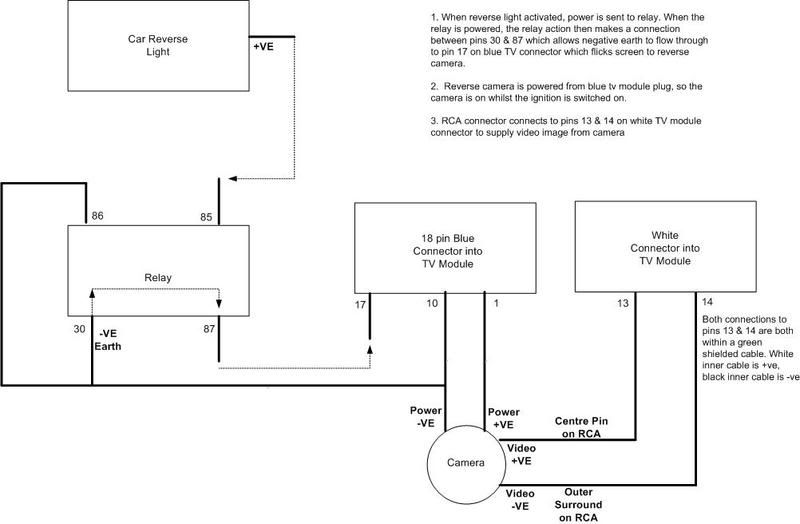
__________________
E83 - Aero PKG Mods installed: Homelink mirror. CIS-IBUS video module, AUX, Rr Dr Release, stock wheels, Remote start, CarPC (Atom) & mud flaps - NAV - MKIV - NA Map DVD - 2011 E46 - 18.5 wheels/tires (summer), 17 stock (winter), Homelink, NAV software upgrade, BMW video module, Radio to V53, AUX, USB IBUS interface,BMW alarm install, CarPC(Epia), remote starter, tank battery & angel eyes. NAV - MKIII - NA Map CD - High Version 2008.1
Last edited by pete_c; 05-11-2016 at 09:45 AM.
|
|
#37
05-11-2016, 09:53 AM
|
|||
|
|||
|
By CID I mean this :
http://www.zpost.com/forums/attachme...1&d=1276373698 So only the screen !And I'm trying to use it standalone (without any other BMW devices).
|
|
#38
05-11-2016, 10:16 AM
|
||||
|
||||
|
Same device (HU) as I have in the BMW X3 E-83. Never touched it directly.
I did literally take the automobile apart when it was about 1 week old to route the extra cabling from the front to the back, added a trunk release button and another AUX audio input in front along with a USB port. All of the cabling goes to the rear deck and rack and I tapped in to the cables / loom right at the Navigation connector. There I have navigation, phone, amplifier, et al). See picture. (old had to look for them). I have been playing with a micro PC and it will fit inside and on the rack such that there is no need for external mounting. (Intel Baytrail). Only thing is that I have 1 TB drive plugged in to the computer for my stuff. BTW I can remote control much of the automobile today via cell phone. IE: starting, windows, lights, et al. (and add ODB information to the HU).
__________________
E83 - Aero PKG Mods installed: Homelink mirror. CIS-IBUS video module, AUX, Rr Dr Release, stock wheels, Remote start, CarPC (Atom) & mud flaps - NAV - MKIV - NA Map DVD - 2011 E46 - 18.5 wheels/tires (summer), 17 stock (winter), Homelink, NAV software upgrade, BMW video module, Radio to V53, AUX, USB IBUS interface,BMW alarm install, CarPC(Epia), remote starter, tank battery & angel eyes. NAV - MKIII - NA Map CD - High Version 2008.1
Last edited by pete_c; 05-11-2016 at 10:26 AM.
|
|
#40
05-12-2016, 01:25 PM
|
||||
|
||||
|
The E46 330XI first car pc (VIA Epia) talked to the analog AUX / Camera and I installed a TV Tuner in it. All of the cabling was there. I upgraded the tuner, added AUX, added a bluetooth from Germany before they were available here. Modded the navigation OS, added satellite radio, et al.
The E83 X3 didn't come with and I didn't add a BMW TV Tuner to it. I did add a USB TV tuner but never use it. The automobile was ordered with the winter package and all of the extra audio stuff. My adds were only the rear hatch button, aux audio and carpc stuff. The pictures you see are the third generation of CarPC (in the E83) as I changed it from when I first purchased it using different hardware. The media / navigation rack in the E83 is smaller than the E46. I also purchased a BMW CD changer for it but never installed it because I wanted to keep the center console. The camera video picture is not good as the real video image is much better looking. I am guessing that your Z4 (E85) should have all of the wiring looms for the display buried somewhere as they used to just wire / install the looms even though you didn't have the optional stuff. The E46 had little buttons telling me what the automobile options were. It was wired for old cellular telephone and I upgraded it to new cellular telephone. The colors and the pin order of the connections are all the same with BMW.
__________________
E83 - Aero PKG Mods installed: Homelink mirror. CIS-IBUS video module, AUX, Rr Dr Release, stock wheels, Remote start, CarPC (Atom) & mud flaps - NAV - MKIV - NA Map DVD - 2011 E46 - 18.5 wheels/tires (summer), 17 stock (winter), Homelink, NAV software upgrade, BMW video module, Radio to V53, AUX, USB IBUS interface,BMW alarm install, CarPC(Epia), remote starter, tank battery & angel eyes. NAV - MKIII - NA Map CD - High Version 2008.1
Last edited by pete_c; 05-12-2016 at 01:30 PM.
|
|
| Bookmarks |
|
|
|
|


 Linear Mode


