Home Forums Articles How To's FAQ Register
Go Back   Xoutpost.com > BMW SAV Forums > X3 (E83) Forum
Fluid Motor Union
User Name
Password
Member List Premier Membership Today's Posts New Posts

Xoutpost server transfer and maintenance is occurring....
Xoutpost is currently undergoing a planned server migration.... stay tuned for new developments.... sincerely, the management


Reply
 
LinkBack Thread Tools Display Modes
  #1  
Old 11-04-2008, 07:01 PM
Member
 
Join Date: Mar 2008
Location: California
Posts: 22
mikebX3 is on a distinguished road
Anyone using NAV-TV or TVandNAV2Go box

I'm thinking about getting one of these boxes for my X3 and wanted to know what you guys were using for audio.

I plan to use my IPOD as the video and audio source but trying to get away from an FM Modulator unit since the audio is really bad through it.

I wanted to see if anyone was using the AUX input, the DICE or the Intravee II as the audio connection.

I would much prefer using the Intravee II but have heard it locks up control from the IPOD and can only be controlled through the BMW stereo system. If this is the case then I would have to consider the DICE instead.

Any help would be great. Thanks ...
Reply With Quote
  #2  
Old 11-04-2008, 07:09 PM
UCrewX5's Avatar
co-founder
 
Join Date: Mar 2005
Location: Hockeytown, USA
Posts: 9,741
UCrewX5 has disabled reputation
I do, and I use the Aux input as the audio source when I use my installed DVD player.
__________________

Xoutpost.com - where you come for the information but stay for the friendships
Reply With Quote
  #3  
Old 11-04-2008, 07:14 PM
zerochief's Avatar
Member
 
Join Date: Apr 2006
Location: USA
Posts: 1,399
zerochief is on a distinguished road
Cool

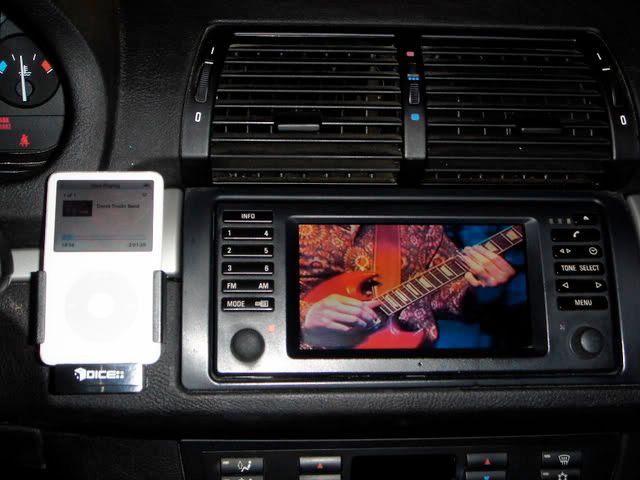
I have a simple straight forward system which allows me to view iPod video on the Nav screen.
Audio is piped through Dice and movie text information is displayed on the cluster or head unit.
Music can be controlled on the HU, steering wheel or iPod.
Movies however must be controlled with the iPod.

More info: http://www.xoutpost.com/bsws-mobile-e...deo+nav+screen
Reply With Quote
  #4  
Old 11-04-2008, 07:41 PM
Tom G.'s Avatar
Member
 
Join Date: Aug 2005
Location: X5world
Posts: 3,228
Tom G. is on a distinguished road
Quote:
Originally Posted by mikebX3
I'm thinking about getting one of these boxes for my X3 and wanted to know what you guys were using for audio.

I plan to use my IPOD as the video and audio source but trying to get away from an FM Modulator unit since the audio is really bad through it.

I wanted to see if anyone was using the AUX input, the DICE or the Intravee II as the audio connection.

I would much prefer using the Intravee II but have heard it locks up control from the IPOD and can only be controlled through the BMW stereo system. If this is the case then I would have to consider the DICE instead.

Any help would be great. Thanks ...
The Dietz 1260 will be the most integrated solution with no external switches or additional wiring to worry about. Video mode is activated by pressing the clock button for +5 seconds.

More info can be found here: http://www.europeanautosource.com/pr...roducts_id=341
__________________
Tom G. | european auto source (eas)
email: [email protected] web: www.europeanautosource.com
tel 866.669.0705 | ca: 714.369.8524 x22 | fax: 714.908.1796


Twitter | Flikr | Facebook | YouTube
Reply With Quote
  #5  
Old 11-04-2008, 08:11 PM
Member
 
Join Date: Mar 2008
Location: California
Posts: 22
mikebX3 is on a distinguished road
The Dietz 1260

The Dietz 1260 WOW!!!

Tom G.

I checked the link you sent me but didn't get me much info on the product.

What I want to know is when it's switched over to Video can I switch it back seeing my Nav Guide but still hearing the audio from the Dietz? Such as if i just wanted to use the IPOD as an audio player but still see my Nav Guide and if I am using Nav will the Nav audio take precedence over the audio of the Dietz?
Reply With Quote
  #6  
Old 11-04-2008, 08:17 PM
Tom G.'s Avatar
Member
 
Join Date: Aug 2005
Location: X5world
Posts: 3,228
Tom G. is on a distinguished road
Quote:
Originally Posted by mikebX3
The Dietz 1260 WOW!!!

Tom G.

I checked the link you sent me but didn't get me much info on the product.

What I want to know is when it's switched over to Video can I switch it back seeing my Nav Guide but still hearing the audio from the Dietz? Such as if i just wanted to use the IPOD as an audio player but still see my Nav Guide and if I am using Nav will the Nav audio take precedence over the audio of the Dietz?
I missed the X3 reference, this is the kit you need:

Dietz Video Multimedia Interface - 1266
http://www.europeanautosource.com/pr...roducts_id=339

NAV/Phone audio will always take top priority over the A/V feed when in play as if it were offered from BMW. Video mode can be switched at any time while in play.
__________________
Tom G. | european auto source (eas)
email: [email protected] web: www.europeanautosource.com
tel 866.669.0705 | ca: 714.369.8524 x22 | fax: 714.908.1796


Twitter | Flikr | Facebook | YouTube
Reply With Quote
  #7  
Old 11-04-2008, 08:56 PM
Weasel's Avatar
Almost never on here anymore :(
 
Join Date: Jul 2008
Location: New Orleans, La
Posts: 6,892
Weasel will become famous soon enough
Damn, with that cut and dry of a solution I wish I had NAV to play with now.......

Good work Tom! Sounds like the perfect solution!
__________________
"When you do things right, people won't be sure you've done anything at all" (Bender, futurama)

You make something idiotproof, they'll make a better idiot


You think professional is expensive, just wait until you pay for amateur.

Never let your sense of morals prevent you from doing what is right.

Examine what is said, not who speaks.

X5 pics

RIP 4.6is.....

2003 4.6is
Reply With Quote
  #8  
Old 11-04-2008, 09:37 PM
Member
 
Join Date: Mar 2008
Location: California
Posts: 22
mikebX3 is on a distinguished road
Tom G.

Few more questions(I wish there was a users guide on the website so I wouldn't ask you this), You mentioned pressing the clock button for 5 seconds to switch the video. If I just wanted to use the audio to play music, is there a AUX option that gets added into my NAV screen to switch over to hearing audio from the Dietz?

I think I might have one more question but just had a brain fart.

But TOM G. you are my saviour I will be ordering soon.
Reply With Quote
  #9  
Old 11-04-2008, 09:47 PM
Tom G.'s Avatar
Member
 
Join Date: Aug 2005
Location: X5world
Posts: 3,228
Tom G. is on a distinguished road
Quote:
Originally Posted by mikebX3
Tom G.

Few more questions(I wish there was a users guide on the website so I wouldn't ask you this), You mentioned pressing the clock button for 5 seconds to switch the video. If I just wanted to use the audio to play music, is there a AUX option that gets added into my NAV screen to switch over to hearing audio from the Dietz?

I think I might have one more question but just had a brain fart.

But TOM G. you are my saviour I will be ordering soon.
That was true of the X5, the X3 is a tiny bit different since the NAV monitor houses no controls - the switching is performed via an included pushbutton switch.

Audio function is still true as that of the X5 application.
__________________
Tom G. | european auto source (eas)
email: [email protected] web: www.europeanautosource.com
tel 866.669.0705 | ca: 714.369.8524 x22 | fax: 714.908.1796


Twitter | Flikr | Facebook | YouTube
Reply With Quote
  #10  
Old 11-04-2008, 09:39 PM
Member
 
Join Date: Mar 2008
Location: California
Posts: 22
mikebX3 is on a distinguished road
And ,

UCrewX5 and Zerochief, thanks for the info on your setup...
Reply With Quote
Reply

Bookmarks


Posting Rules
You may not post new threads
You may not post replies
You may not post attachments
You may not edit your posts

BB code is On
Smilies are On
[IMG] code is On
HTML code is Off
Trackbacks are On
Pingbacks are On
Refbacks are On


All times are GMT -4. The time now is 08:00 PM.
vBulletin, Copyright 2026, Jelsoft Enterprises Ltd. SEO by vBSEO 3.6.0
© 2017 Xoutpost.com. All rights reserved. Xoutpost.com is a private enthusiast site not associated with BMW AG.
The BMW name, marks, M stripe logo, and Roundel logo as well as X3, X5 and X6 designations used in the pages of this Web Site are the property of BMW AG.
This web site is not sponsored or affiliated in any way with BMW AG or any of its subsidiaries.