
|
|
|
|
||||||||||
| Xoutpost server transfer and maintenance is occurring.... |
| Xoutpost is currently undergoing a planned server migration.... stay tuned for new developments.... sincerely, the management |
 |
|
|
LinkBack | Thread Tools | Display Modes |
|
|
|
#1
 09-06-2013, 04:30 PM
|
|||
|
|||
|
Torque app on the mobile (finally gave it a try) my thoughts on it with the X5
Just thought I'd share my experience with this little app, you need a little Bluetooth plug which you plug into your 16 pin diagnostic port then fire up the app then you have your self a great little code reader and if like me you go for the full app then you get loads extra live data info as well as extra features.
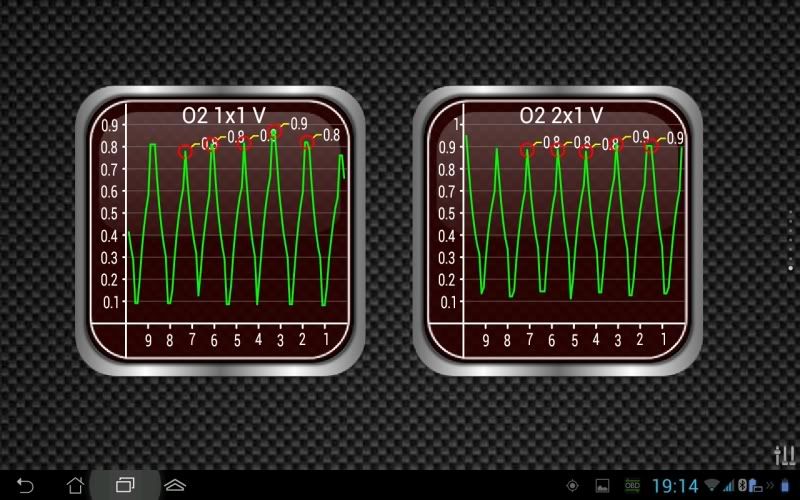
The little Bluetooth plug in is called an ELM327 i picked it up of eBay a few months back for about £6 delivered then the full app ( Ian Hawkins Tourqe pro) cost £2.95 that then gives you the capability of reading and clearing codes as well as a heap of useful live data for tracking down problems. Here's a few screen shots: On the phone opening screen with menu  In live data mode with on screen dials  My phone is the Asus Padfone 2 and with the handset I can slot it into the Padstation a 10.1" tablet and run it in tablet mode, here's how it looks on there: Opening screen  Live data dials (you can customise them as you like)  You can run 7 screens and just flick between them here's one of both my upstream O2 sensors (bank 1 sensor 1 and bank 2 sensor 1) working perfectly in graph mode  Anyway just thought I'd share my thoughts and for the money its an awesome bit of kit, i use lots of diagnostic gear at work in my garage and this is so simple to use any one could use it. 
|
|
#2
09-06-2013, 05:17 PM
|
||||
|
||||
|
At least you know that your O2 sensor are working.
 It's an alright app, I keep my buetooth scanner in the car and my android phone has Torque, but to trouble shoot a BM Trouble you still need BMW software. Torque will not tell you why you have the trifecta of lights on or why your AC stop blowing cold air.
__________________
2006 Infiniti G35 2001 BMW 3.0I E53 X5 Build date 08/2000 SOLD Lotus Europa 1970 Destroyed by fire Lotus Europa 1970 S2 Renault Powered Lotus Type 52 1970 Twincam Webers Powered PORSCHE 911 Targa 1982 The Garage Queen Audi Avant donated to Kars for Kids BMW 525IT Sold Audi 4000CS Quattro Sold Jensen Healey Lotus Powered Sold Opel 1900 Sold Triumph Spitfire 1971 Sold Triumph Spitfire 1968 Sold Plymouth "Cuda" 340 Six pack SOLD
|
|
| Bookmarks |
|
|
|
|





 Hybrid Mode


