
|
|
|
|
||||||||||
| Xoutpost server transfer and maintenance is occurring.... |
| Xoutpost is currently undergoing a planned server migration.... stay tuned for new developments.... sincerely, the management |
 |
|
|
LinkBack | Thread Tools | Display Modes |
|
|
|
#1
 03-31-2007, 03:59 PM
|
|||
|
|||
|
Upgrading!
Hi,
I am hoping to upgrade my current MK2 Navigation system which currenty runs a small monochrome display. 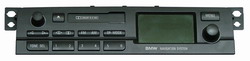 This is whats in the trunk:  First off there is the cd changer and the Nav computer (Part No. 65906908310). The Nav Computer has one red and one blue ELO connector on the rear. Here is a picture of the label on the navigation computer:  And the connectors at the rear:  Under that is a silver module that is labelled as a "BMW BUSINESS RDS" (Part No.65126901348). There are two coax cables connected to this, one standard FM size with a standard aerial connector and another thin piece of coax that runs to a GPS receiver module (Part No. 65908385141). You can see the RDS module in the top picture under the navigation computer. Here is a picture of the two coaxial cables connected to it.  Here is the GPS receiver:  I've also had a look at the rear of the head unit (Part No. 65126902804) and it has one blue ELO conector. I am hoping to install a 16:9 display using as much of my current system as possible. The display I bought has a cd player built in but I also have a changer in the boot so if this doesn't work, It won't bother me too much. My question is this, what will happen if I plug the blue connector into the new display without changing any of the current setup? My navigation reads SW 2-2/90. I've read many posts regarding this but find my situation to be different as I am not attempting a complete retro fit, plus I am upgrading from a system that already located most of the equipment in the trunk. The retro fit harness will be mostly wasted as I dont need to re-direct speaker cables, aerial coax etc. Regardless of the computer I end up using (I might upgrade to a MK4) All I seem to be missing is the cable that connects to the white ELO socket on the 16:9 display. Can anyone tell me more of what this is responsible for? Thanks for your thoughts  M 
|
|
#2
03-31-2007, 04:14 PM
|
||||
|
||||
|
It won't work connecting up a widescreen bordmonitor to a navicomp which is setup & running a mono-screen display.
There are divived opinions on recoding a Mk4 that came from a mono system to work with a 16:9 - seems it can be done. Your best bet is to get hold of a Mk4 DVD navicomp and substitute that and the mono unit - and you will need the gubbins to move the air con panel to give room for the larger display.... Someone who has done a similar retrofit may come along to give you some more in-depth advice.
|
|
#3
03-31-2007, 04:31 PM
|
|||
|
|||
|
Hi,
Thanks for your reply. I already have a 16:9 display from bimmernav.com and the bits to move the air con down. If you look at the sticker on the nav computer, you will see that it says HW 21 SW 40, but the display reads 2-2/40 or 2-2/90 since I did an upgrade. Dose this tell anything to anyone? So if I get a MK4 dvd computer it will be plug and play? Last edited by mccabema; 03-31-2007 at 04:36 PM.
|
|
#4
04-01-2007, 02:29 AM
|
|||
|
|||
|
This will be a serious job to do, b'cos your cable harness is missing allmost all the wires and connecters that are needed for your boardmonitor installation.
You also need a new radio module in the thrunk and again all the wires there are missing b'cos of your radio and speakers are now wired to be in the front. So you basicly need a new cable harness that runs inbetween your dash, all the speakers and the frame in the thrunk, a new radio module, a MK3 or MK4 navigation comupter and lots, lots of time. To be honest, allmost the only thing that is inplace is the GPS antenna for the rest everything needs to be changed or rebuild. BTW; There are two versions of navigation computers, one for the monochrome display and one for the colour displays. The monochrome display gets the information throu a data link (IBUS) and the colour ones throu RGB video directly from the navigation computer. Cheers,
__________________
E46 320i touring E46 328i sedan E53 3.0i Last edited by J0HN; 04-01-2007 at 02:46 AM.
|
|
#5
04-01-2007, 05:47 AM
|
|||
|
|||
|
Quote:
I'd probably be better off if I did have all this wiring up front as BMW make a retrofit harness to cover this, however, they do not make a harness that covers the instance of having an old style navigation system. Its either you have, or you haven't !
|
|
#6
04-01-2007, 06:25 AM
|
|||
|
|||
|
Hi,
You do need some wiring. Your current radio/nav receives all its data over the ibus - a single wire. With a colour screen, you need to feed it the RGB video signal, which is done on 3 x coax cables. These cables fron from the blue connector on the nav unit to the blue connector on the on-board monitor (screen) Essentially, to make your system work you need to: 1. Re-code your existing nav unit from mono-screen to colour screen (enables the video outputs); OR buy a newer version nav already coded for a colour screen. A Mk3 or Mk4 has the GPS receiver built in, so the GPS antena unplugs from your separate GPS receiver and connects to the Mk3 or Mk4 nav computer. 2. Run 3 x 75-ohm coax cables from the nav computer to the bordmonitor. Fit the cable into the existing connectors. you'll need to buy some pins to do so, or get an old plug from a wreckers, and reuse the pins. 3. Run a bordmonitor ground wire from the nav computer to the bordmonitor. This ensures the screen and nav share a common ground 4. You may also need to cable the other white plug for the bordmonitor - refer to the retrofit instructions to determine all the wires, their colours and their functions. All in all achievable, but you'll have to run your own cables. BMW did not, I believe, make a retrofit kit to do what you want to do. Jochen
|
|
#7
04-01-2007, 06:46 AM
|
|||
|
|||
|
Quote:
I am going to replace my nav computer to a MK4 DVD so coding won't be an issue. I don't quite understand what you are saying about running 3 coaxial cables ! This is an awful lot of cable to be running and I would never be able to fit 75ohm coax into one of the ELO connectors would I ?! Surely I would be better off trying to find a harness that I could take apart rather than running 3 individual cables like you say ! I could buy a retrofit harness and pull the cables I need from it possibly!? Surely BMW make a replacement harness for the system I am attempting to install? By that I mean, what happens if an existing widescreen navigation system has a problem with the harness and it needs to be replaced? If I can get one of these harnesses, I can just pull out the old and replace it with this, right? Thanks for your help and well done on the NAVCODER. Making life a lot easier for a lot of people from what I've read ! Last edited by mccabema; 04-01-2007 at 06:59 AM.
|
|
#8
04-01-2007, 03:22 PM
|
||||||
|
||||||
|
Quote:
Quote:
you need 1 x coax cable for Reb, one for Green and one for Blue (RGB). This is how BMW designed the system. Quote:
Quote:
Quote:
Quote:
|
|
#9
04-01-2007, 04:23 PM
|
|||
|
|||
|
Thanks KiwiJochen,
Finally someone who understands exactly what I am trying to attempt !! I have the instructions you mention but thanks for the offer. I understand the RGB cabling you mention, I just had visions of heavy 75 ohm coax running through the vehicle and attempting to home it into a connector with great difficulty. **Update- Having studied the circuit diagram on page 15 of the retrofit guide I figure the following: The violet connector on the nav computer connects to the black/white cable of PIN 8 of plug X11175 on the instrument cluster. This connector also carrys the reversing signal? There is another cable on this violet plug described as X229- Terminal R connector, I don't know what this is for !!? So I need not use the violet connector on the new retrofit harness, I can simply leave the original harness in place and use this in part alongside my new retrofit? I can strip the speakers, aerial, cd connection from the retro fit harness (Item A1, A2, A3, A4, A7 and A9) to make thing a little neater or else find a harness with just Item A5 and A6 on one end !! I get the feeling I'll be getting a retro fit harness and stripping it back, wasteful as it may seem, I fear it will be my only option. A Breaker isn't really an option as specs are pretty low on BMWs round these parts!! Not much need for navigation round here !! The rest should be almost plug and play from what I can figure ! The white plug (X18802) at the monitor end, will connect to the nav computer via the blue socket (X1313) (You mention in a previous post that the blue connection on the nav computer goes to the blue plug on the display, from what I figure, the white goes to blue !! Am I wrong??). The blue plug (X18802) at the monitor end, will connect to the radio module via X13649 or Radio IV. The black connector on the radio tuner (X18126) will stay as is. Forgive me for asking this as I should have checked whilst I was digging around earlier, how does the cd changer (Also located in the rear) connect ? Is it on a seperate plug or do I need to add it to a connector? There are two wires running from the cd player connector (X13321) that cross into the radio module (X13649). There is also a cable (X13321) that connects from the cd changer to the radio module?? And finally, the aerial stays connected to the radio module whilst the GPS coax that is currently going to the GPS module will connect the the GPS socket on the new MK4 computer. The earth connection (X3279) will join the earth strap along with the existing harness? The only other thing confusing me (As if theres not enough already !) is X3279, X1543 and X18344 which appear to go nowhere ! Am I there?? Thanks again and again Last edited by mccabema; 04-01-2007 at 09:08 PM.
|
|
#10
04-02-2007, 04:10 AM
|
|||||||||||
|
|||||||||||
|
Quote:
Quote:
Pin 1 = RS = RuckfahrSignal = Reverse signal. Pin 3 = R = TerminalR = +12V when ignition on Pin 10 = TAA = TachoAnzeige = Speedo pulse signal You existing Mk2 nav will have all of these signals in place on its violet connector, no need to touch anything. Quote:
Quote:
Bordmonitor White = Video signal to LCD Bordmonitor Blue = Tape/CD audio, power, ibus, illumination etc Quote:
Quote:
Quote:
Quote:
Quote:
the GPS antenna now plugs directly into the Mk3 or Mk4 nav. The old GPS receiver can be removed and discarded. Quote:
Quote:
X18344 = loom connector I recommend you do the following: 1. Remove and discard GPS receiver, and associated wiring loom. Some unwrapping may be required. 2. Obtain and fit connector X18802 + associated cabling back to nav computer. Remove the cabling and pins from the loom you obtain, and insert into the X1313 connector housing. All other nav signals are present, and remain required. Do not change them! This is the only cable loom you need to run from front of vehicle to back. 3. Obtain connector X18801. Remove the corresponding wires from your existing radio-nav headunit, and insert into appropriate pins in X18801. Fit PL wire from new loom. PL (LCD brightness control) will be the only missing wire. Done! Remember: 90% of what you need is already existing in your Mk2 mono nav. You only need to add the video signals. Jochen
|
|
| Bookmarks |
|
|
|
|





 Hybrid Mode


