
|
|
|
|
||||||||||
| Xoutpost server transfer and maintenance is occurring.... |
| Xoutpost is currently undergoing a planned server migration.... stay tuned for new developments.... sincerely, the management |
 |
|
|
LinkBack | Thread Tools | Display Modes |
|
|
|
#1
 10-31-2017, 10:36 PM
|
|||
|
|||
|
How to program BMW FEM/BDC key
Here i want to share a guide on how to program a key for BMW FEM/BDC modules.And this article from UOBD2 blog,more detail search it at google.
Steps: Mainly 3 steps: read key info->Pre-process FEM/BD system->Generate dealer key. Read the operation instructions in the below picture, as you can see, when you make dealer key for all key lost, enter 32-bit ISN code. 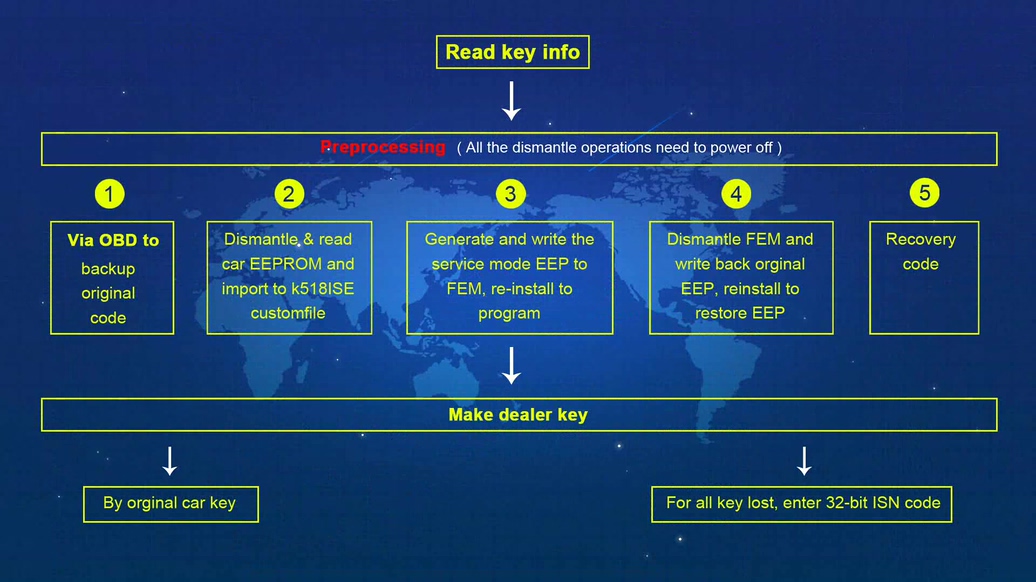 Step 1. read key info Before operating other functions, you must read key info firstly including VIN, type, current key position and kilometers etc (see below picture). 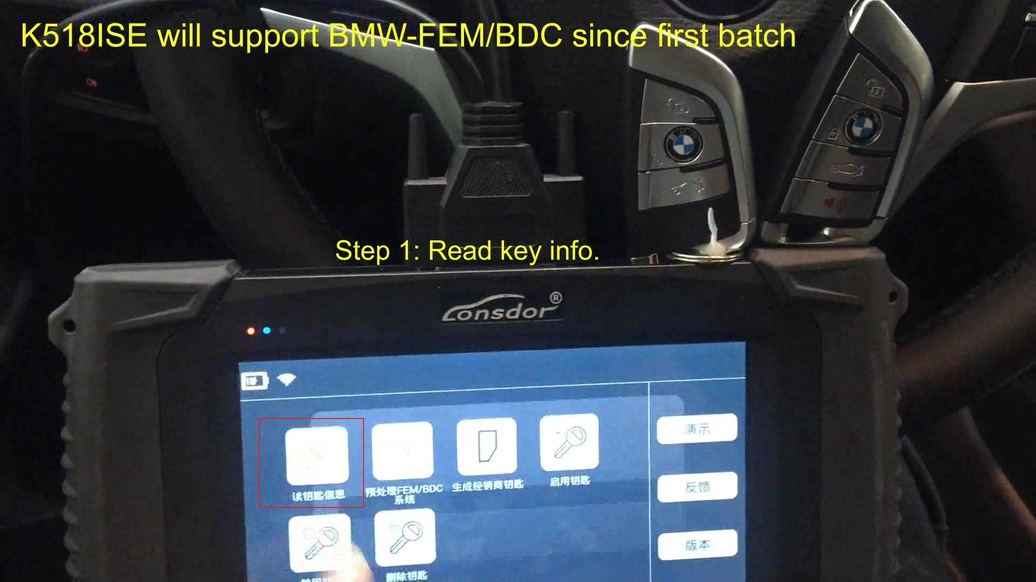 Step 2. pre-process FEM/BDC system 1: OBD backup the original coding data: Connect the FEM/BDC system on the car or the test platform, then backup the original coding files via OBD. 2: read out EEPROM backup data & generate service mode EEPROM:
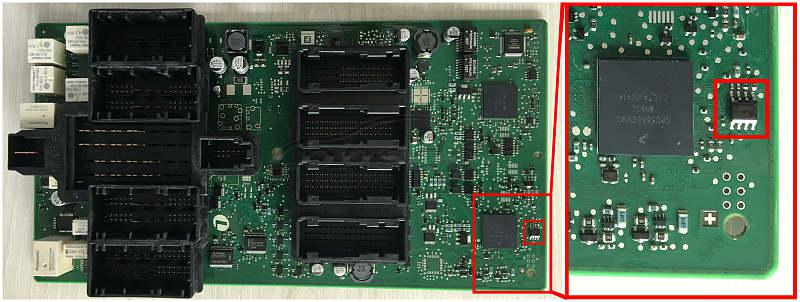 3: programming 3: programming
4: restore EEPROM data
5: restore coding data Load the coding files that are backed up in step 1, restore coding information via OBD 6: pre-processing is done. Step 3: Generate dealer key. 1: Lonsdor K518ISE Programmer reads out data, select the key position to be generated. 2: Choose “by original car key” to make a dealer key, for all key lost: enter 32-bit ISN code 3: Put the original key near the car immo induction loop 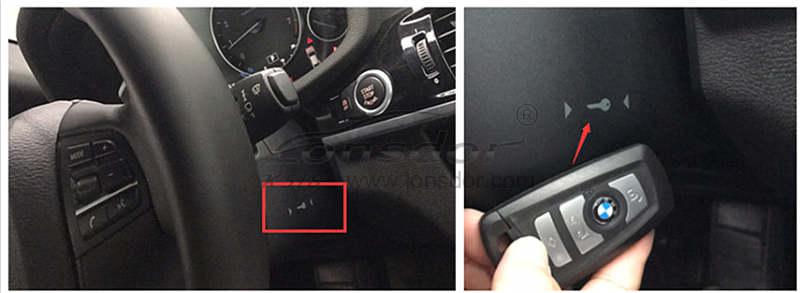 4: Detecting the original key, read out immo data 5: Put a new key near the car immo induction loop (see the above picture) 6: Detect the key key, learn new key (don’t move the key, keep stable) 7: key learn complete. Step 4: disable the key 1: Lonsdor K518ISE read out data, select the key ID position to disable 2: Put a working key near the car induction loop 3: K518ISE system tries to connect to CAS, disable the key in the current ID position, disable key with success. Step 5: enable the key 1: Lonsdor K518ISE read out data, select the key ID position to enable 2: put a “used” key near the car induction loop 3: K518ISE system tries to connect to CAS, enable the key with current ID position, enable key successfully Step 6: delete the key 1: K518ISE read out data, select the key ID position to delete 2: read FEM/BDC key pin code 3: delete the key successfully; the key position is blank Tips (Very important): 1: Please remember to read key info before you want to operate any function. 2: 5 tips on pre-process FEM/BDC (all the dismantle operations need to power off) 1) via OBD to backup original code 2) Dismantle & read car EEPROM and import to K518ISE customfile. 3) Generate and write the service mode EEPROM data to FEM, re-install to program 4) Dismantle FEM and write back original EEPROM data, reinstall to restore EEPROM. 5) ECU programming: need 6 min, with power supply connected 6) disconnect to the power supply, disassemble CPU, write the original EEPROM data into the chip, install CPU on the car, connect to the power supply, make sure communicate is successful 7) upload coding files (Step 1), restore original coding info to pre-process, then make a dealer key And thanks to the author Green original post: Lonsdor K518ISE program BMW FEM BDC key even all key lost | Car Key Programmer 
|
|
#2
08-09-2019, 02:42 AM
|
|||
|
|||
|
5 BMW FEM/BDC IMMO key programmer recommend:
Xhorse VVDI2 Key Programmer CGDI BMW Lonsdor K518S Yanhua Mini ACDP OBDSTAR X300 DP Plus
__________________
https://www.facebook.com/elsa.kent.96
|
|
| Bookmarks |
| Thread Tools | |
| Display Modes | |
|
|
|
|





 Hybrid Mode


