|
||||||||
| Xoutpost server transfer and maintenance is occurring.... |
| Xoutpost is currently undergoing a planned server migration.... stay tuned for new developments.... sincerely, the management |
![]() |
|
|
LinkBack | Thread Tools | Display Modes |
|
#201
|
|||
|
|||
|
hualingan
i was talking with another technician re: my Hualingan problem, theres video but no sounds coming out. He said maybe the other installer removed my Alpine BMW iPod interface cable of which should have not been remove in the first place. I browse xoupost and saw a link of the said BMW iPod interface, but it didnt show or instruct where to put those 4 color pin into the 40 pin harness. ( http://www.xoutpost.com/articles/x5/...ion-guide.html ) Does anyone have a link or guide on where to put these 4 colors pin into the 40 pin harness. Thanks in advance |
| Sponsored Links | |
|
|
|
|
#202
|
||||
|
||||
|
Wow, I had no idea you had to rewire for this iPod connector. I learn something new about this vehicle everyday. Sorry, I can't help on this one. But at least it looks like you have narrowed down the issue.
I think the other technician is wrong on leaving the iPod connector in. More than likely it is designed to only work with the MID and radio. I think you are going down the right path trying to figure out the original location of these wires. So the installer removed the iPod connector and just left these wires hanging free?
__________________
[Sold] 2004 X5 4.4i - Sterling Gray - Truffle Brown, Sport, Preminum, Rear Climate, DSP, Sirius, PDC, 132's (19 inch wheel), Comfort Seats Dynavin, JL Audio Stealthbox, Alpine PDX-5 Amp |
|
#203
|
|||
|
|||
|
Hi NextGen:
Yes, I believe the problem is the other technician removed these 4 pins where in fact he should not and done so. Also, he didnt make any notes on which color is for which pin etc. So when the Hualingan unit doesnt have any sound, I ask him to put back the original stereo and it was not functioning anymore ( radio not working) as he have no idea on how to put these 4 pin back. Lesson learned, don't just trust any so called " expert" on X5 even no matter how nice is their shop. Upon talking with another technician and explaining to him on what happened, seem he make more sense as he suspect the problem is on the 4 pin being removed. Another thing that concern me is that for these 4 pins, he said 3 are positive and one negative and the first technician just leave them as is without putting any electrical tape on each pin/s. At any rate, so excited to have stereo again in X5. Currently using iPod while driving *wink I hope someone will have an instruction on how to put those 4 pin back. Quote:
|
|
#204
|
||||
|
||||
|
Larry, PM me the guy and store who did this to your X. Oh by the way, I previously had a DICE iPod integration kit, and previous to that, I also used a GROM. The wiring harness that came with these iPod integration kits were completely disconnected from my system. I just connected the Hualingan harness to the ORIGINAL wire cluster - without error. The only difference is that I did it myself. Sometime when you want it done right, we have to do it ourselves!
Also, if you are open to it, bring your X to Sanny / Victor of SNYC3. They know what they're doing there specially on BMW's. If everything fails...let me know, I have a "real EXPERT" fix your system. However, logically...it will cost you an arm. Don't gamble your BMW in Banawe or Cubao pare ko. Good luck. |
|
#205
|
|||
|
|||
|
Hi fullmetal:
Thanks so much. PM sent. Thanks Quote:
|
|
#206
|
||||
|
||||
|
If all else fails then consider taking it to the dealer. Since there are no parts involved they should just charge you for labor to put those pins back in.
__________________
[Sold] 2004 X5 4.4i - Sterling Gray - Truffle Brown, Sport, Preminum, Rear Climate, DSP, Sirius, PDC, 132's (19 inch wheel), Comfort Seats Dynavin, JL Audio Stealthbox, Alpine PDX-5 Amp |
|
#207
|
|||
|
|||
|
hi guys:
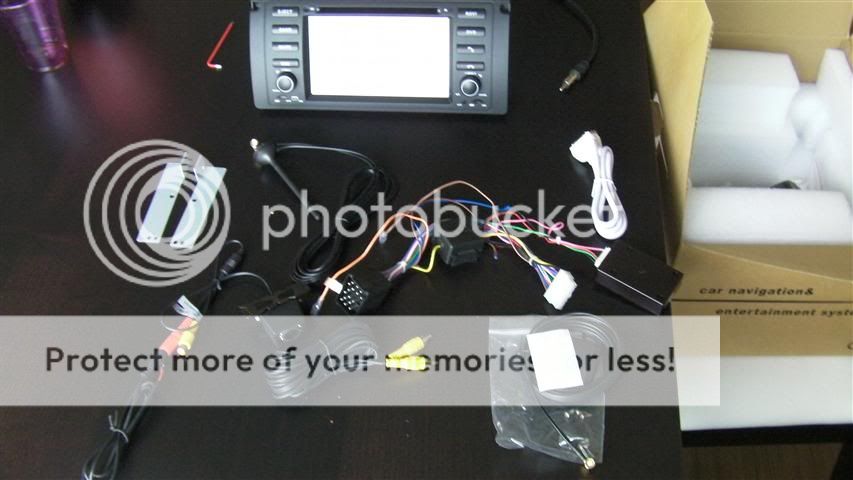
Finally the 2nd technician was able to put back the 4 pins into their respective places and put them back into the 40pin harness. After which, he put the old stereo back and the radio is now running. Upon putting the hualingan harness into the BMW harness. No sound came out of the radio. What he did was , on the hualingan harness, there are 4 loose colored cables. He put two of those cables into different pins. I believe one of those is for the radio and another for the wheel steering. Finally there is sound in my radio. I also tried the stereo control in the wheel steering and its working perfectly. Upon pairing my phone, the phone bluetooth is working as well as the other party can hear me loudly ( and vice versa). a. What need to be done on the other 2 loose colored cable that comes in Hualingan harness? Are they of any use? Where should i put them? b. Things that are not working 1. iPod - once iPod is connected, it can show my iPod playlists and once I click on a song, screen will show and running, but no sounds coming out of the speaker/s. 2. CD - once I put the CD, it can read the CD and track is running and seconds are counting( and i didnt put in mute), but no sounds coming out as well. The tech said all his electrical wiring are correct, bec if not, there will be no radio sounds and phone bluetooth sounds. What do you guys think the problem is? 3. TV - there is a TV antenna plug on the stereo ( besides the iPod connector plug) but no cable/ plug etc that comes with the packaged. What do I need to buy to make the TV run. What else need to be done. 4. NAV - not sure how to make it run. Thanks, |
|
#208
|
|||
|
|||
|
Incase someone will need it:
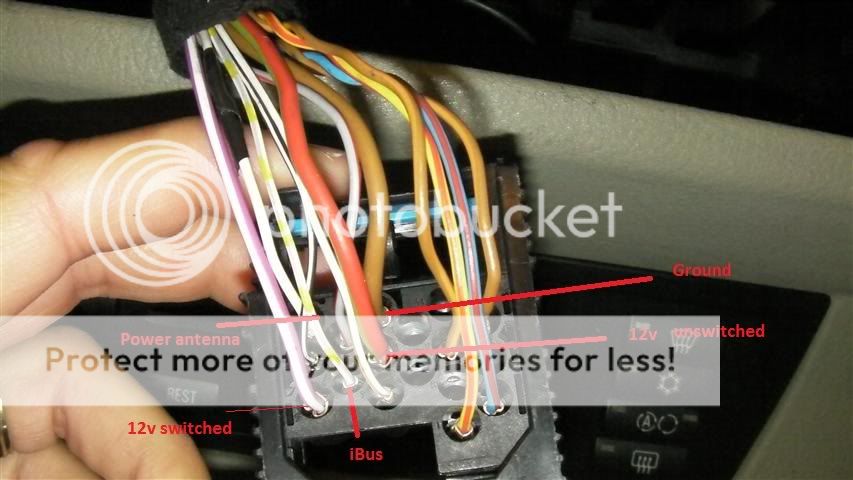
Pin16 violet white Pin9 white grey yellow Pin15 red green Pin 12 brown |
|
#209
|
|||
|
|||
|
I changed my radio country setting to latin america from china and suddenly the cd/ dvd is working
Now only tv and nav not working. Any inputs pls. Thanks in advance Quote:
|
|
#210
|
||||
|
||||
|
@thecount123 - sent you PM on regarding your other problems. But regarding the NAV, I think this guy can help you. HE gave me maps and the unlocked application. Tell him I recommended him to you...
GPS map philippine map installation for GARMIN,NOKIA,PDA/SMARTPHONE Philippines - 2500273 Good luck and have fun. |
![]() |
| Bookmarks |
|
|
|
|