
|
|
|
|
||||||||||
| Xoutpost server transfer and maintenance is occurring.... |
| Xoutpost is currently undergoing a planned server migration.... stay tuned for new developments.... sincerely, the management |
 |
|
|
LinkBack | Thread Tools | Display Modes |
|
#1
 05-18-2010, 09:18 AM
|
|||
|
|||
|
tcu install in a 2001 e39 with no pre-wire
I recently bought myself a 2005 everest tcu off ebay, on the idea that I'd get it first and then worry about how I'm going to install it! I have some thoughts on how I'm going to do the install and I'd like to mention them here and maybe people could advise me on whether I'm on the right track or not. I've looked in my boot and there is no db25 connector or any of the different connectors that people have talked about using to adapt into a 54pin plug for their tcu. I'm thinking that most likely I will need to: -install the microphone up at the front and then run those wires all the way back to the trunk. -install the bluetooth antenna somewhere and run that back to the trunk. -then the rest of the important connections I need (ibus, power, ignition, ground, etc) I'm hoping will already be back in the trunk and I could splice from these into my 54pin adapter. Here's a picture of what's in my trunk already. There's three units in there: radio, tv, and cd changer. Unless the radio is also the amplifier - I'm a bit stumped as to where the amplifier is? 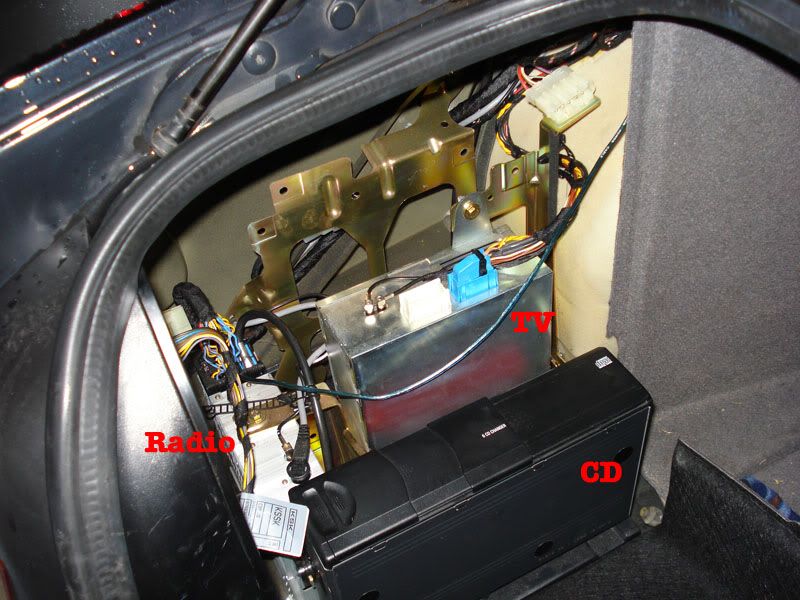 Also at the front of the car there is a mobile phone cradle for a Nokia phone. I was hoping it might have helped simplify my tcu install, but I think it's quite a simple setup. A friend had a phone that fitted into the cradle. We could call from the phone itself and the sound did come out over the speakers. But I couldn't find anyway to control the phone from the steering wheel or head unit, and no phone option turned up on the head unit. 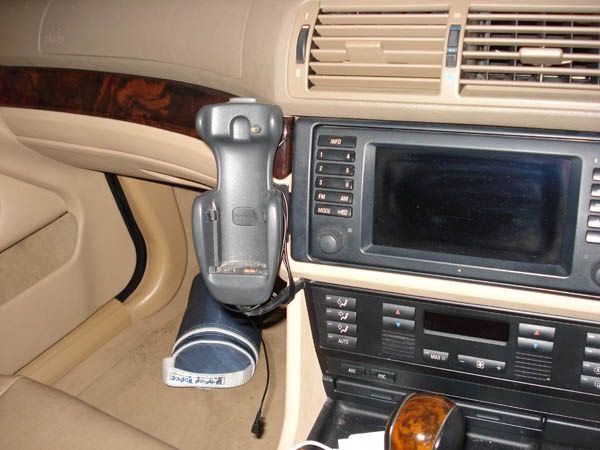 I haven't yet been able to get directly behind the console to see what's going on with the cradle but looking under the glovebox I can trace two wires that I'm sure come from the cradle. One is definitely an antenna cable that goes up to a mobile phone antenna stuck on the rear glass. The other is a single greenish wire that ends right at the radio module in the trunk (you can the wire in the top picture). It's spliced onto a wire that has the colour coding for 'Radio Mute'. I'm not sure how the cradle connects to the car speakers. Anyway, that's where I'm at at the moment. As I said I'm hoping most, if not all, of the wires I need are ones that are already going into the radio unit. If anyone knows of pitfalls in my plan or has suggestions I'd be very appreciative. Also if there's any other parts I should consider buying, aside from microphone, BT antenna and 54pin plug (,and NavCoder if I get that far)? 
|
| Sponsored Links | |
|
|
|
|
#2
05-18-2010, 10:05 AM
|
|||
|
|||
|
The nokia kit probably uses an amplified speaker in the footwell. There is no mute kit evident in the boot.
Unfortunately the TCU install will not be easy. For the install on your year of car, the BM24 you have will not support the TEL_NF audio input, I am lead to understand. Instead it has dual voice coil front speakers. You may need a telephone retrofit harness. If you intend to make one, you will need to find a way of passing the telephone audio either to the Nokia speaker, the dual voice coil speakers (if fitted), or buy a BM54 and the 17 to 40 pin adaptor. You may find the vehicle has the four black speaker wires for the dual voice coil speakers in the harness at the connector X400/X3221. You will also want to make sure your TCU works. Early GSM models do not, despite the Bluetooth sticker. See Stringback's recent TCU thread in this forum.
|
|
#3
05-18-2010, 07:47 PM
|
|||
|
|||
|
Thanks big bob for that info.
I'm wondering what's the fewest things I could initially purchase just to check that the unit's working for me before I fully kit it out. I don't think I need the BT antenna or even the microphone yet - just to check that the tcu is showing up on the head unit and that I can pair a phone with it. Also I've been looking for an explanation of what things like "TEL_NF" and other abbreviations mean. I saw the pinout for the BM24 and saw that it has "tel_audio_in" +,- pins. But from what you say I'm guessing this is different to "TEL_NF" pins. Can anyone point me to a guide, or should I start trying to understand the WDS? Also, the tcu I got is a USA Everest 2005 model. I know this a CDMA version and the Assist portion of it won't work for me. But - unless the tcu uses rSAP - I can't see any reason why the bluetooth part won't work for me. sim,
|
|
#4
05-19-2010, 03:32 AM
|
|||
|
|||
|
Yes the early CDMA ones seem to work. You can fire it up to test it pairs using PWR, GND and iBus. Note it needs IGN and 12V connections.
You will need the 54 pin conector and some pins from Audi. 4E0 972 144 54 pin multilock (Audi) £1.47 - £1.84+VAT 000-979-010 Pins for the connector £0.97 each - £1.28+VAT Edit: the PWR/GND/iBus are easily available in a handy 2.54mm pitch connector at the CD changer. If you are intending to build your own cable, then think twice. For a start you'll spend £15 on the BT RF cable, £30 on connectors, and there are a lot of connections to make and most are proprietry and very difficult to locate part numbers. There are twisted paris and shields, and if you want charging the Eject Box needs a loom too. Bite the bullet and get the retrofit cable for ~£80, once the TCU is confirmed working. I tried to build a cable, bought all the bits, some CAT5e screened cable thinkng I could save money, how hard could making one cable be, with me doing electronics for a living and having access to all the right equipment... Got halfway through it in two weeks. And that's where it stayed. Last edited by big bob; 05-19-2010 at 04:02 AM.
|
|
#5
05-19-2010, 09:13 AM
|
|||
|
|||
|
Thanks big bob, with what you said about the pwr,gnd,ibus, I should be able to quickly verify the tcu is good or not. -Which'll be great start.
Just quickly, what is the retrofit cable for? (I don't think I've done enough research yet to 'click' about what you're referring to?) Does it run between the radio and the 54pin plug I'm getting for the tcu. Or do I plug it between the radio and something else in the car? 'cheers Sim.
|
|
#6
05-19-2010, 09:42 AM
|
|||
|
|||
|
I have yet to find a decent TCU retrofit thread where the cable is fully detail in what it connects to.
Most are US market cars that are prewired for telephone. Should you be able to find the cable part numebr please post a full retrofit thread so we can see how the cable connects up. In my estimation, the cable will run the whole lenght of the car, conecting to the mic and Eject box, and connect at X400/X322 in the luggage compartment to access the power, iBus and audio. That white connector X400/X322 is not available to purchase for building your own loom. This is all supposition.
|
|
#8
05-26-2010, 08:38 AM
|
|||
|
|||
|
Hi just quickly,
I've been trying to find the required 54pin connector. I've found out about the Audi parts that can be used. And I can get the connector itself (4E0 972 144) from an Audi dealer here in Sydney for about $10. I'm okay with that price. However when I quoted part number 000-979-010, for the pin wires I was given a price of $9!! The guy on the phone said they were a special order that would take a few days and reckoned that was the price per wire. -Which I just can't believe, that's too much money for one little wire! Surely it has to be a packet of wires. Can anyone here let me know if ordering that part# usually arrives as packet, or is per single wire? Can't find any online Audi/Volkswagen parts suppliers that post to Australia. I've found the BMW part# for these wires, and the best price available to me is from my favourite parts supplier PelicanParts. Their price is still $2 for that part number. I figured I'll need around 13 of these connections into the connector. I'd hate to over order. Sim.
|
|
#9
05-26-2010, 08:44 AM
|
|||
|
|||
|
Sorry, but I did warn you.
Quote:
Quote:
|
|
#10
05-08-2011, 02:41 AM
|
|||
|
|||
|
Cheaper sources I've found now.
All BMWs UK cheaper source for electrical connectors, Farnell, RS. - BMW Forum|Bimmerforums.co.uk|No1 forum for BMWs|BMW Forums|BMW Tuning
|
|
| Bookmarks |
|
|
|
|





 Linear Mode


