
|
|
|
|
||||||||||
| Xoutpost server transfer and maintenance is occurring.... |
| Xoutpost is currently undergoing a planned server migration.... stay tuned for new developments.... sincerely, the management |
 |
|
|
LinkBack | Thread Tools | Display Modes |
|
#1
 01-12-2006, 03:46 AM
|
|||
|
|||
|
Icelink Plus install guide from Business CD to Console Bin (INCLUDING BLUETOOTH)
Installation of Icelink Plus to standard Business CD (INCLUDING BLUETOOTH) The Dension Kit contains a simple wiring harness and Ipod cradle. The object here is to install the wiring harness from the rear of the standard Business CD to the centre console bin, without major trim removal. Please note I have sourced some photos from a post by Tom G of eas as there was no point in duplication. Thank you Tom You will need: flat blade paint scraper drill 1/2" drill bit 3/16" or smaller drill bit side drive (ratchet) phillips screw driver 2mm or similar allen key 2.5mm or similar allen key tin snips or sharp cutting knife Time required: Approx 40 minutes Skill Level required: You can read, and look at pictures STEP 1 MID REMOVAL Remove volume control knob by simply pulling it out. You will find a small grub screw that secures the MID in place.Insert a 2mm or similar allen key and turn the screw anticlockwise until it stops.  Grasp the volume control spindle and gently lift out the MID. The MID is locked in at the opposite end of the volume control knob so you will need to 'rotate' the unit as you pull it out.  Remove the data input cables by depressing the raised ridge (1) to the front of the grey lever and push/undo the lever (2). The cable will eject. STEP 2 CD PLAYER REMOVAL There are a further two grub screws requiring a 2.5mm or similar allen key located on the lower fascia at either end.  Undo these until they spin freely.The CD unit can now be pulled out from the dash  Unclip the aerial by depressing the raised ridge and pull. Unclip the cable harness by depressing a small tab inside the black lever then open the lever upwards, drawing the harness away from the CD Player. STEP 3 CLIMATE CONTROL REMOVAL  There are two Phillips drive screws located on the upper portion of the climate control unit located within the dash. Loosen the screws until they rotate freely.Remove the Climate control unit. Do not disconnect as this is not required STEP 4 REMOVAL OF TRIM/CENTRE CONSOLE BIN Move left seat to the forward position. Use a small paint scraper or flat tool to pry the rear most centre console panel open.  The clips will pop out easily without damage by spreading the leverage along a flat tool.  remove panel by working forward and pressing the panel outwards. The front edge of the panel clips to the next panel. Move the seat to the rear and continue releasing the panel. Remove the next forward panel the same way. NOTE: The front leading edge is secured by a visible screw and will need to be removed. Open centre console bin and grasp the forward edge and lift. The bin is not secured. STEP 5 INSTALL HARNESS THROUGH DASH Cut the black plastic clamp around the cable and extend the smallest connector to its' full length. Attach the S video adaptor (long grey adaptor) to the cable.  Feed the adaptor down through the Climate control opening and around the plastic ducting (1) to the lower front section of the centre console as shown. Draw the adaptor down (2) and connect the Ipod cradle to the adaptor as shown below.  Install the new harness to the rear of the CD unit and connect remaining harness to the original vehicle wiring. Reconnect MID and insert Ipod into cradle. Test operation of Ipod/sound control etc by turning on ignition and use CD setting. Disconnect MID and Ipod cradle. STEP 6 BLUETOOTH RECONNECTION The bluetooth pins are located in the lower right corner of the existing harness connector (1). Unclip the whole connector by pressing the small black tab and simply swap it over to the new Icelink harness (2). Bluetooth sound functionality is thus continued.  STEP 7 INSTALL CRADLE TO CENTRE CONSOLE BIN The Ipod cradle has a plastic mount that can be screwed direct to the interior of the bin. Test fit the mount to the cradle and modify if necessary by widening cradle hole with a small file set. Be careful to retain the shape. Mark out placement by using the mount as a template to the outside and drill pilot holes from the outside.  NOTE: be sure to allow enough room for the lid to close without touching the Ipod when sitting in the cradle. Install the mount. Cut a hole for the cable connector in the face of the bin and feed through. Replace the centre console bin and feed the cable connector down through the gap to the side of the console. Join the cable connector to the console. Ensure all connections are correctly seated as this may affect sound transmission. The component reinstallation is now the reverse of the removal.
__________________
PREVIOUS 2006 E53 X5 3.0D 2004 E53 X5 4.8is 2004 E53 X5 4.4 Sport 2011 E70 X5 3.0D with Aero kit 2009 E71 X6 50i Sport 2009 E70 X5 50i Sport 2007 E60 540 M Sport LCI (All time favourite car) 2007 E70 X5 4.8i Sport 2005 E53 4.8is 2003 E53 3.0 Sport Last edited by LVR; 01-23-2006 at 09:34 PM. 
|
| Sponsored Links | |
|
|
|
|
#2
01-12-2006, 04:40 AM
|
||||
|
||||
|
Great DIY!

__________________
Tom G. | european auto source (eas) email: [email protected] web: www.europeanautosource.com tel 866.669.0705 | ca: 714.369.8524 x22 | fax: 714.908.1796  Twitter | Flikr | Facebook | YouTube
|
|
#4
01-12-2006, 09:08 PM
|
|||
|
|||
|
No, you don't need anything other than the cable supplied in the kit. It is all bolt straight in and does not affect our bluetooth.......
__________________
PREVIOUS 2006 E53 X5 3.0D 2004 E53 X5 4.8is 2004 E53 X5 4.4 Sport 2011 E70 X5 3.0D with Aero kit 2009 E71 X6 50i Sport 2009 E70 X5 50i Sport 2007 E60 540 M Sport LCI (All time favourite car) 2007 E70 X5 4.8i Sport 2005 E53 4.8is 2003 E53 3.0 Sport
|
|
#5
01-12-2006, 10:47 PM
|
|||
|
|||
|
mmmmmmm I take it back, callers can hear but no operation in the car.......
Any help on this please?????????
__________________
PREVIOUS 2006 E53 X5 3.0D 2004 E53 X5 4.8is 2004 E53 X5 4.4 Sport 2011 E70 X5 3.0D with Aero kit 2009 E71 X6 50i Sport 2009 E70 X5 50i Sport 2007 E60 540 M Sport LCI (All time favourite car) 2007 E70 X5 4.8i Sport 2005 E53 4.8is 2003 E53 3.0 Sport
|
|
#6
01-12-2006, 10:59 PM
|
||||
|
||||
|
it actually is in the articles section, just needed to be approved. however, the old articles module is being replaced, and your above post is being moved to the appropriate section in the new articles forum.
thanks so much for such a great writeup...
|
|
#7
01-13-2006, 12:45 AM
|
||||
|
||||
|
Quote:
http://forum.e46fanatics.com/showthread.php?t=206474
__________________
Tom G. | european auto source (eas) email: [email protected] web: www.europeanautosource.com tel 866.669.0705 | ca: 714.369.8524 x22 | fax: 714.908.1796 Twitter | Flikr | Facebook | YouTube
|
|
#8
01-22-2006, 01:53 PM
|
|||
|
|||
|
Connecting to the radio end kit was a bit of a pain but I was finally able to get rid of my noise problem. (see http://www.xoutpost.com/showthread.php?t=8529) The trickiest part of the operation was fishing the line from the MID opening to the driver's foot well. Note: I had a problem with the pins pushing out the back of the connector.. this requires pushing the wires back in (once assembled) with a pair of pliers. The next step was to route the cable from the top of the arm rest into the console. There is already and cable route built into the hinge. Unfortunately it is already occupied. It contains the pre-wired connectors for a wired hands free phone. But since I have bluetooh on my phone, I should never need it. Whenever possible. I like to leave factory wiring un-molested. Unfortunately, it was not possible to get it out of the hinge channel without a bit of damage. I tried to release and remove each pin. It cleared to "pin lock" but then got held up inside the connector. So my only option was to snip...
 Once the cable was removed, now you have to route the ice>link cable through the hinge. This required a little surgery with a drill bit to enlarge the hole for the connector.  Once assembled.. it still looks stock..  And now my audio project is done... 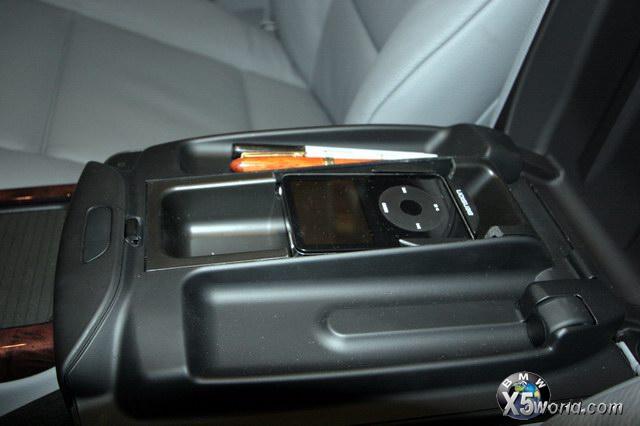 This coupled with my subwoofer install (http://www.xoutpost.com/showthread.php?t=7101) has really improved the sound quality of my X5.
|
|
#9
01-23-2006, 09:39 PM
|
|||
|
|||
|
BLUETOOTH
EDIT Read the instructions properly on my installation guide and included that step in my guide above. Problem solved.
__________________
PREVIOUS 2006 E53 X5 3.0D 2004 E53 X5 4.8is 2004 E53 X5 4.4 Sport 2011 E70 X5 3.0D with Aero kit 2009 E71 X6 50i Sport 2009 E70 X5 50i Sport 2007 E60 540 M Sport LCI (All time favourite car) 2007 E70 X5 4.8i Sport 2005 E53 4.8is 2003 E53 3.0 Sport
|
|
#10
01-23-2006, 10:18 PM
|
||||
|
||||
|
Now it's an article too
 http://www.xoutpost.com/showthread.php?t=10333 and number 16 in the STEREO section of the home page.
__________________
 Xoutpost.com - where you come for the information but stay for the friendships
|
|
| Bookmarks |
|
|
|
|











 Linear Mode


