
|
|
|
|
||||||||||
| Xoutpost server transfer and maintenance is occurring.... |
| Xoutpost is currently undergoing a planned server migration.... stay tuned for new developments.... sincerely, the management |
 |
|
|
LinkBack | Thread Tools | Display Modes |
|
#12
 09-02-2008, 01:40 AM
|
|||
|
|||
|
Where is that?

|
|
#13
09-03-2008, 12:53 AM
|
||||
|
||||
|
Means no, correct? ;-)
Press MENU button, select SET (SETTINGS), then shortly press and hold MENU button again for approx 8 sec - Service menu will appear. Scroll down to the end and one more click down (to the next screen) - you should see Perspective -> switch it ON. Then go to MENU -> GPS-Navigation -> Map, then press right selector and on the pop-up menu select Map positioning -> Perspective If you really have v29 or higher everything should work. Good luck!
|
|
#14
09-04-2008, 02:21 AM
|
|||
|
|||
|
So perspective view works now, but the streets dont show up at all like they do when i'm in the other two modes...what's up?
|
|
#15
09-04-2008, 03:12 AM
|
|||
|
|||
|
Quote:
__________________
Thanks Tina
|
|
#16
09-04-2008, 07:53 AM
|
|||
|
|||
|
so whats the point?
|
|
#17
09-04-2008, 08:25 AM
|
||||
|
||||
|
Quote:
The mk4 is not quick enough to render all the street names and display them on the limited screen space available in 3D mode, so you either use 2D or 3D, it's up to you. The way I see it is, what's the point of all those street names on screen that you never read and don't need to know unless you are being routed there by the nav (even then you dont need the street names). If you know where you're going then you don't need the nav, if you don't, use the nav, no need for street names at all. I see no merit at all in the SatNav telling me something i know (or don't need to know), the whole point is that it tells me what I don't know when I want to know it. Telling me the street name when I don't care is a waste of time and effort. Seems pretty simple to me. My 2 pennys worth.
__________________
Sept 03, M3, Silver Grey. Retro-fits: Modded Mk4 DVD Drive, OEM Bluetooth, VR Control, Rainbow Speaker Upgrade, Sony SOT Amp, HK Sub, CCFL, Intravee II, NightMode.
|
|
#18
09-08-2008, 02:56 AM
|
|||
|
|||
|
mine isnt in 3D, it looks just like 'pointing north' or 'traveling direction' looks just at a different angle.
|
|
#19
09-08-2008, 03:14 AM
|
||||
|
||||
|
Sounds like 3d is not enabled then.
To enable 3d you need, a mk4 nav computer, v26 or above, 3d turned on in the secret menu, 3d turned on in the direction pointer menu. Follow the instructions either myself or scuba have provided and then 3d will be "turned on", then to enable it use the direction pointer menu (from the map screen). This is a pic of the 3d view 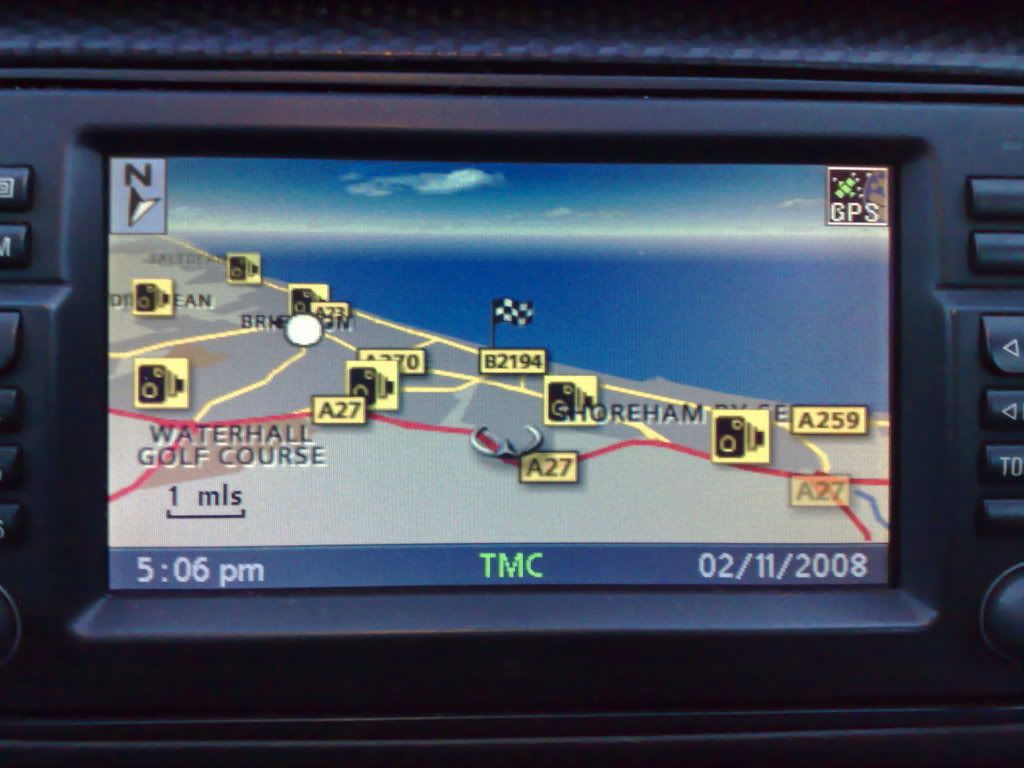
__________________
Sept 03, M3, Silver Grey. Retro-fits: Modded Mk4 DVD Drive, OEM Bluetooth, VR Control, Rainbow Speaker Upgrade, Sony SOT Amp, HK Sub, CCFL, Intravee II, NightMode.
|
|
#20
09-08-2008, 01:45 PM
|
|||
|
|||
|
that doesnt look 3d at all
|
|
| Bookmarks |
|
|
|
|


 Linear Mode


