
|
|
|
|
||||||||||
| Xoutpost server transfer and maintenance is occurring.... |
| Xoutpost is currently undergoing a planned server migration.... stay tuned for new developments.... sincerely, the management |
 |
|
|
LinkBack | Thread Tools | Display Modes |
|
#1
 02-11-2009, 04:14 PM
|
|||
|
|||
|
MK IV upgrade and map problem

|
| Sponsored Links | |
|
|
|
|
#2
02-11-2009, 04:37 PM
|
|||
|
|||
|
Modify Road Map DVD
Hi mike123g,
if you have an image file of your DVD you can use UltraIso to modify the database. Delete all language folders you don´t need from this path /TPD/NCCBEUFNM_EU_20081007 This will reduce the file size to appr. 4.3GB and you will be able to burn it to a normal DVD. Save the modified .iso file before you burn it with ImgBurn I´m sure you can find more infos by using the search function 
|
|
#4
02-22-2009, 01:53 AM
|
||||
|
||||
|
Where is the lang files
Hi,
I have searched all over the forum but couldent find anything. A friend of mine has downloaded a new version of his Navigation map ( it is a business edition ) and to reduce the file size we wanted to delete the language files. After downloading all the parts from the net and opening it with win rar we had a .iso file at the pc. When we open the iso file with ultriso we couldent find the lang files. Any idea on which file to delete or any programs to extract the files in iso to PC would be great. ( I am thinking that if we write it to a Double Layer DVD it would exctract all the files but at the moment we are unavailable to find a double layer DVD ( as its 07:00 am sunday )
|
|
#5
02-22-2009, 03:11 AM
|
|||
|
|||
|
Quote:
The map format is completely different It is not for the Mk4 or the NAVI01...O3 nav systems You need the HIGH version, not the Professional J
|
|
#6
02-22-2009, 08:58 AM
|
||||
|
||||
|
Yes Jochen, and I just realised my post is on MKIV topic and sorry for that.
My friend has an idrive with arrow display ( map is business edition also ) But I just got the answer from your post I think since the software language is totally different than it is not possible ( at the moment ) to open up the files and edit or delete the language files. Thanks.
|
|
#7
03-25-2009, 09:19 AM
|
|||
|
|||
|
I'm trying to do the same thing as the OP (remove lang files) and I have the 2009.1 High version for an e46 with MKIV drive.
In my /TPD folder I have a TPD3.DIC file and a ntcBusa_na_20080812 folder. In the ntcBus... folder I have 2 files (INFO15.PSC and LPOI.txt) and 6 folders (ENG, FRE, ICONS, IMAGES, SPA, TABLES) Where are my lang files? Inside FRE and/or SPA? Thanks in advance.
|
|
#8
03-25-2009, 10:04 AM
|
|||
|
|||
|
Quote:
FRE = French language SPA = Spanish language Remove what you don't want. You need to decide what language to keep and what to remove. also, look in the Tables folder, there may be more language related info there.
|
|
#9
03-25-2009, 04:57 PM
|
|||
|
|||
|
I was able to do that, but still am getting a 'Incorrect disk' message.
I have the 2009.1 High Version with a structure that contains root folders config, db, dbal, fill, telemat, tpd, and 3 files (cdrom.toc, files.cfg, and INFO_MAP.txt) 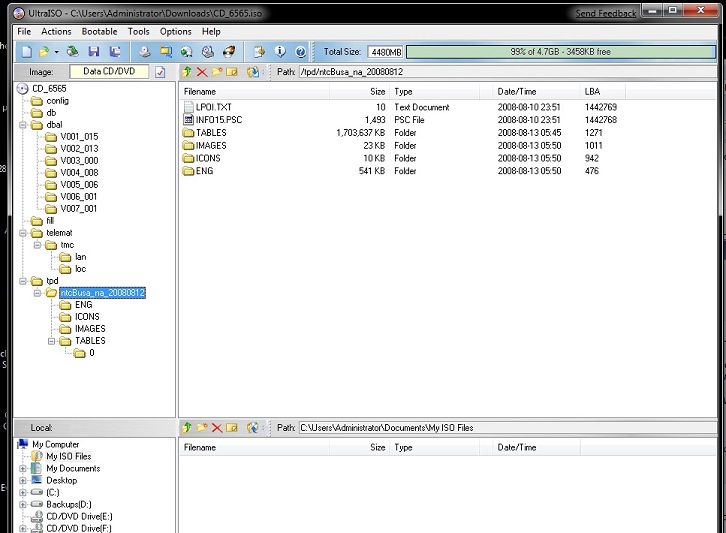 I've tried to burn this to many types of media and can't get it to load. I've always burnt at the lowest possible speed setting and tried DVD+R Memorex, DVD-R Memorex, DVD+RW Fujifilm, and DVD+R DL Sony Accucore. Anyone have any thoughts? I've been simply opening the door, popping the trunk, putting the disk in, then starting the car each time. Am I missing something obvious here? Last edited by grpatter; 03-25-2009 at 05:34 PM.
|
|
| Bookmarks |
|
|
|
|


 Linear Mode


