
|
|
|
|
||||||||||
| Xoutpost server transfer and maintenance is occurring.... |
| Xoutpost is currently undergoing a planned server migration.... stay tuned for new developments.... sincerely, the management |
|
|
LinkBack | Thread Tools | Display Modes |
|
#1
 05-05-2009, 08:33 AM
|
||||
|
||||
|
Night Mode now Available, Here.
Hi All,
As promised, Night Mode for the MK3 and MK4 BMW Nav Computers.  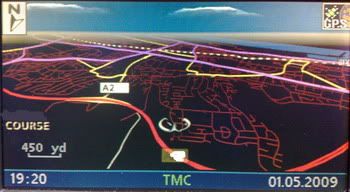 Mods: 1: Night Mode Colour Scheme. 2: Day/Night text added (for all languages). 3: Modded image version number for both mk3 (3-1/65) and mk4 (4-1/01) 4: Mk3 and Mk4 can be done with same image (mode2/form1). Caveats; Read, Understand and Accept. 1: You do this update at your own risk. 2: I'm just a normal guy like you, I'm not a shop or business, so don't expect instant replys to any emails or PM's 3: I do not have access to a mk3 so while I'm pretty confident that it will work as it should, that's no guarantee. 4: The fully modded menu text is only available to the UK Sound modded images. 5: Street names in 2d night mode do not appear as they are black and are hard coded on the map disc and as such can't be changed, so this means no street names are displayed in night mode, 3d Perspective mode is slightly better as this has white shadow, so you can make words out, if this is a problem, then please DON'T download it and then moan about it. 6: Creating a patched version for every language on the disc is a monumental task so, I've only done one for the UK, all others must be done by yourselves for yourselves. 7: The default for the POI alerts in "on", "off" should only be used as a temporary measure, as this has knock on effects (for the VR, TV and some displays, appearing in French). The only real fix is to use Jochens excellent navcoder and recode/reorder the languages (I use UK,USA and GER) this fixes the "problem". MK3 and MK4 - UPDATE 10-06-09 This is now working for the mk3 and the street names are in a very light blue so can be seen in night mode. Mk3 : My Custom Splash, OEM Day mode, Custom Night mode (col_set 2 wide and split) and modded Day/Night menu text. Mk4 : My Custom Splash, Sky, Pointers, OEM Day mode, Custom Night mode (col_set 2 wide and split) and modded Day/Night menu text. Night all mods 1010 Oval Land Rover Splash, OEM Day mode, Modded Sky, Custom Night mode (col_set 2 wide and split, but OEM colours) and Day/Night menu text. Night_RR_Only_1009 (mk3 & mk4) Downloads, MK4 only. 1: OEM Splash, OEM Day mode, Modded Sky, Custom Night mode (col_set 2 wide and split, but OEM colours) and Day/Night menu text. v31 Night OEM 1010 2: MK4 Only, Custom Night mode (col_set 2 wide and split) and modded sky files only. MegaUpload, use this only to mod the navboot yourself. 3: For UK forum members only, My Custom Splash, Sky, Pointers, Patched for POI camera alerts, OEM Day mode, Custom Night mode (col_set 2 wide and split) and modded Day/Night menu text Plus on/off menu option for POI alerts. PM Me. Once you have downloaded the file, unzip it (using winzip or similar) into a sub-dir on your pc. Then use imgburn or similar (The Official ImgBurn Website) to burn a new (blank) cd with the new downloaded firmware image. v32 is the latest, but has no updates for the mk4 over v31). Unzip imgburn, then v31 image and then open imgburn, and select the "write image file to disc" then select the v31_Night_OEM_1010.cue or v31_Mine_Night_1010,cue file, depending on download. Select the write speed at the slowest rated speed for the disc, you must do this and then burn on a good quaility cd. When its finished writing your new firmware cd, Goto the car open the drivers door, Goto the nav computer and press eject on drive, Eject the map disc, Switch ign to pos 1, leave door open. Insert firmware disc into drive, follow instruction on nav screen. Wait (approx 6 mins) till sat nav asks to eject cd and reboot. Eject cd, Confirm reboot. That's it. Do not switch off ignition or close the door when doing the upgrade. Any problems get in touch, Thanks to: nomad (for navtweak & POISon), Kiwijocken (navcoder) and manormachine for the inspiration (nightview). NOTE: Please do not use any of my pictures without my permission, I found them cropping up on websites where they should not be.
__________________
Sept 03, M3, Silver Grey. Retro-fits: Modded Mk4 DVD Drive, OEM Bluetooth, VR Control, Rainbow Speaker Upgrade, Sony SOT Amp, HK Sub, CCFL, Intravee II, NightMode. Last edited by ccfj1; 06-21-2011 at 03:24 AM. Reason: Mk3 Nightmode 
|
| Bookmarks |
|
|
|
|


 Threaded Mode

