|
||||||||
| Xoutpost server transfer and maintenance is occurring.... |
| Xoutpost is currently undergoing a planned server migration.... stay tuned for new developments.... sincerely, the management |
![]() |
|
|
LinkBack | Thread Tools | Display Modes |
|
#31
|
||||
|
||||
|
__________________
"Lapit mga kaibigan at makinig kayo, ako'y may dala-dalang balita galing sa bayan ko Nais kong ipamahagi ang mga kwento at mga pangyayaring nagaganap sa lupang ipinangako..."
|
| Sponsored Links | |
|
|
|
|
#32
|
||||
|
||||
|
Quote:
|
|
#33
|
|||
|
|||
|
Quote:
cheers Rondo |
|
#34
|
||||
|
||||
|
He will, but only if you start a new thread asking everyone what's their favorite James pond movie. I'll start ... Poldfinger
Quote:
|
|
#35
|
||||
|
||||
|
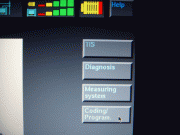
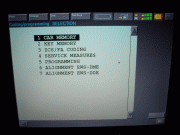
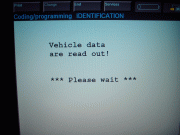
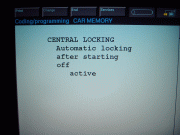
GT1 DIY - Automatic locking after starting off
Well, I was wrong the first DIY is NOT turning off the DRLs.
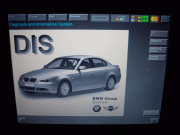
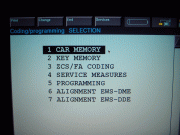
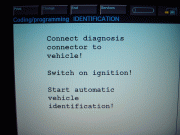
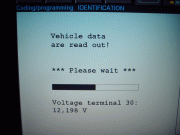
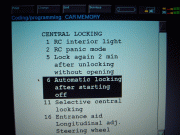
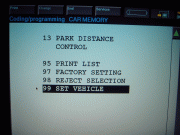
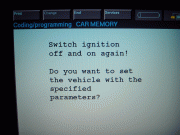
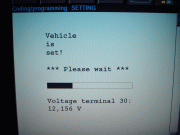
Riaz ... this is for you. Hurry up and get the T30! I will add a little more detail/pics later - like how and where to connect the diagnostic cables, etc. Here's how to Activate/De-activate the Automatic Locking After Starting Off: 1) Main DIS screen ------> 2) Select: Coding/Programming 3) Select: Car Memory --> 4) Select: Next (right arrow, bottom right. Typical after each selection) 5) Confirm connected to OBDII & key position #2 --> 6) Pre data read 7) Actual data read -----> 8) Select: Central Locking 9) Select: Auto lock ----> 10) Select: Active or Not Active 11) Selection confirmation -> 12) Returns to Car Memory Menu automatically after confirmation 13) Scroll down, Select: Set Vehicle -> 14) Displays what will be set 15) Ignition on/off & confirm setting -> 16) Select: Yes 17) Setting (encoding) --> 18) Setting completed! Last edited by TwinsPoppa; 03-17-2009 at 01:25 AM. |
|
#36
|
|||
|
|||
|
Congrats on your first software mod.I did notice that your voltage is low you may want to run a charger for longer sessions.
cheers Rondo |
|
#37
|
||||
|
||||
|
Quote:
Its actually my second, I already did the DRLs but didn't do the DIY yet. My auto locking was already active so I actually had to turn it off then back on! As a matter of fact, I think screenshot #10 show its active because of the "=" symbol. If its not too involved, can you school me a bit on this charger? I'll do my due-diligence meanwhile. 1) The purpose of the charger: Is it to keep it ABOVE a certain level? For the X (or all BMWs?) what would that be? 2) What kind of charger: Do I need a special kind or any trickle charger type will do? What specs should I be looking for in a charger - voltage & amperage I guess? 3) Any recommndations for a unit? Sorry if I'm asking stupid questions but I like to be thorough. Like I said I'll be doing my own reasearch now ... Thanks again! |
|
#38
|
|||
|
|||
|
1 yep you must keep the voltage above 12.6 while you are coding or programing on all bmw or else!!
2 i think that a 40amp constant voltage would do it for any thing you may try 3 dont have any specific recomendations as i use an old marine charger. |
|
#39
|
||||
|
||||
|
Quote:
Ayayai ... guess I better buy a charger right away! Are you reading this people! I'll add this info. to the first post right now! ![]() Thanks for sharing your knowledge and experience Rondo! Luckily, I'll only be doing diags this weekend.
|
|
#40
|
||||
|
||||
|
dang jose..these are some hardcore stuff. i'd be very scared to play with the ecu.. good luck with everything. i'll keep my eye on this thread maybe i'll learn a few tricks..
|
![]() |
| Bookmarks |
| Tags |
| gt1 setup |
|
|
|
|