Home Forums Articles How To's FAQ Register
Go Back   Xoutpost.com > BMW SAV Forums > X5 (E70) Forum
Fluid Motor Union
User Name
Password
Member List Premier Membership Today's Posts New Posts

Xoutpost server transfer and maintenance is occurring....
Xoutpost is currently undergoing a planned server migration.... stay tuned for new developments.... sincerely, the management


Reply
 
LinkBack Thread Tools Display Modes
  #11  
Old 12-01-2007, 04:28 PM
Denalio's Avatar
Member
 
Join Date: Oct 2006
Location: Canada
Posts: 1,331
Denalio is on a distinguished road
Quote:
Originally Posted by Greenberg
Hey does anybody know how to do this... cant be bothered to read the manual.... I only read the manual once I break something to find out why I broke it in the first place...
Currently you can't. It is onlt this way beacause of the error message. I wish we could also.
__________________
2013 BMW X6M-current
2013 Audi S4-current
2007 BMW X5 4.8i (E70)-sold
Reply With Quote

Sponsored Links

  #12  
Old 12-01-2007, 10:09 PM
rodybmw's Avatar
Member
 
Join Date: Jun 2006
Location: Los Angeles, CA USA
Posts: 210
rodybmw is on a distinguished road
Quote:
Originally Posted by Greenberg


Hey how did you get the navigation on that small area showing up??? That means I can be in the Entertainment Area and have Navi still showing up?????
Quote:
Originally Posted by Denalio
Currently you can't. It is onlt this way beacause of the error message. I wish we could also
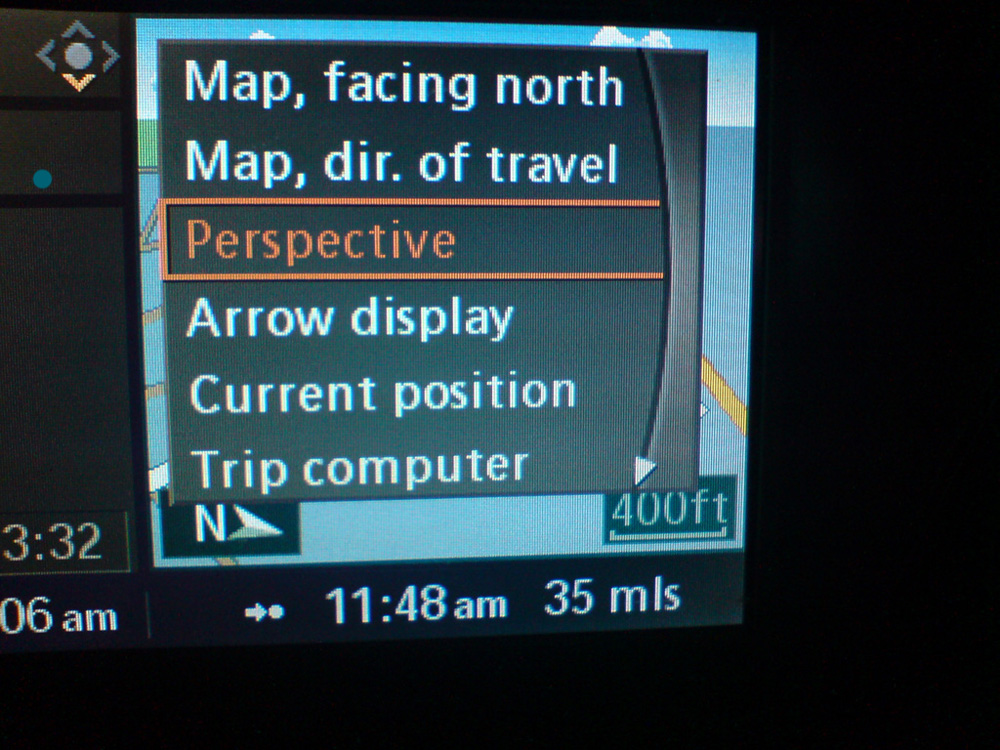
Actually it isn't because of the error message........I have the right side assist screen showing the map all the time. I haven't tried it on an E70 yet, but I assumed that it would be the same as the E60. I have the map on the right side Assist Window all the time no matter what is on the left Main widow and regardless of whether I'm using NAV or not. All you need to do on the E60 is to slide the iDrive controller to the right, push down once, then choose whether you want "perspective", "map facing north", or "map direction of travel".

Whenever I use the NAV system I have the HUD show the arrow/information display and the right side assist window show the map, and then I leave the main screen on either the Entertainment setting or "Route List". That way everything I could possibley need is displayed at the same time.
__________________
rodybmw
Reply With Quote
  #13  
Old 12-01-2007, 10:12 PM
rodybmw's Avatar
Member
 
Join Date: Jun 2006
Location: Los Angeles, CA USA
Posts: 210
rodybmw is on a distinguished road
By the way, when the fluid level is borderline low then it will trigger the low sensor regardless of whether you're on a nose up incline or nose down incline....in my case it is a nose up incline.
__________________
rodybmw
Reply With Quote
  #14  
Old 12-02-2007, 12:16 PM
Member
 
Join Date: Aug 2007
Location: ///Moscow
Posts: 88
Greenberg is on a distinguished road
Quote:
Originally Posted by rodybmw
Actually it isn't because of the error message........I have the right side assist screen showing the map all the time. I haven't tried it on an E70 yet, but I assumed that it would be the same as the E60. I have the map on the right side Assist Window all the time no matter what is on the left Main widow and regardless of whether I'm using NAV or not. All you need to do on the E60 is to slide the iDrive controller to the right, push down once, then choose whether you want "perspective", "map facing north", or "map direction of travel".

Whenever I use the NAV system I have the HUD show the arrow/information display and the right side assist window show the map, and then I leave the main screen on either the Entertainment setting or "Route List". That way everything I could possibly need is displayed at the same time.
Do you have any pictures when you are in the Entertainment section with the Navigation little window next to it?...

Ill try fiddle with it a bit more.
Reply With Quote
  #15  
Old 12-02-2007, 01:12 PM
Member
 
Join Date: Aug 2007
Location: ///Moscow
Posts: 88
Greenberg is on a distinguished road
Quote:
Originally Posted by Denalio
Currently you can't. It is onlt this way beacause of the error message. I wish we could also.
Maybe a software update could fix this?
Reply With Quote
  #16  
Old 12-02-2007, 09:37 PM
rodybmw's Avatar
Member
 
Join Date: Jun 2006
Location: Los Angeles, CA USA
Posts: 210
rodybmw is on a distinguished road
[/ATTACH]
Quote:
Originally Posted by Greenberg
Do you have any pictures when you are in the Entertainment section with the Navigation little window next to it?...

Ill try fiddle with it a bit more.
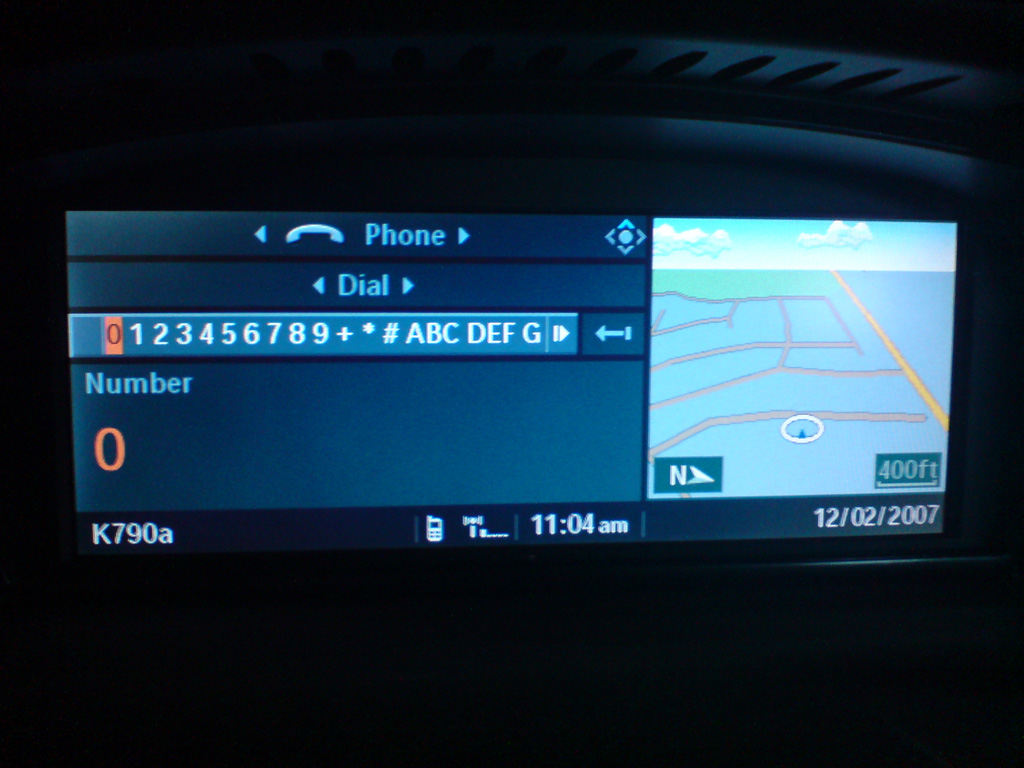
Here are some pictures showing that you can have a map window on the right no matter what screen you have on the left.....at least you can on the E60, I haven't tried it on an E70 yet.


Here are some of the menu choices in the Assist Window (there are more if you scroll down):
Name:  DSC00263.JPG
Views: 330
Size:  318.5 KB


Route List on the left, Perspective map on the right:
Name:  DSC00264.JPG
Views: 306
Size:  222.8 KB


Phone on the left, Perspective map on the right:
Name:  DSC00266.JPG
Views: 345
Size:  223.5 KB


Climate on the left, Perspective map on the right:
Name:  DSC00267.JPG
Views: 293
Size:  250.2 KB


Entertainment on the left, Perspective map on the right:
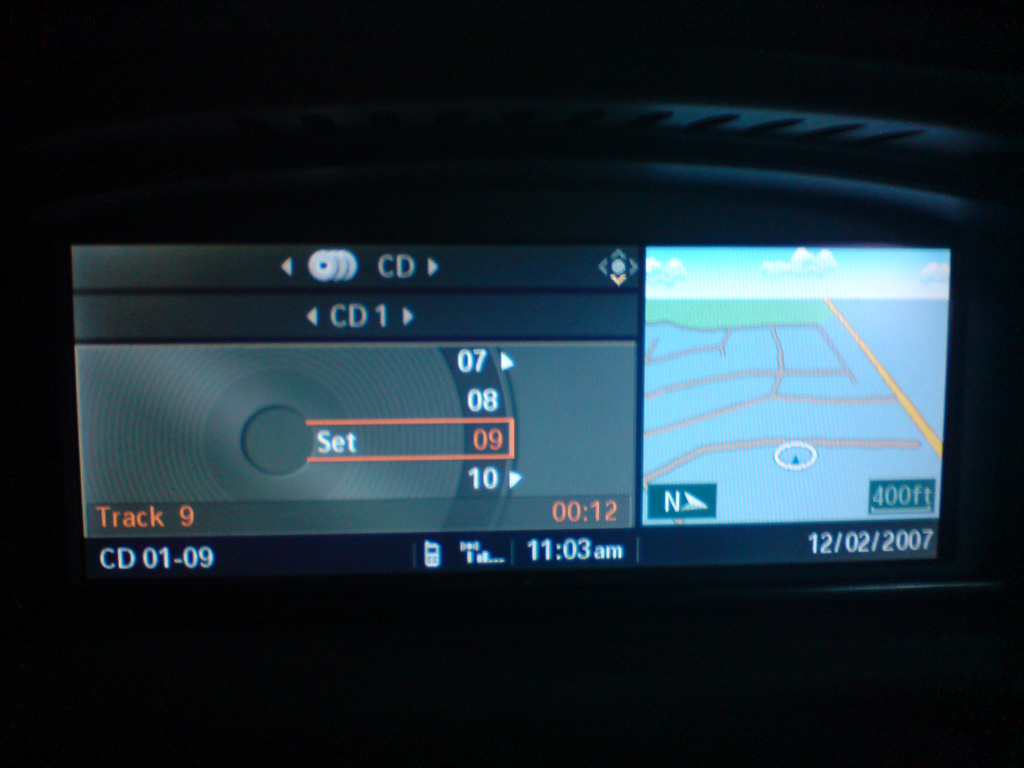
Name:  DSC00268.JPG
Views: 298
Size:  220.2 KB
__________________
rodybmw
Reply With Quote
  #17  
Old 12-03-2007, 03:14 AM
Member
 
Join Date: May 2006
Location: Scotland, UK
Posts: 683
Fastbuck is on a distinguished road
My E70 allows the same options as the pics in the post above.
__________________

Fastbuck
2009 F01 7 Series 3.0D SE Saphire Black/ Oyster
2008 E83 X3 2.0D SE Montego Blue/ Black
2007 E70 X5 3.0D SE Space Grey/ Beige - SOLD
2006 Land Rover Freelander Sport TD4 Zambezi Silver/Black - SOLD
2005 W203 C200K Sports Coupe Jasper Blue/Artico Black - SOLD
2004 W211 E320 CDI Avantgarde Brilliant Silver/Alpaca Grey - SOLD
2001 E39 530i SE Crystal Green/ Beige - SOLD
Reply With Quote
  #18  
Old 12-03-2007, 03:39 PM
Denalio's Avatar
Member
 
Join Date: Oct 2006
Location: Canada
Posts: 1,331
Denalio is on a distinguished road
Had my X in for service to look at why the steering malfuction notice was coming on. They are replacing the power steering pump. I have to take it back when the part arrives from Germany.
__________________
2013 BMW X6M-current
2013 Audi S4-current
2007 BMW X5 4.8i (E70)-sold
Reply With Quote
  #19  
Old 12-03-2007, 04:02 PM
alexmish's Avatar
Member
 
Join Date: Nov 2007
Location: Garden State
Posts: 1,005
alexmish is on a distinguished road
Quote:
Originally Posted by Denalio
Had my X in for service to look at why the steering malfuction notice was coming on. They are replacing the power steering pump. I have to take it back when the part arrives from Germany.
Ouch... let us know how it works out. I guess they declared it 'safe to drive' while new parts is on the way....
__________________
His : 2013 X5 3.5d Deep Sea Blue/Black/Aluminum with ALL packages, 20" 214"s, running boards, Adaptive Drive, Spare Tire, BMW Apps
On Order : 2016 X3 3.5 MSport Silver/Mocha with DHP, CW, Prem, Tech, DA, Lighting

Hers : 2015 328xi MSport Silver/Red

Prior:
2008 X5 4.8
2011 X5 3.5d
2010 335 xDrive
2013 335 xDrive
Reply With Quote
  #20  
Old 12-04-2007, 12:00 PM
whoopy-do's Avatar
Member
 
Join Date: Oct 2007
Location: UK
Posts: 194
whoopy-do is on a distinguished road
The E70 i had on demo last month aloud you to change the trip computer on the right hand side of the screen to the mini navigation screen as shown in the previous pics, the only crap thing about it was if you then select navigation from the idrive main menu you get two nav screens insted of one big one ! Weird!

this was a UK E70 also..
__________________

2008 X5 3.0d se
Dynamic Pack
Y spoke 214's
Media Pack
Nav Professional
Bluetooth
BMW Assist
Panoramic Roof
Electric Memory Heated Seats
Running Boards
Xenons
Sun Protection Glass
Titanium Grilles
USB audio interface
Super Guard Paint Protection
Saph Black, Black leather/Brushed Aluminium
Reply With Quote
Reply

Bookmarks


Posting Rules
You may not post new threads
You may not post replies
You may not post attachments
You may not edit your posts

BB code is On
Smilies are On
[IMG] code is On
HTML code is Off
Trackbacks are On
Pingbacks are On
Refbacks are On


All times are GMT -4. The time now is 11:36 AM.
vBulletin, Copyright 2026, Jelsoft Enterprises Ltd. SEO by vBSEO 3.6.0
© 2017 Xoutpost.com. All rights reserved. Xoutpost.com is a private enthusiast site not associated with BMW AG.
The BMW name, marks, M stripe logo, and Roundel logo as well as X3, X5 and X6 designations used in the pages of this Web Site are the property of BMW AG.
This web site is not sponsored or affiliated in any way with BMW AG or any of its subsidiaries.