
|
|
|
|
||||||||||
| Xoutpost server transfer and maintenance is occurring.... |
| Xoutpost is currently undergoing a planned server migration.... stay tuned for new developments.... sincerely, the management |
|
|
LinkBack | Thread Tools | Display Modes |
|
#1
 06-10-2005, 12:46 PM
|
||||
|
||||
|
Completed the installation of the Ice Link Plus
I've had the Ice Link Plus installed in my 2001 X5 (with nav and without DSP) for a few weeks now, but it wasn't a permanent install as I was still mulling where to mount the unit. Dension gives you several options that maximize the flexibility and choices.
One of the options, which is what I've been using the last few weeks, is basically what they call their docking cable. It's basically a pigtail cable with an iPod interface jack on the end and you can use the cable to put the iPod wherever you choose. This is what you would use if you decided that you wanted it mounted in the cup holder area, for example. Another option is a docking cradle. The docking cradle could be mounted next to the radio/nav screen if you wanted visibility to the iPod itself. Personally, I like the stealth approach. Noone but you knows its there, which keeps it from being a target for thieves. So what I did was mount the cradle in the console bin that is below the armrest. I had previously replaced my bin that had the cassette holder with the empty bin, so there is more than enough space to mount the iPod there and still have plenty of storage for other things. Here's a couple pictures of the mounting approach that I used:  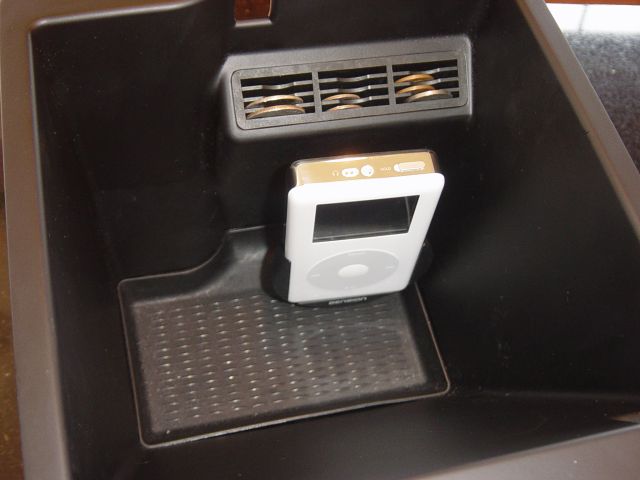 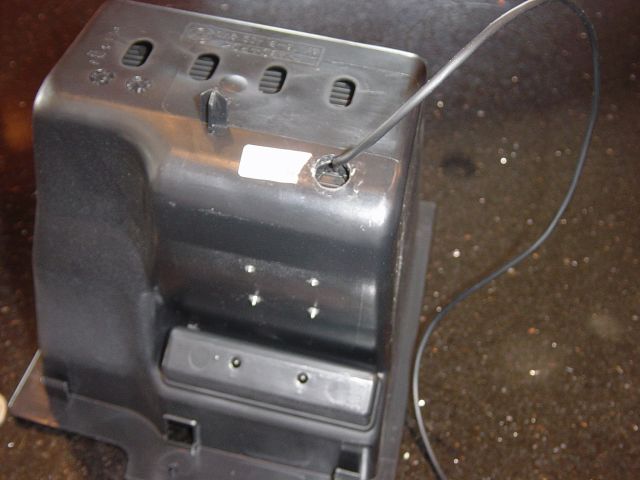 The Dension software configurations give you three options for displaying song tag information. One is to have no song tag information displayed at all. A second choice is to have the information displayed in the dash OBD area, which looks like this:  A third choice is to have the information displayed on the Nav screen (or on the radio MID if you don't have nav) , which looks like this.  Personally I have been running with the song tag information displayed in the dash OBD display area. If you display it on the nav screen then it more or less overrides anything else displayed in that area of the screen, which I didn't care for since I prefer to see the nav map displayed during normal driving situations. It only takes a minute to change the configuration, though, so that's convenient. As for the install, it really is a simple DIY. All you need to do is remove the CD changer and plug the Ice Link connectors into the cables you removed from the back of the CD changer. Then just fish the cables to the front and you are all set. If you have a 2000 to 2002 with DSP then you will also need to wire in an additional component so that the audio works properly. Those with DSP on a 2003 and newer don't have to worry about this since BMW changed over from a digital DSP system to an analog DSP system starting with MY2003 (that's what 2003 and newer don't have the coax cable to the CD changer, BTW).  Finally, here's another picture of the iPod in it's final home. It's very easy to take it in and out of the cradle, and where it's mounted gives me the stealth look I was going for.  Enjoy!! Jeff
__________________
 Xoutpost.com - where you come for the information but stay for the friendships 
|
| Bookmarks |
|
|
|
|








 Threaded Mode

