
|
|
|
|
||||||||||
| Xoutpost server transfer and maintenance is occurring.... |
| Xoutpost is currently undergoing a planned server migration.... stay tuned for new developments.... sincerely, the management |
 |
|
|
LinkBack | Thread Tools | Display Modes |
|
#1
 01-30-2009, 09:20 AM
|
|||
|
|||
 POISoN
Proviso; this software is still in development and may give some interesting results while in use so please report any bugs or strange behaviour You use this at you own risk. Download POISoN.zip.pdf, remove .pdf extension then unpack ZIP archive somethere (c:\poison for example). GKT+ runtime environmet must be installed to run poison.exe A: OS Software modification 1. Open original V32 image with UltraIso. 2. Extract navboot file from CD image to c:\poison 3. Run patch.exe to add sound notification code. 4. Replace military base icon (romicons #216) to something you like. 5. Put modified navboot file back to CD image. B: Voice modification 1. Extract voice file from V_2/Voices/0506 (gb_f.csf for english) 2. Edit voice phrases #8 #9 using NavSpeak utility, for example: 322,323,88,250,191 (high beep, low beep, a pause, attention, ahead) 3. Put modified voice file file back to CD image. C: Force SW upgrade 1. Extract sw_rel.tbl form CD image 2. Use hex editor to change first 4 bytes from '1000' to '1001' to force upgrade. D: Force Voice upgrade 1. Create directory /V_2/Voices/0507 in original disc image and copy all files from /V_2/Voices/0506 to it 2. Copy voice.lst file from poison zip archve to /V_2/Voices/0507 3. Copy lng_rel.tbl file from poison zip archve to /V_2/RR/0101/BMWC01S first 4 bytes in lng_rel.tbl must be the same as in sw_rel.tbl Burn CD and upgrade the system. E:Adding POI to map database: 1. Copy map database from CD/DVD to the hard drive (bibliogr and carindb files are enough fo CD, bibliogr and DB folder for DVD maps). 2. Run poison.exe, open map folder (folder where bibliogr file located) 3. Add your own POI or import from plain lon/lat txt or csv file. Take a look at http://www.poiplaza.com/index.php?p=...pg=ds&lsts=616 You can use: iGO 8 txt, iGo txt, GARMIN csv, destinator asc, mio asc, navigon asc, route 66 csv and tomtom asc files from there. 4. Save modified database 5. Insert modified database (carindb file of DB folder) back to image using UltraIso. Note: Don't create new disc from scratch, it will not work. F: Burn the disc. 
|
| Sponsored Links | |
|
|
|
|
#3
01-30-2009, 10:35 AM
|
||||
|
||||
|
Nice Work Nomad,
Please remember when burning your discs, to burn at either 1x speed or the slowest rated for the media you are using. Also use the Update procedure when upgrading your mk4. Goto the car open the drivers door, Goto the nav computer and press eject on drive, Eject the map disc, Switch ign to pos 1, leave door open. Insert firmware disc into drive, follow instruction on nav screen. Wait (approx 6 mins) until the nav computer ejects the cd Then confirm reboot. Do not switch off ignition or close the door when doing the upgrade. Then Insert modded map disc. NOTE: Extra stuff needed to get it all working, in case it's not obvious. GDK+ Libraries Navtweak Navtweak Imgburn: The Official ImgBurn Website (or similar) UltraIso: Download site (or similar) POI DB, Take a look at poiplaza NOTE Update 24-02-10. If running windows7 then you need to run 2.14.7 (gtk2-runtime-2.14.7-2009-01-13-ash) of the GDK+ Libraries for the poision.exe to work. Navtweak (both 2.6 and 2.7) need 2.16.6 (gtk2-runtime-2.16.6-2009-12-01-ash) of the GDK+ Libraries to work. You can have them in 2 separate dirs.
__________________
Sept 03, M3, Silver Grey. Retro-fits: Modded Mk4 DVD Drive, OEM Bluetooth, VR Control, Rainbow Speaker Upgrade, Sony SOT Amp, HK Sub, CCFL, Intravee II, NightMode. Last edited by ccfj1; 02-24-2010 at 05:18 AM.
|
|
#5
01-30-2009, 11:21 AM
|
||||
|
||||
|
/V_2/RR/0101/BMWC01S/app_sw
You need to open the v32.iso with something like ultraiso and then navigate to the dir above. 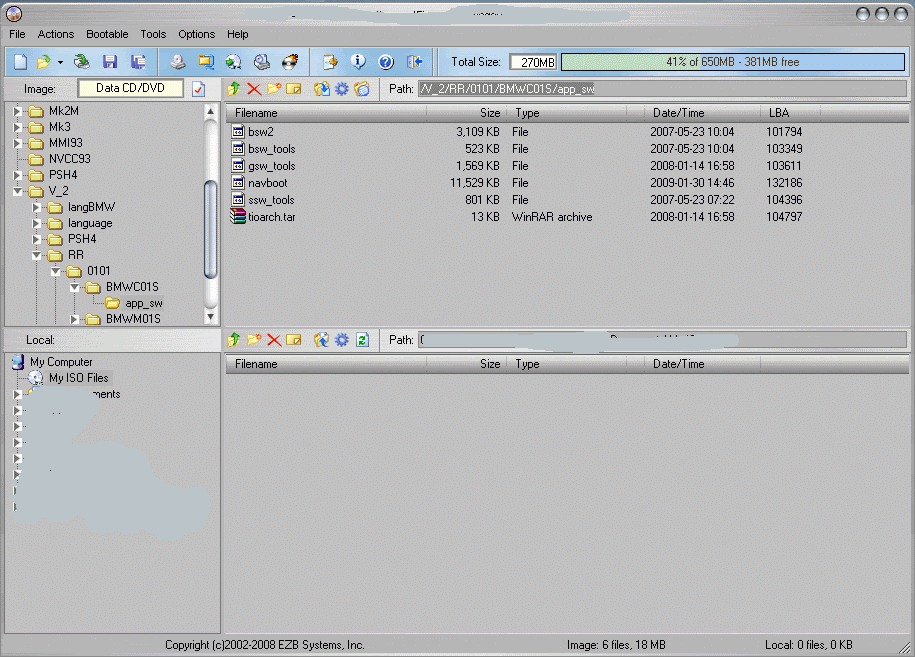 Remember to make the file read/write (or you can't make changes to it).
__________________
Sept 03, M3, Silver Grey. Retro-fits: Modded Mk4 DVD Drive, OEM Bluetooth, VR Control, Rainbow Speaker Upgrade, Sony SOT Amp, HK Sub, CCFL, Intravee II, NightMode. Last edited by ccfj1; 01-30-2009 at 12:13 PM.
|
|
#7
01-30-2009, 11:26 AM
|
|||
|
|||
|
Quote:

|
|
#8
01-30-2009, 11:29 AM
|
|||
|
|||
|
Quote:
|
|
#9
01-30-2009, 11:30 AM
|
||||
|
||||
|
Quote:
http://gtk-win.sourceforge.net/home/index.php/en/Home 2.14 or above I think
__________________
Sept 03, M3, Silver Grey. Retro-fits: Modded Mk4 DVD Drive, OEM Bluetooth, VR Control, Rainbow Speaker Upgrade, Sony SOT Amp, HK Sub, CCFL, Intravee II, NightMode.
|
|
#10
01-30-2009, 11:40 AM
|
||||
|
||||
|
Quote:
Quote:
Quote:
Quote:
__________________
Sept 03, M3, Silver Grey. Retro-fits: Modded Mk4 DVD Drive, OEM Bluetooth, VR Control, Rainbow Speaker Upgrade, Sony SOT Amp, HK Sub, CCFL, Intravee II, NightMode.
|
|
| Bookmarks |
|
|
|
|





 Linear Mode


