
|
|
|
|
||||||||||
| Xoutpost server transfer and maintenance is occurring.... |
| Xoutpost is currently undergoing a planned server migration.... stay tuned for new developments.... sincerely, the management |
 |
|
|
LinkBack | Thread Tools | Display Modes |
|
#81
 01-12-2015, 11:51 PM
|
||||
|
||||

|
| Sponsored Links | |
|
|
|
|
#82
01-13-2015, 12:26 AM
|
||||
|
||||
|
Quote:
Just tested the capabilities of BMWhat app on the Avin Avant 2 and it is pretty good. Definitely not as good as INPA or DIS, but does some coding and reads a ton of diagnostic modules. I'll try to get some video messing around with it.
__________________
2005 X5 4.4i Build 04/05 Maintenance/Build Log Nav, Pano, Sport (Purchased 06/14 w/ 109,000 miles) (Sold 8/15 w/121,000 miles) 2006 X5 4.8is Build 11/05 Maintenance/Build Log Nav, DSP, Pano, Running Boards, OEM Tow Hitch, Cold Weather Pckg (Purchased 08/15 w/ 90,500 miles) 2010 X5 35d Build 02/10 Nav, HiFi, 6 DVD, Sports Pckg, Cold Weather Pckg, HUD, CAS, Running Boards, Leather Dash, PDC, Pano (Purchased 03/17 w/ 136,120 miles)
|
|
#83
10-27-2015, 06:48 PM
|
||||
|
||||
|
Going to Start Coding in a Couple Days!
Finally going to code my car. I purchased the kit from Romania that everyone seems to be using. This was two years ago! I finally found some time to format the hard drive on my sisters old laptop and installed Win 7 Ultimate.
Just got all the software installed and I am currently waiting for my battery charger to get here so I can have the X fully charged before I start. I've read all the threads on this site on coding and I'm feeling pretty comfortable with it. In case anyone is interested, these are the lines I will be changing: Windows roll up/down when the door is open FH_TIPP_DISABLE_TUER_AUF - nicht_activ Windows/sunroof close on remote KOMFORTSCHLIESSUNG_FB – activ AND/OR KOMFORTSCHLIE_FB_OHNE_SHD High beams on with bi-xenon PWM_FL_BIX - wert_01********* Doors auto lock VERRIEGELN_AUT_AB_X_KM/H - activ; VERRIEGELN-XKM/H_SENDER_1 - activ; VERRIEGELN-XKM/H_SENDER_2 - activ; VERRIEGELN-XKM/H_SENDER_3 - activ; VERRIEGELN-XKM/H_SENDER_4 - activ; VERRIEGELUNGSSCHWELLE - 16_KM/H Cold monitoring off for license plate lights KENNZEICHENLI_PRUEF - nicht_melden; Is this right? "Nicht-melden" CC_MELDUNG_KZL - nicht_activ; KALTUEBERWACHUNG_KZL - nicht_activ Cold monitoring off for Angel Eyes KALTUEBERWACHUNG_SL_LV - nicht-activ; KALTUEBERWACHUNG_SL_RV - nicht-activ Cold monitoring off for reverse lights KALTUEBERWACHUNG_RFS_L - nicht-activ KALTUEBERWACHUNG_RFS_R - nicht-activ Fogs simultaneous with high beams FL_UND_NSW_NICHT_GLEICHZ - nicht_activ Gong off for key left in ignition ZUENDSCHLUESSEL_WARNUNG - nicht_activ Gong off for seat belt (warning is still in the cluster) GURTWARNUNG_GONG - nicht_activ AND/OR AKUSTIK_GURT_WARN – nicht_activ Single push of remote to unlock all doors ZV_SELECTIV - nicht_activ
__________________
 2005 BMW X5 3.0i 2013 BMW M3 Competition
|
|
#85
10-28-2015, 06:31 PM
|
||||
|
||||
|
Well the charger doesn't have a power supply mode so I am hesitant of using it while its connected. I think it may be safer of letting it charge for a day then coding it while its disconnected. I'll post here again after my first attempt.
__________________
2005 BMW X5 3.0i 2013 BMW M3 Competition
|
|
#86
10-28-2015, 08:43 PM
|
||||
|
||||
|
i am interested if these one works
High beams on with bi-xenon PWM_FL_BIX - wert_01*********
__________________
5G Ford Ranger Lariat 2022 E36/7 Z3 97 1.9 New project  E53 X5 4.6is 02  OFF to Bring a trailer soon OFF to Bring a trailer soonLand Rover Disco 2 03 - sold Kawasaki Z900B 17- sold E53 X5 3.0 5M/T 01-sold-again E53 X5 4.4 05-the beast a 4.8tu swap. at 150k  -SOLD -SOLDE83 X3 3.0-the wife's - sold R56 Mini Cooper S 07-sold E36 M3 97 - sold E36 M3 98-sold E39 528i 00-sold E30 318i 91-sold E36 M3 95-sold https://www.youtube.com/channel/UCcI..._as=subscriber 
|
|
#87
10-28-2015, 09:58 PM
|
||||
|
||||
|
Coding 95% Success!
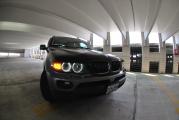
The smile on my face after seeing all 6 lights on in the front of the bimmer..... priceless.
The CTEK charger was great for knowing how much charge your battery had. I did my coding in steps. Once the CTEK indicated that the battery was in stage 7 (float mode), I disconnected the charger and started reading the modules. I then shut NCS down as well as the ignition and made the edits in the house to preserve the battery. While making the edits I plugged the charger back up and drank a couple brews. I proceeded to upload the .MAN file for the LCM module and repeated the steps above for the GM3 module (4 brews in). However I only waited for the charger to get to stage 4, which indicated that majority of charging is complete (~90%) I had no issues with getting the software to connect or reading/writing code. But for some reason I could not get two functions to code: First was unlocking all doors with one click on the key. In the GM3 Module, I changed the following line: Single push of remote to unlock all doors (GM3) ZV_SELEKTIV - nicht_aktiv (was originally aktiv) Second was the seat belt warning in the LCM module: Gong off for seat belt (warning is still in the cluster) (LCM) GURTWARNUNG_GONG - nicht_aktiv (was originally aktiv). Everything else worked, which I am extremely happy with! No more flickering of angel eyes and reverse lights and my LED reverse lights are fucking bright! I made a simple step-by-step guide on coding with NCS Expert. A lot of the info here is just a summary of whats already out there. I also used the software package and cable from the guy in Romania. Make sure you set the USB to com 1 and latency to 1 ms. Make a blank FSW_PSW.MAN file first in the work directory. Steps Connect cable to car, turn key to position 2, start INPA Check to see if both black dots are lit. Close INPA, open NCS 1. Load Expert Profile 2. Hit f1 3. Hit f3 4. Pick e53 5. Pick EWS to read your vin into the system 6. Hit f6 to go back. 7. Now you have to start reading the modules. You can only code one at a time. 8. Hit f4 to bring up the module specific menu (Process ECU) 9. Pick the gm3 for example, then select OK 10. Go to f2, change job. The default here is SG_codiren which is write, you need to select, codiren lessen, which is read. (Mine was Codirendaten_lessen) 11. Now select f3, which is execute job. In the work folder you will see the trc file. Make a back-up of .trc file EDIT CODES NOW To upload the changes. Save .trc file to .man Go to f2, and select sg-codiren, Then f3 to execute. CODES NCS expert is relatively easy, just program one module at a time, it does have ability to "program" all at once but works selectively... when you do individual modules, you can see the results right away... Windows roll up/down when the door is open (GM3) FH_TIPP_DISABLE_TUER_AUF - nicht_aktiv (Changed) Windows/sunroof close on remote (GM3) KOMFORTSCHLIESSUNG_FB – aktiv (Changed) High beams on with bi-xenon (LCM) PWM_FL_BIX - wert_01 (Changed) Doors auto lock (GM3) VERRIEGELN_AUT_AB_X_KM/H - aktiv (Changed) VERRIEGELN-XKM/H_SENDER_1 - aktiv (Changed) VERRIEGELN-XKM/H_SENDER_2 - aktiv (Changed) VERRIEGELN-XKM/H_SENDER_3 - aktiv (Changed) VERRIEGELN-XKM/H_SENDER_4 - aktiv (Changed) VERRIEGELUNGSSCHWELLE - 16_KM/H (NOT Changed) Cold monitoring off for license plate lights (LCM) KENNZEICHENLI_PRUEF - nicht_melden (Changed) CC_MELDUNG_KZL - nicht_aktiv (Changed) KALTUEBERWACHUNG_KZL - nicht_aktiv (Changed) Cold monitoring off for Angel Eyes (LCM) KALTUEBERWACHUNG_SL_LV - nicht_aktiv (Changed) KALTUEBERWACHUNG_SL_RV - nicht_aktiv (Changed) Cold monitoring off for reverse lights (LCM) KALTUEBERWACHUNG_RFS_L - nicht_aktiv (Changed) KALTUEBERWACHUNG_RFS_R - nicht_aktiv (Changed) Fogs simultaneous with high beams (LCM) FL_UND_NSW_NICHT_GLEICHZ - nicht_aktiv (Changed) Gong off for key left in ignition (LCM) ZUENDSCHLUESSEL_WARNUNG - nicht_aktiv (Changed) Gong off for seat belt (warning is still in the cluster) (LCM) GURTWARNUNG_GONG - nicht_aktiv (Changed) Single push of remote to unlock all doors (GM3) ZV_SELECTIV - nicht_aktiv
__________________
2005 BMW X5 3.0i 2013 BMW M3 Competition
|
|
#88
10-28-2015, 11:17 PM
|
||||
|
||||
|
I just did the high beams one thanks. Where did you find what the wert_01 equals to?
__________________
5G Ford Ranger Lariat 2022 E36/7 Z3 97 1.9 New project E53 X5 4.6is 02 OFF to Bring a trailer soonLand Rover Disco 2 03 - sold Kawasaki Z900B 17- sold E53 X5 3.0 5M/T 01-sold-again E53 X5 4.4 05-the beast a 4.8tu swap. at 150k -SOLDE83 X3 3.0-the wife's - sold R56 Mini Cooper S 07-sold E36 M3 97 - sold E36 M3 98-sold E39 528i 00-sold E30 318i 91-sold E36 M3 95-sold https://www.youtube.com/channel/UCcI..._as=subscriber
|
|
#90
10-29-2015, 07:28 PM
|
||||
|
||||
|
Oh ok . Thanks for posting ur progress
__________________
5G Ford Ranger Lariat 2022 E36/7 Z3 97 1.9 New project E53 X5 4.6is 02 OFF to Bring a trailer soonLand Rover Disco 2 03 - sold Kawasaki Z900B 17- sold E53 X5 3.0 5M/T 01-sold-again E53 X5 4.4 05-the beast a 4.8tu swap. at 150k -SOLDE83 X3 3.0-the wife's - sold R56 Mini Cooper S 07-sold E36 M3 97 - sold E36 M3 98-sold E39 528i 00-sold E30 318i 91-sold E36 M3 95-sold https://www.youtube.com/channel/UCcI..._as=subscriber
|
|
| Bookmarks |
| Thread Tools | |
| Display Modes | |
|
|
|
|










 Linear Mode


