
|
|
|
|
||||||||||
| Xoutpost server transfer and maintenance is occurring.... |
| Xoutpost is currently undergoing a planned server migration.... stay tuned for new developments.... sincerely, the management |
 |
|
|
LinkBack | Thread Tools | Display Modes |
|
#1
 10-10-2007, 04:38 PM
|
|||
|
|||
|
Bluetooth module power connector
I already posted below on M5board.com but nobody seems to know the answer to my question; Quote:
Thank you in advance for your answers! Kr Bjorn 
|
| Sponsored Links | |
|
|
|
|
#3
10-11-2007, 06:40 AM
|
|||
|
|||
|
Thank you for your quick answer!
Nonetheless, that is what I was fearing. There is no such connector in my car on that position. I can clearly see that there are some tabs foreseen to put the connector however. I believe the connector might have been used for the viasat system which is also in my car. Maybe you can tell me were the original power connector originates from (under the back seat or something) so that I can backtrack this and put the connector back in its original place and install the BMW BT.
|
|
#4
03-14-2008, 08:18 AM
|
|||
|
|||
|
Old topic back up...
I am still wondering, a couple of months later, if bluetooth can be added to my car. As mentioned, I do not have the power connector available in the trunk of my car. I also have looked a lot at different DIY's and the bimmernav site but no-one seems to have this same problem... I now have found the following on realoem.com: http://www.realoem.com/bmw/showparts...03&hg=84&fg=20 If someone could please verify if this is the cable (#4) that powers the ULF? Thank you all in advance...
|
|
#5
03-14-2008, 08:51 AM
|
||||
|
||||
|
Hi Bjorn, welcome to the forum,
I've retrofitted BT to my 02 e46, mine also did not have any phone pre-wire, so i started from scratch and made my own retrofit harness, I used the radio modules quadlock connector to provide all that was needed for the 54 ULF connector (ie: power, switched power, GND, i-bus, tel-on, mute and so on), this is no different from a normal car phone kit. This is what i came up with (not this exact one but similar, I made this one for a friend). 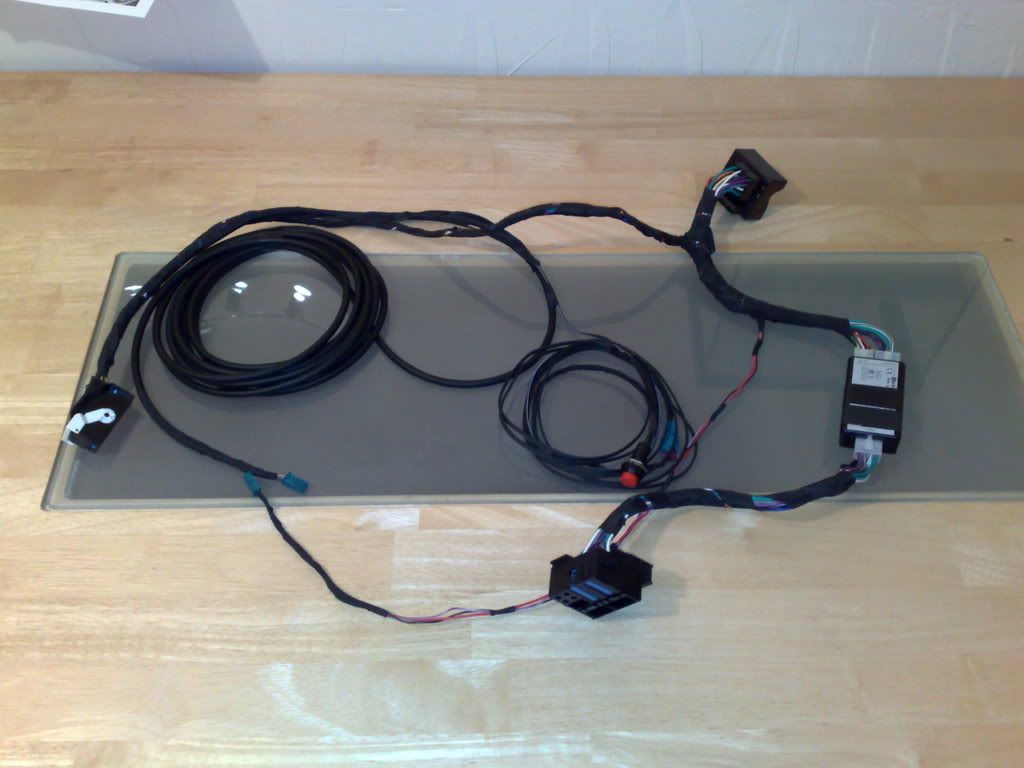 Your car is similar to the e46, so I see no reason why you can't do the same, after all the BMW ULF acts exactly the same way as any aftermarket BT car kit (nokia, sony and parrot etc), the only real difference is the I-bus/Tel-on connection. Here is a link to what I did; http://www.xoutpost.com/bluetooth/324...tml#post329623 If you have any more qusetions the just e-mail or PM me. HTH BR//john
__________________
Sept 03, M3, Silver Grey. Retro-fits: Modded Mk4 DVD Drive, OEM Bluetooth, VR Control, Rainbow Speaker Upgrade, Sony SOT Amp, HK Sub, CCFL, Intravee II, NightMode.
|
|
#6
03-14-2008, 09:56 AM
|
|||
|
|||
|
you can also get a similar setup (with BMW parts) from www.bimmernav.com
|
|
#7
03-19-2008, 02:54 PM
|
|||
|
|||
|
Hi John, thank you for the welcome! It's a great place for us non-X5 owners when it comes to navi and BT
 Thank you also for your explanation, but unfortunately I'm still in doubt. When I look at the tutorial made by Sportypants http://www.accessone.co.uk/images/ca...IT_PROJECT.pdf (which is the Bimmernav package) I assume that the harness on the first page is the same one as the one that you have created? I'm confused because I do not recognise the power connector on your harness (maybe it's plugged in one of the black plastic boxes?). The harness that I'm looking for is not the harness from the ULF to the mic etc... but the harness which provides the white plug as indicated in sportypants tutorial on page 35 (point 29) where the ULF harness has to be plugged in. I believe it is the X400 connector (http://www.e39.org/forums/posts/193851/) I'm not that well-known with electronics, that's why I always double check and check again :-). @Ambishop: Since the picture in the tutorial indicates what is included in the Bimmernav package, it seems so that the 12 pin connector harness is not included or maybe am I missing something? Thank you both very much in advance for your help! Bjorn
|
|
#8
03-19-2008, 03:35 PM
|
||||||||
|
||||||||
|
Hi Bjorn,
Quote:
Quote:
Quote:
Quote:
If however, you have the x400 white power block then the Ambishop loom is definatly the best way to go, as it will be plug n play, (not blowing Ambishop trumpet, but his stuff really is very good). Quote:
Quote:
 I always treble check when I make something up (no nasty supprises then). I always treble check when I make something up (no nasty supprises then). Quote:
Quote:
BR//John
__________________
Sept 03, M3, Silver Grey. Retro-fits: Modded Mk4 DVD Drive, OEM Bluetooth, VR Control, Rainbow Speaker Upgrade, Sony SOT Amp, HK Sub, CCFL, Intravee II, NightMode.
|
|
#9
04-08-2008, 12:25 PM
|
|||
|
|||

John
I tried to send you a PM to thank you, but apparently your inbox is overloaded :-) I've been away on holidays with little or no internet access so I couldn't reply any earlier. So thank you very much for the info provided and to help me with my issue Kr Bjorn
|
|
#10
04-08-2008, 03:55 PM
|
||||
|
||||
|
Hi Bjorn,
Glad I could help mate, (just emptied my mail box, thanks for the heads up) BR//John
__________________
Sept 03, M3, Silver Grey. Retro-fits: Modded Mk4 DVD Drive, OEM Bluetooth, VR Control, Rainbow Speaker Upgrade, Sony SOT Amp, HK Sub, CCFL, Intravee II, NightMode.
|
|
| Bookmarks |
|
|
|
|





 Linear Mode


