
|
|
|
|
||||||||||
| Xoutpost server transfer and maintenance is occurring.... |
| Xoutpost is currently undergoing a planned server migration.... stay tuned for new developments.... sincerely, the management |
 |
|
|
LinkBack | Thread Tools | Display Modes |
|
#11
 02-18-2006, 09:30 AM
|
|||
|
|||

__________________
    DC Metro MINIs, MMC #30, Randy Pulley Install #604, MOTORING ID: QUIK060 05 MCSa PS/S w/4 packages,Aero,Tartan Red,Navi,R99s,Tint,Alta(CAI NOW w/ HOSE,15%,22mmRSB, IC Dirv),H-sport Springs,Ian Auto-up,Euro shelf w/Aux |
| Sponsored Links | |
|
|
|
|
#12
02-18-2006, 09:34 AM
|
||||
|
||||
|
Hey Paul, I was just thinking. There must be something in the code that tells the logo where to position itself on the screen and maybe if you don't give it that info it doesn't know what to do with it and causes the error. - just a thought, I'm certainly no code guy...
__________________
'08 335i Coupe - Barbera Red / Saddle Leather / Light Poplar Wood / 6spd Manual Options: Sport, Premium, Cold Weather, Comfort Access, Active Steering (awesome!), Power Rear Shade, IPod Adapter, Navigation w/IDrive Mods: M6 Wheels, Split Armrest, M-Steering Wheel, Euro Light Switch w/Rear Fog Lights, Short Shift Knob w/Matching E-Brake Handle, Clear Reflectors, CDV, Clear Bra Retired:'04 X5 4.4i |
|
#13
02-18-2006, 11:23 AM
|
|||
|
|||
|
i edited the navboot file now with a individual startlogo. but i am not able to burn a cd. all burn-modi that i try with nero7 are not accepted at my MK4. actually i throw 11 cd into trash
 did anyone burn successfully a software-cd that is readable by the MK4? please send infos about the burning-software and the burn-modus. thx |
|
#14
02-18-2006, 01:49 PM
|
|||
|
|||
|
Hi,
I wrote a program with which you can extract and exchange the gif images from the navi software: GifExtractor The exchange works flawless but I didn't upgrade my navi system with the patched files. You have to edit the following file: \V_2\RR\0101\BMWC01S\app_sw\navboot I will keep you updated. Tino |
|
#15
02-18-2006, 02:06 PM
|
||||
|
||||
|
Quote:
First I used a CD image editor (UltraISO) to open "Mk4 3D.mdf". I then navigate to the file NAV_SW/V_2/RR/0101/BMWC01S/app_sw/navboot. I renamed "navboot" to "navboot_BACKUP" and then I extracted it to my desktop. I used a hex editor (Cygnus Free Editor) to open the desktop file "navboot_BACKUP" and scrolled down to the beginning of the GIF89a used as the "T 26.09A" startup logo (address: 00B1FE84-00B21D8F) and cut the code to a new Hex page where I pasted it and saved it to my deskto as BMWLOGO. I then used a graphics editor (CorelXARA) to edit this: 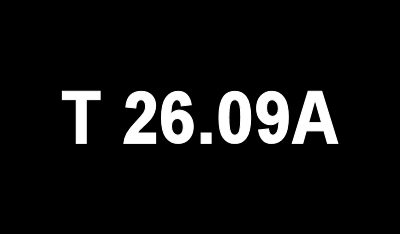 to this... 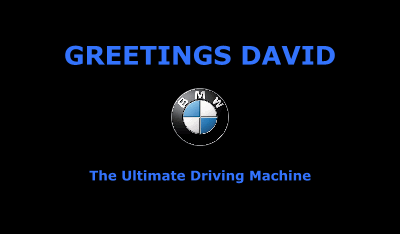 making certain to retain the original GIFs properties: 400x234 pixels 96x96 dpi bit depth of 8 1 frame GIF89a file type and saved it as BMWLOGO2. I opened the new logo in the hex editor copied the code, then opened navboot_BACKUP and pasted the code at address 00B1FE84. Then I saved the file as "navboot". I then used CD image editor (UltraISO) to re-open "Mk4 3D.mdf". I then navigate to the file NAV_SW/V_2/RR/0101/BMWC01S/app_sw/ and added the newly created navboot file to the directory and saved the image. Using Alcohol 120 I burnt a CD and proceeded to the X for install. CD boot install routine ran... progress 100% at which point I received (5 times) an installation failure message as did the guys at RoadFly and BimmerBoard. The screen goes blank and you can not view any menu ites, though of course the radio still works. *Note: By placing the original unadulterated Beta CD in drive, the Nav will restore itself. So, I am temporarily stumped. If anyone has any ideas, I anxiously await to hear them as I can not have my buddy (who owns an Acura) walking around with custom nav logo while I have monochrome number displayed My current attempt involves trying to get my logo precisely (exact address numbers) the same size as the original... will update you when done.-RSZ
__________________
---------------------- the REAL Shaka Zulu My X5 Page: http://www.xoutpost.com/userpage/RealShakaZulu.html Silver w/ Black Interior '03 4.4i w/ Sport & Winter Pkg ClearBra, BimmerSpinners, XM Radio, Pirelli Scorpions, Thule Rack (Snowboard), ADS Amp, MB Quart (front), Focal (rear), JL Subwoofer, GG Bailey Custom Mats, Dension Ice>Link, ACS Pedals |
|
#16
02-18-2006, 02:09 PM
|
||||
|
||||
|
Thanks Tino
Quote:
__________________
---------------------- the REAL Shaka Zulu My X5 Page: http://www.xoutpost.com/userpage/RealShakaZulu.html Silver w/ Black Interior '03 4.4i w/ Sport & Winter Pkg ClearBra, BimmerSpinners, XM Radio, Pirelli Scorpions, Thule Rack (Snowboard), ADS Amp, MB Quart (front), Focal (rear), JL Subwoofer, GG Bailey Custom Mats, Dension Ice>Link, ACS Pedals |
|
#17
02-18-2006, 02:12 PM
|
||||
|
||||
|
Quote:
 If you still have the same problem then the issue isn't the custom logo, it's something with the extract and reinsert process (or some other hidden trigger)
__________________
 Xoutpost.com - where you come for the information but stay for the friendships |
|
#18
02-18-2006, 02:18 PM
|
||||
|
||||
|
Quote:
__________________
---------------------- the REAL Shaka Zulu My X5 Page: http://www.xoutpost.com/userpage/RealShakaZulu.html Silver w/ Black Interior '03 4.4i w/ Sport & Winter Pkg ClearBra, BimmerSpinners, XM Radio, Pirelli Scorpions, Thule Rack (Snowboard), ADS Amp, MB Quart (front), Focal (rear), JL Subwoofer, GG Bailey Custom Mats, Dension Ice>Link, ACS Pedals |
|
#19
02-18-2006, 02:25 PM
|
||||
|
||||
|
Quote:
I'm sure so many of us would appreciate it! |
|
#20
02-18-2006, 02:31 PM
|
|||
|
|||
|
THe reason why you can't simply replace the Gif89a image in the navboot file and expect it to work is simple... BMW will have employed a checksum mechanism to ensure that the sat nav computer doesn't try and install software that it thinks may be corrupt..
What I'd suggest you need to try and do to maintain the correct checksum, is for the original GIF image in thh navboot file total up the bytes.. Say the original image is 30kb in length... Total each and every byte within that 30Kb.. Say that gives you a number like 236553434.. Now when replacing the original image in the navboot file with a replacement one, ensure that the replacement image is smaller than the original GIF image..and use the difference in size between the original image and the replacement image to correct the checksum.. e.g. if original image was 30Kb, and your replacement image is 25Kb, then the checksum over the original 30Kb of data, where 25Kb is now your new image, will not equal the original checksum of 236553434 so from the end of your replacement image data which is 25Kb in size you have 5Kb of spare data with which to correct the checksum.. So total up the 30Kb of data where the original image data (30Kb) was, but your replacement image data (25Kb) is now in place, and you'll get a different checksum e.g. 223553001 In my examples, the different between the original check sum, and the new checksum is 13000433.. So you'll need to modify the data in the spare 5Kb after your replacement image, to ensure that the checksum of the 30Kb is the same as the original checksum..basically increasing the values as necessary in the 5Kb of data So far instance if the first byte of the spare 5Kb of data is a 0, then if you change it to a 255, then your 255 nearer to the correct checksum..keep doing this over the 5Kb of data until the original checksum for the 30kb is reached.. Hope that all makes sense... NavMan |
|
| Bookmarks |
| Thread Tools | |
| Display Modes | |
|
|
|
|








 Linear Mode


