
|
|
|
|
||||||||||
| Xoutpost server transfer and maintenance is occurring.... |
| Xoutpost is currently undergoing a planned server migration.... stay tuned for new developments.... sincerely, the management |
 |
|
|
LinkBack | Thread Tools | Display Modes |
|
#11
 01-30-2009, 11:41 AM
|
|||
|
|||
|
Note: Don't create new disc from scratch, it will not work E.g. I have already a disc with POI's using the software PimpMyNav, because i don't know how to do add this in the Navigation DVD so the POI's will be visible in the Mini Cooper. Can I use this disc with POI's already? I advice people to use Notepad++ as a hex editor 
|
| Sponsored Links | |
|
|
|
|
#12
01-30-2009, 11:48 AM
|
||||
|
||||
|
Quote:
Quote:
Make 2 dirs in the C:\\POISon dir ; 1 called "C:\\POISon\DB" and the other called "C:\\POISon\DB1" Open the image with UltraIso and drag the 2 DB files (BD_0 and DB_1) into the "C:\\POISon\DB" dir along with all the other files in the top DB dir, see hlighted files in pic 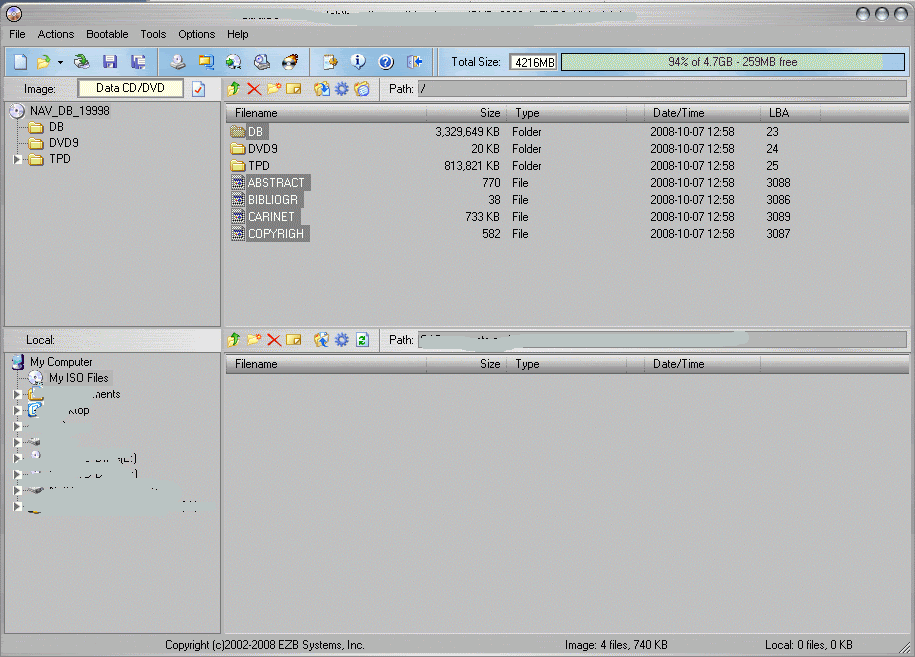 Run the poison.exe and press the forward button, select the map DB in "C:\\POISon\DB" and then open, the forward, then select the import Select map to modify (if possible, use CD map, not DVD or DVD-DL). On the edit page click 'Import' button and select file "tomtom.asc" then save modified database in DB1. Drag and drop the now modified database files back to CD/DVD map image. Save the map image to something like 2009-2-Sound.iso.
__________________
Sept 03, M3, Silver Grey. Retro-fits: Modded Mk4 DVD Drive, OEM Bluetooth, VR Control, Rainbow Speaker Upgrade, Sony SOT Amp, HK Sub, CCFL, Intravee II, NightMode. Last edited by ccfj1; 01-30-2009 at 12:12 PM.
|
|
#14
01-30-2009, 12:19 PM
|
||||
|
||||
|
Quote:
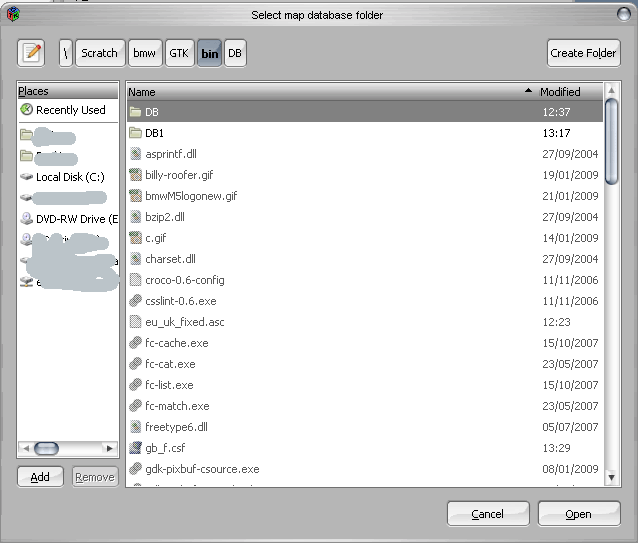 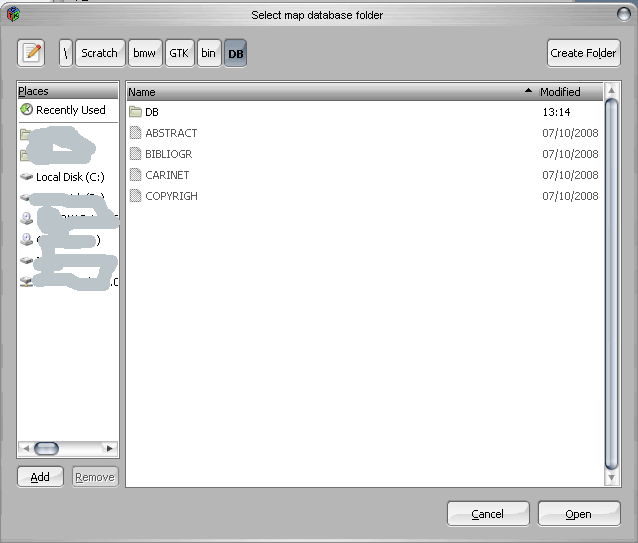
__________________
Sept 03, M3, Silver Grey. Retro-fits: Modded Mk4 DVD Drive, OEM Bluetooth, VR Control, Rainbow Speaker Upgrade, Sony SOT Amp, HK Sub, CCFL, Intravee II, NightMode.
|
|
#15
01-30-2009, 12:42 PM
|
|||
|
|||
|
Thanks again, I can load the DB dir now. I only had to place the two DB files in a sub dir. Now I want to add POI. I click on Import and than select the *.txt or *.ov2 file but nothing happens. There are no points imported.
 
|
|
#16
01-30-2009, 12:58 PM
|
|||
|
|||
|
Quote:
|
|
#17
01-30-2009, 01:02 PM
|
||||
|
||||
|
See first post.
You can use: iGO 8 txt, iGo txt, GARMIN csv, destinator asc, mio asc, navigon asc, route 66 csv and tomtom asc files from there. I used the tt.ov2 then used poiconvertor to make a asc file and then imported that.
__________________
Sept 03, M3, Silver Grey. Retro-fits: Modded Mk4 DVD Drive, OEM Bluetooth, VR Control, Rainbow Speaker Upgrade, Sony SOT Amp, HK Sub, CCFL, Intravee II, NightMode.
|
|
#20
01-30-2009, 01:16 PM
|
|||
|
|||
|
ccfj1: can you verify if this one works?
http://qshare.com/get/808617/benelux...l_all.ov2.html Received a modded file from ccf1, but still no poi's in the list (0 points imported, 0 added). I can add points only manually. Last edited by jordi.c; 01-30-2009 at 01:22 PM.
|
|
| Bookmarks |
| Thread Tools | |
| Display Modes | |
|
|
|
|





 Linear Mode


