Home Forums Articles How To's FAQ Register
Go Back   Xoutpost.com > Electronics > Bluetooth
Arnott
User Name
Password
Member List Premier Membership Today's Posts New Posts

Xoutpost server transfer and maintenance is occurring....
Xoutpost is currently undergoing a planned server migration.... stay tuned for new developments.... sincerely, the management


Reply
 
LinkBack Thread Tools Display Modes
  #21  
Old 03-31-2006, 08:08 AM
SuperGreg's Avatar
SuperHero
 
Join Date: Mar 2005
Location: Good Ol' USA
Posts: 7,794
SuperGreg is on a distinguished road
Quote:
Originally Posted by bsprtsgrp
I'm am having the same exact problem tonight. I cannot get my NAV screen to show "BLUETOOTH PAIRING"
Need more info. Where did you get your BT retro kit? What kind of phone? Are you following the pairing process exactly? Does you VR work properly? Is your phone set to "search for BT device"?
Reply With Quote

Sponsored Links

  #22  
Old 03-31-2006, 08:39 AM
bsprtsgrp's Avatar
Member
 
Join Date: Mar 2006
Location: Titletown USA
Posts: 440
bsprtsgrp is on a distinguished road
Kit is from BimmerNav. Phone is Verizon Razr. I am following the pairing procedures as per the instructions that came with the kit. Phone is set to Bluetooth search but does not find any devices.

What is a VR?
__________________
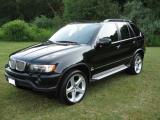
03' X5 4.4i Black Sapphire/Black
04' Land Rover Range Rover HSE
95' Jeep GC Ltd
Reply With Quote
  #23  
Old 03-31-2006, 08:45 AM
UCrewX5's Avatar
co-founder
 
Join Date: Mar 2005
Location: Hockeytown, USA
Posts: 9,741
UCrewX5 has disabled reputation
Hold the armrest pairing button down for about 10 seconds before turn the key to the on position. Once the key is on, while continuing to hold the pairing button, hit the MENU button on your nav screen. After another 10 seconds then release the pairing button and the screen should now display "BLUETOOTH PAIRING"

VR is short for Voice Recognition
__________________

Xoutpost.com - where you come for the information but stay for the friendships
Reply With Quote
  #24  
Old 03-31-2006, 08:45 AM
SuperGreg's Avatar
SuperHero
 
Join Date: Mar 2005
Location: Good Ol' USA
Posts: 7,794
SuperGreg is on a distinguished road
Quote:
Originally Posted by bsprtsgrp
Kit is from BimmerNav. Phone is Verizon Razr. I am following the pairing procedures as per the instructions that came with the kit. Phone is set to Bluetooth search but does not find any devices.

What is a VR?
Voice recognition. If that works, it would tell me that your pairing button works in the first place. Do you have the eject box with the pairing button? Are you depressing the pairing button on the eject box as opposed to the button on your steering wheel when trying to pair? What are the pairing instructions that were included with your kit?
Reply With Quote
  #25  
Old 03-31-2006, 08:57 AM
bsprtsgrp's Avatar
Member
 
Join Date: Mar 2006
Location: Titletown USA
Posts: 440
bsprtsgrp is on a distinguished road
I'm depressing the pairing buttom on the eject kit, not the steering wheel. The instructions are as follows:

1. Depress and hold the pairing button (eject box) for at least 2secs, keeping it pressed, switch the key to the 1st position (accessory) keeping the pairing button depressed for an additional 2-3 secs.

2. Release the button ---- Shortly after releasing the "BLUETOOTH PAIRING should appear on the NAV screen.

BTW, when I go to MENU and TELEPHONE, it says on the NAV screen, ACTIVATE PHONE, so I believe it is seeing the ULF

When I do depress the wheel button, the VR system beeps and prompts me for a verbal input, so that works
__________________
03' X5 4.4i Black Sapphire/Black
04' Land Rover Range Rover HSE
95' Jeep GC Ltd
Reply With Quote
  #26  
Old 03-31-2006, 09:03 AM
SuperGreg's Avatar
SuperHero
 
Join Date: Mar 2005
Location: Good Ol' USA
Posts: 7,794
SuperGreg is on a distinguished road
Quote:
Originally Posted by bsprtsgrp
I'm depressing the pairing buttom on the eject kit, not the steering wheel. The instructions are as follows:

1. Depress and hold the pairing button (eject box) for at least 2secs, keeping it pressed, switch the key to the 1st position (accessory) keeping the pairing button depressed for an additional 2-3 secs.

2. Release the button ---- Shortly after releasing the "BLUETOOTH PAIRING should appear on the NAV screen.

BTW, when I go to MENU and TELEPHONE, it says on the NAV screen, ACTIVATE PHONE, so I believe it is seeing the ULF

When I do depress the wheel button, the VR system beeps and prompts me for a verbal input, so that works
Try to hold down the button for exactly 2-3 seconds before turning on the key. Don't hold it down any longer than that. Shall I assume that you are putting your Razr into search mode prior to holding down the button and not waiting until after you turn the key on? Is your BT antenna hooked up properly?
Reply With Quote
  #27  
Old 03-31-2006, 09:04 AM
UCrewX5's Avatar
co-founder
 
Join Date: Mar 2005
Location: Hockeytown, USA
Posts: 9,741
UCrewX5 has disabled reputation
Did you try what I suggested in post 23?
__________________

Xoutpost.com - where you come for the information but stay for the friendships
Reply With Quote
  #28  
Old 03-31-2006, 09:07 AM
bsprtsgrp's Avatar
Member
 
Join Date: Mar 2006
Location: Titletown USA
Posts: 440
bsprtsgrp is on a distinguished road
Just tried it. Still no prompt for Bluetooth Pairing

Yes, everything is connected correctly.
__________________
03' X5 4.4i Black Sapphire/Black
04' Land Rover Range Rover HSE
95' Jeep GC Ltd
Reply With Quote
  #29  
Old 03-31-2006, 09:29 AM
bsprtsgrp's Avatar
Member
 
Join Date: Mar 2006
Location: Titletown USA
Posts: 440
bsprtsgrp is on a distinguished road
Stupid question....I had my NAV software updated yesterday to version 27. Would this be an issue?
__________________
03' X5 4.4i Black Sapphire/Black
04' Land Rover Range Rover HSE
95' Jeep GC Ltd
Reply With Quote
Reply

Bookmarks


Posting Rules
You may not post new threads
You may not post replies
You may not post attachments
You may not edit your posts

BB code is On
Smilies are On
[IMG] code is On
HTML code is Off
Trackbacks are On
Pingbacks are On
Refbacks are On


All times are GMT -4. The time now is 02:08 AM.
vBulletin, Copyright 2026, Jelsoft Enterprises Ltd. SEO by vBSEO 3.6.0
© 2017 Xoutpost.com. All rights reserved. Xoutpost.com is a private enthusiast site not associated with BMW AG.
The BMW name, marks, M stripe logo, and Roundel logo as well as X3, X5 and X6 designations used in the pages of this Web Site are the property of BMW AG.
This web site is not sponsored or affiliated in any way with BMW AG or any of its subsidiaries.