
|
|
|
|
||||||||||
| Xoutpost server transfer and maintenance is occurring.... |
| Xoutpost is currently undergoing a planned server migration.... stay tuned for new developments.... sincerely, the management |
 |
|
|
LinkBack | Thread Tools | Display Modes |
|
#131
 03-26-2009, 08:00 PM
|
||||
|
||||
|
Quote:
All those you mentioned are in the same area and PROBABLY similarly turned on/off, etc. Doing a Short Test was like 1 minute maybe two. All the things I've done were fairly quick. Of course, it takes a LOT longer when you're taking pics for DIYs!  BTW ... I can confirm I have NOT blown my X up .... yet!  BTW #2 ... does this mean you're gonna start contributing DIYs? 
Last edited by TwinsPoppa; 03-26-2009 at 08:34 PM. 
|
| Sponsored Links | |
|
|
|
|
#133
03-26-2009, 08:37 PM
|
||||
|
||||
|
Just about every module in there needs to be coded... It tells it what vehicle it's in and what options it has to work with.
__________________
"When you do things right, people won't be sure you've done anything at all" (Bender, futurama) You make something idiotproof, they'll make a better idiot You think professional is expensive, just wait until you pay for amateur. Never let your sense of morals prevent you from doing what is right. Examine what is said, not who speaks. X5 pics RIP 4.6is..... 2003 4.6is 
|
|
#134
03-26-2009, 08:39 PM
|
||||
|
||||
|
Quote:
__________________
"When you do things right, people won't be sure you've done anything at all" (Bender, futurama) You make something idiotproof, they'll make a better idiot You think professional is expensive, just wait until you pay for amateur. Never let your sense of morals prevent you from doing what is right. Examine what is said, not who speaks. X5 pics RIP 4.6is..... 2003 4.6is
|
|
#135
03-26-2009, 08:40 PM
|
|||
|
|||
|
Quote:
|
|
#136
03-26-2009, 08:46 PM
|
||||
|
||||
|
Yeah, it would either take someone with a GT1 or the dealer. But beware, in some cases it fails to take the encoding with used modules saying it is permanently paired to another vehicle, vin # doesn't match. But it usually takes the encoding ok.
__________________
"When you do things right, people won't be sure you've done anything at all" (Bender, futurama) You make something idiotproof, they'll make a better idiot You think professional is expensive, just wait until you pay for amateur. Never let your sense of morals prevent you from doing what is right. Examine what is said, not who speaks. X5 pics RIP 4.6is..... 2003 4.6is
|
|
#137
03-26-2009, 11:58 PM
|
||||
|
||||
|
GT1 DIY - Daytime Driving Light (DRL)
Here's how to Activate/De-activate the Daytime Driving Light (DRL):
1) Main DIS screen ------> 2) Select: Coding/Programming  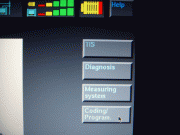 3) Select: Car Memory --> 4) Confirm connected to OBDII & key position #2 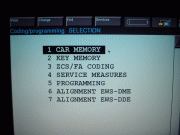  5) Pre data read --------> 6) Actual data read 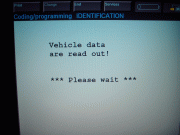 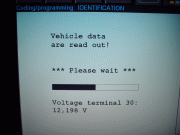 7) Select: Lighting ------> 8) Select: External Lights 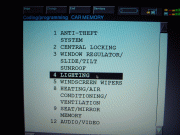 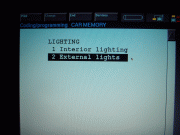 9) Select: Daytime Driving Light -> 10) Select: Active or Not Active 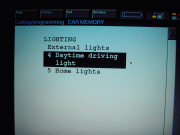 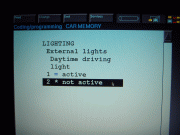 11) Selection confirmation -> 12) Returns to Car Memory Menu automatically after confirmation 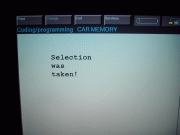 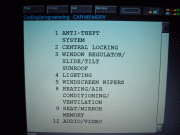 13) Scroll down, Select: Set Vehicle -> 14) Displays what will be set 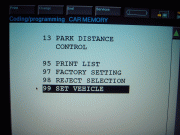 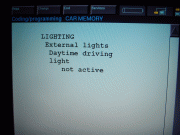 15) Ignition on/off & confirm setting -> 16) Select: Yes 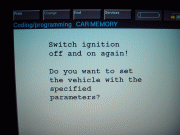  17) Setting (encoding) --> 18) Setting completed! 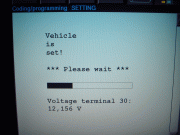 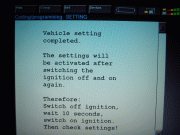
|
|
#138
03-27-2009, 01:07 AM
|
||||
|
||||
|
Quote:
However, I was able to clear the fault through the Control Module-Functions. I updated my original post, with the question, with the screenshots of what I did. You can see it here: X5world - View Single Post - My experience with a laptop GT1 I figure if it comes back again then I'll show you the screens of where I'm unsure of which selection to choose. 
|
|
#139
03-27-2009, 02:10 AM
|
|||
|
|||
|
I got it hooked up tonight and have the power issue.
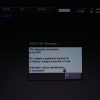 I checked the connection with the head and confirmed that it is connected okay. With this power issue, I can't advance from this menu 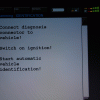 Can anyone tell me what terminal 15 is? And I don't quite get how DIS reads voltage because there is no direct power connection to the head. In the GT1 manual, it must refer to the battery voltage of the GT1 unit. Does that mean it measures the voltage of the laptop in our setup? I have connected my laptop to the power outlet so thought it won't cause the voltage problem.. Last edited by koister2001; 03-27-2009 at 02:16 AM.
|
|
#140
03-27-2009, 02:25 AM
|
||||
|
||||
|
Quote:
Han .... some things to know: 1) The diagnostic head gets powered through the OBD-II connection. Also reads voltage from there too. 2) Make sure your battery is in good condition, if not hook-up a charger. 3) For long diagnostic sessions, you can have the X running or again use a charger. 4) If you were turning off the DRLs and you are going very slow the DRLs probably drained your battery too much - because you took too long! (assuming your battery is good). 5) Terminal 15 I believe is your ignition or OBD-II connector. I have turned my DRLs off/on several times .. in the same session with no problems. Some other tips. I don't turn the car on until I'm ready: Which means laptop already at the screen I need to be, cables connected already, all doors closed, lights in the off position not auto, seat belt connected. Once I'm ready it usually only takes less than 5 minutes to do the complete process. Your battery should not be drained already. Better get it checked to make sure. Ithink my batter has gone below 12V like maybe once or twice on some extended sessions - but have never received the voltage low message you received. I wonder if my battery happens to be very good .. I doubt it. Hope that helps. BTW .. I'm not sure if you can do certain encoding/programming with the X running. Diagnosis yes ... but encoding  I need to ask weasel. I need to ask weasel.
Last edited by TwinsPoppa; 03-27-2009 at 02:34 AM.
|
|
| Bookmarks |
| Tags |
| gt1 setup |
|
|
|
|








 Linear Mode


