Home Forums Articles How To's FAQ Register
Go Back   Xoutpost.com > Electronics > Navigation System
Fluid Motor Union
User Name
Password
Member List Premier Membership Today's Posts New Posts

Xoutpost server transfer and maintenance is occurring....
Xoutpost is currently undergoing a planned server migration.... stay tuned for new developments.... sincerely, the management


Reply
 
LinkBack Thread Tools Display Modes
  #751  
Old 01-12-2012, 03:48 PM
Member
 
Join Date: Jan 2012
Location: Florida, USA
Posts: 10
kingmark is on a distinguished road
It's making more sense to me now. Yes, I think the "Traffic Information" is like TMC. I wasn't aware that the image I'm currently using is for the UK, that would explain why I'm unable to click on "Traffic Information" then. Thanks for that info!!

Yessir, my unit is the MKIV. I've learned that only the OEM images that I burn will actually update my system, so I need a USA OEM firmware with the night/blue option along with the last BMW Logo image that I posted.

I've tried several different types of CD-R medias....the latest that I've used (and was succefful updating the system) is a Sony CD-R that burns at 10X. I haven't been able to find any media that will burn at a slower rate other than DVD media, however, I've tried those and my system says those discs are "invalid" when trying to update.

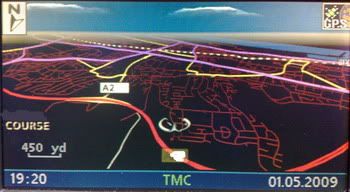
I originally updated my 4:3 monitor to the 16:9 monitor then upgraded my MKII system to the MKIV unit. I lost the "Info" & "Select" button functions on my system. I downgraded to v24 OEM then back to the current image I'm running, but didn't regain Info & Select options. This downgrade/upgrade did change my nav map scale to yards instead of feet, which isn't a problem. I just ordered the Navcoder v6 Interface so hopefully I'll be able to restore those two functions.

If you could possibly create a v32 USA OEM image with Night/blue option and the bmw logo image, I would greatly appreciate it. In the meantime, I'll keep looking for other CD-R discs that will burn at a slower rate than 10X. I have a feeling we'll get this figured out soon THANKS AGAIN FOR ALL OF YOUR HELP!!!!!
Reply With Quote

Sponsored Links

  #752  
Old 01-12-2012, 04:21 PM
ccfj1's Avatar
Member
 
Join Date: Sep 2006
Location: The UK.
Posts: 1,934
ccfj1 is on a distinguished road
Quote:
Originally Posted by kingmark View Post
It's making more sense to me now. Yes, I think the "Traffic Information" is like TMC. I wasn't aware that the image I'm currently using is for the UK, that would explain why I'm unable to click on "Traffic Information" then. Thanks for that info!!

Yessir, my unit is the MKIV. I've learned that only the OEM images that I burn will actually update my system, so I need a USA OEM firmware with the night/blue option along with the last BMW Logo image that I posted.

I've tried several different types of CD-R medias....the latest that I've used (and was succefful updating the system) is a Sony CD-R that burns at 10X. I haven't been able to find any media that will burn at a slower rate other than DVD media, however, I've tried those and my system says those discs are "invalid" when trying to update.

I originally updated my 4:3 monitor to the 16:9 monitor then upgraded my MKII system to the MKIV unit. I lost the "Info" & "Select" button functions on my system. I downgraded to v24 OEM then back to the current image I'm running, but didn't regain Info & Select options. This downgrade/upgrade did change my nav map scale to yards instead of feet, which isn't a problem. I just ordered the Navcoder v6 Interface so hopefully I'll be able to restore those two functions.

If you could possibly create a v32 USA OEM image with Night/blue option and the bmw logo image, I would greatly appreciate it. In the meantime, I'll keep looking for other CD-R discs that will burn at a slower rate than 10X. I have a feeling we'll get this figured out soon THANKS AGAIN FOR ALL OF YOUR HELP!!!!!
No problem, the discs I use are x8 and I dont have any read problems with them (the are by TDK)

If all else fails, PM me your postal address and I'll pop a modded image in the post.
__________________
Sept 03, M3, Silver Grey. Retro-fits: Modded Mk4 DVD Drive, OEM Bluetooth, VR Control, Rainbow Speaker Upgrade, Sony SOT Amp, HK Sub, CCFL, Intravee II, NightMode.
Reply With Quote
  #753  
Old 01-12-2012, 06:56 PM
Member
 
Join Date: Jan 2012
Location: Florida, USA
Posts: 10
kingmark is on a distinguished road
Okay....I just downloaded the OEM image NAV_SW(v32).rar from www.e38.org/nav and used navtweak to change the splash screen to my logo image. I used UltraISO to edit the "created" dates for navboot to the original creation date then saved to a new image, v32OEM-BMWLogo-NAV_SW(v32).rar....then burned using ImgBurn. I went out to my car, downgraded to v29 OEM, then my system actually let me update to my burned image. Here is the file I used/created & burned: MEGAUPLOAD - The leading online storage and file delivery service

I've got the BMW Logo image as my splash screen now, but I'm missing the blue/night mode now. Is it possible to add the blue/night mode colors & the Camera options to the above image? THANK YOU!!!!!!
Reply With Quote
  #754  
Old 01-13-2012, 04:25 AM
ccfj1's Avatar
Member
 
Join Date: Sep 2006
Location: The UK.
Posts: 1,934
ccfj1 is on a distinguished road
Quote:
Originally Posted by kingmark View Post
Okay....I just downloaded the OEM image NAV_SW(v32).rar from www.e38.org/nav and used navtweak to change the splash screen to my logo image.
OK.

Quote:
I used UltraISO to edit the "created" dates for navboot to the original creation date then saved to a new image, v32OEM-BMWLogo-NAV_SW(v32).rar....
hmmm, naver done that before mate, file creation dates have never played a part in wether it works or not.!!

Quote:
then burned using ImgBurn. I went out to my car, downgraded to v29 OEM, then my system actually let me update to my burned image. Here is the file I used/created & burned: MEGAUPLOAD - The leading online storage and file delivery service
OK, so its OEM except the splash.

Quote:
I've got the BMW Logo image as my splash screen now, but I'm missing the blue/night mode now. Is it possible to add the blue/night mode colors & the Camera options to the above image? THANK YOU!!!!!!
Day/night = yes, The camera option is a patch to the navboot file that allows for the the alert function.

The camera on/off (the then setring menu) is a whole different ball game and requires several modded voice and text files to be moved about, (this is why I dont offer a USA version, only a UK version, the USA has to many variables, aand I dont have the tme to cater for all the variables).

PM me your email address and I'll send you the day nigh colour files (and you can use navtweak to replace the ones you have to the nightmode ones.

OR send me the navboot file and I'll mod that for you.
__________________
Sept 03, M3, Silver Grey. Retro-fits: Modded Mk4 DVD Drive, OEM Bluetooth, VR Control, Rainbow Speaker Upgrade, Sony SOT Amp, HK Sub, CCFL, Intravee II, NightMode.

Last edited by ccfj1; 01-13-2012 at 04:31 AM.
Reply With Quote
  #755  
Old 01-13-2012, 04:52 AM
Member
 
Join Date: Jan 2012
Location: Florida, USA
Posts: 10
kingmark is on a distinguished road
Okay...let's scratch the camera option, I can do without. The navboot file from the v32OEM-BMWLogo-NAV_SW(v32) is here: MEGAUPLOAD - The leading online storage and file delivery service. If you could modify that navboot file to have the night/blue option, I'd appreciate it!!! Again, thank you for all of your help.....You're amazing!
Reply With Quote
  #756  
Old 01-13-2012, 05:11 AM
ccfj1's Avatar
Member
 
Join Date: Sep 2006
Location: The UK.
Posts: 1,934
ccfj1 is on a distinguished road
here you go mate, have a look and try

MEGAUPLOAD - The leading online storage and file delivery service
__________________
Sept 03, M3, Silver Grey. Retro-fits: Modded Mk4 DVD Drive, OEM Bluetooth, VR Control, Rainbow Speaker Upgrade, Sony SOT Amp, HK Sub, CCFL, Intravee II, NightMode.
Reply With Quote
  #757  
Old 01-13-2012, 10:04 AM
Member
 
Join Date: Jan 2012
Location: Florida, USA
Posts: 10
kingmark is on a distinguished road
Hello.....your last megaupload link says "link temporarily not available". Is this normal for newly uploaded files...should I keep trying the link or is there a problem?
Reply With Quote
  #758  
Old 01-13-2012, 10:18 AM
ccfj1's Avatar
Member
 
Join Date: Sep 2006
Location: The UK.
Posts: 1,934
ccfj1 is on a distinguished road
Just tested it works for me, give a 5min and if its not working I'll post it somewhere else.
__________________
Sept 03, M3, Silver Grey. Retro-fits: Modded Mk4 DVD Drive, OEM Bluetooth, VR Control, Rainbow Speaker Upgrade, Sony SOT Amp, HK Sub, CCFL, Intravee II, NightMode.

Last edited by ccfj1; 01-13-2012 at 10:26 AM.
Reply With Quote
  #759  
Old 01-13-2012, 09:15 PM
Member
 
Join Date: Jan 2012
Location: Florida, USA
Posts: 10
kingmark is on a distinguished road
Guess What??? SUCCESSFUL!!!!!! Thank you, Thank you!! I'm good to go now. The only thing I have to do now is restore my "Info" & "Select" buttons once I receive my navcoder usb interface. Thanks again for taking the time to help me!!
Reply With Quote
  #760  
Old 04-27-2012, 08:22 AM
Member
 
Join Date: Oct 2005
Location: Scotland, UK
Posts: 465
apetrov1x5 is on a distinguished road
Quote:
Originally Posted by ccfj1 View Post
Hi All,

As promised, Night Mode for the MK3 and MK4 BMW Nav Computers.


Mods:

1: Night Mode Colour Scheme.
2: Day/Night text added (for all languages).
3: Modded image version number for both mk3 (3-1/65) and mk4 (4-1/01)
4: Mk3 and Mk4 can be done with same image (mode2/form1).

Caveats; Read, Understand and Accept.

1: You do this update at your own risk.
2: I'm just a normal guy like you, I'm not a shop or business, so don't expect instant replys to any emails or PM's
3: I do not have access to a mk3 so while I'm pretty confident that it will work as it should, that's no guarantee.
4: The fully modded menu text is only available to the UK Sound modded images.
5: Street names in 2d night mode do not appear as they are black and are hard coded on the map disc and as such can't be changed, so this means no street names are displayed in night mode, 3d Perspective mode is slightly better as this has white shadow, so you can make words out, if this is a problem, then please DON'T download it and then moan about it.
6: Creating a patched version for every language on the disc is a monumental task so, I've only done one for the UK, all others must be done by yourselves for yourselves.
7: The default for the POI alerts in "on", "off" should only be used as a temporary measure, as this has knock on effects (for the VR, TV and some displays, appearing in French). The only real fix is to use Jochens excellent navcoder and recode/reorder the languages (I use UK,USA and GER) this fixes the "problem".

MK3 and MK4 - UPDATE 10-06-09

This is now working for the mk3 and the street names are in a very light blue so can be seen in night mode.

Mk3 :
My Custom Splash, OEM Day mode, Custom Night mode (col_set 2 wide and split) and modded Day/Night menu text.
Mk4 :
My Custom Splash, Sky, Pointers, OEM Day mode, Custom Night mode (col_set 2 wide and split) and modded Day/Night menu text.

Night all mods 1010

Oval Land Rover Splash, OEM Day mode, Modded Sky, Custom Night mode (col_set 2 wide and split, but OEM colours) and Day/Night menu text.
Night_RR_Only_1009 (mk3 & mk4)

Downloads, MK4
only.

1:
OEM Splash, OEM Day mode, Modded Sky, Custom Night mode (col_set 2 wide and split, but OEM colours) and Day/Night menu text.
v31 Night OEM 1010

2: MK4 Only, Custom Night mode (col_set 2 wide and split) and modded sky files only. MegaUpload, use this only to mod the navboot yourself.

3: For UK forum members only, My Custom Splash, Sky, Pointers, Patched for POI camera alerts, OEM Day mode, Custom Night mode (col_set 2 wide and split) and modded Day/Night menu text Plus on/off menu option for POI alerts. PM Me.

Once you have downloaded the file, unzip it (using winzip or similar) into a sub-dir on your pc.

Then use imgburn or similar (The Official ImgBurn Website) to burn a new (blank) cd with the new downloaded firmware image.

v32 is the latest, but has no updates for the mk4 over v31).

Unzip imgburn, then v31 image and then open imgburn, and select the "write image file to disc" then select the v31_Night_OEM_1010.cue or v31_Mine_Night_1010,cue file, depending on download.

Select the write speed at the slowest rated speed for the disc, you must do this and then burn on a good quaility cd.

When its finished writing your new firmware cd,
Goto the car open the drivers door,
Goto the nav computer and press eject on drive,
Eject the map disc,
Switch ign to pos 1, leave door open.
Insert firmware disc into drive, follow instruction on nav screen.
Wait (approx 6 mins) till sat nav asks to eject cd and reboot.
Eject cd,
Confirm reboot.

That's it.

Do not switch off ignition or close the door when doing the upgrade.

Any problems get in touch,

Thanks to: nomad (for navtweak & POISon), Kiwijocken (navcoder) and manormachine for the inspiration (nightview).
NOTE: Please do not use any of my pictures without my permission, I found them cropping up on websites where they should not be.
Hi, and thank you once again for the great work you have done.

I have used your modded disc on my previous car and been very happy with the result.

However, now I got a different car and it has already V32 installed - how can I install your image with night mode?

Many thanks,
Andy
Reply With Quote
Reply

Bookmarks


Posting Rules
You may not post new threads
You may not post replies
You may not post attachments
You may not edit your posts

BB code is On
Smilies are On
[IMG] code is On
HTML code is Off
Trackbacks are On
Pingbacks are On
Refbacks are On


All times are GMT -4. The time now is 03:23 PM.
vBulletin, Copyright 2026, Jelsoft Enterprises Ltd. SEO by vBSEO 3.6.0
© 2017 Xoutpost.com. All rights reserved. Xoutpost.com is a private enthusiast site not associated with BMW AG.
The BMW name, marks, M stripe logo, and Roundel logo as well as X3, X5 and X6 designations used in the pages of this Web Site are the property of BMW AG.
This web site is not sponsored or affiliated in any way with BMW AG or any of its subsidiaries.