
Home Forums Articles How To's FAQ Register
Go Back   Xoutpost.com > BMW SAV Forums > X5 (E53) Forum
Arnott
User Name
Password
Member List Premier Membership Today's Posts New Posts

Xoutpost server transfer and maintenance is occurring....
Xoutpost is currently undergoing a planned server migration.... stay tuned for new developments.... sincerely, the management


Reply
 
LinkBack Thread Tools Display Modes
  #161  
Old 11-06-2010, 12:30 PM
mrBrigante's Avatar
Member
 
Join Date: May 2009
Location: NY
Posts: 174
mrBrigante is on a distinguished road
Quote:
Originally Posted by fullmetaljacket View Post
Yes yes! I hate the glare! What's the solution guys? Would it be putting on those anti-glare screen protectors for iPhones that are fingerprint / smudge free? Let me know how you guys solve this issue.
worked for me get uncut or ipad privacy screen protector then cut to screen and turn up the screen brightness if needed sand voila no more glare
Reply With Quote

Sponsored Links

  #162  
Old 11-06-2010, 12:39 PM
fullmetaljacket's Avatar
Member
 
Join Date: Jun 2010
Location: Philippines
Posts: 245
fullmetaljacket is on a distinguished road
got it thanks!
Reply With Quote
  #163  
Old 11-06-2010, 10:08 PM
Member
 
Join Date: Apr 2009
Location: Calgary
Posts: 1,048
fmugur is on a distinguished road
Quote:
Originally Posted by capmaier View Post

Thanks for all the info, you guys have done a great job and the units look awesome installed, mine improved the sound like 40% with the same speakers, and one question what is the DSP they are talking about?
The DSP is an amp with extra feature which works very different than the normal amp. Glad you found this thread helpful. Post you install and user experience with your unit.
__________________

4.8is 2004 imola red
4.8is 2005 Black on Black - DINAN/2 sold
4.4 2004 X5
2003 330xi
2008 328xi - sold
4.4 2000 X5 - sold
Reply With Quote
  #164  
Old 11-06-2010, 10:48 PM
Member
 
Join Date: Nov 2010
Location: Mexico
Posts: 4
capmaier is on a distinguished road
So Far IŽm ok with the unit, DVD working ok, installation took about 5 hrs but it fitted great at the end, IŽll Post pics later, the ipod works and sounds great, but the cable is not very good, sometimes I have to reconnect to get the unit reading the Ipod, my gps is not working, I get 1 or 2 satellites max, I got to run Igo8 and Polnav softwares, but havenŽt been able to make them work, tomorrow a gps guy is coming to help me; IŽll post results, I checked today the antenna and is well connected, and I put the antenna in the dash next to the speaker also, but IŽll try tomorrow again and post.

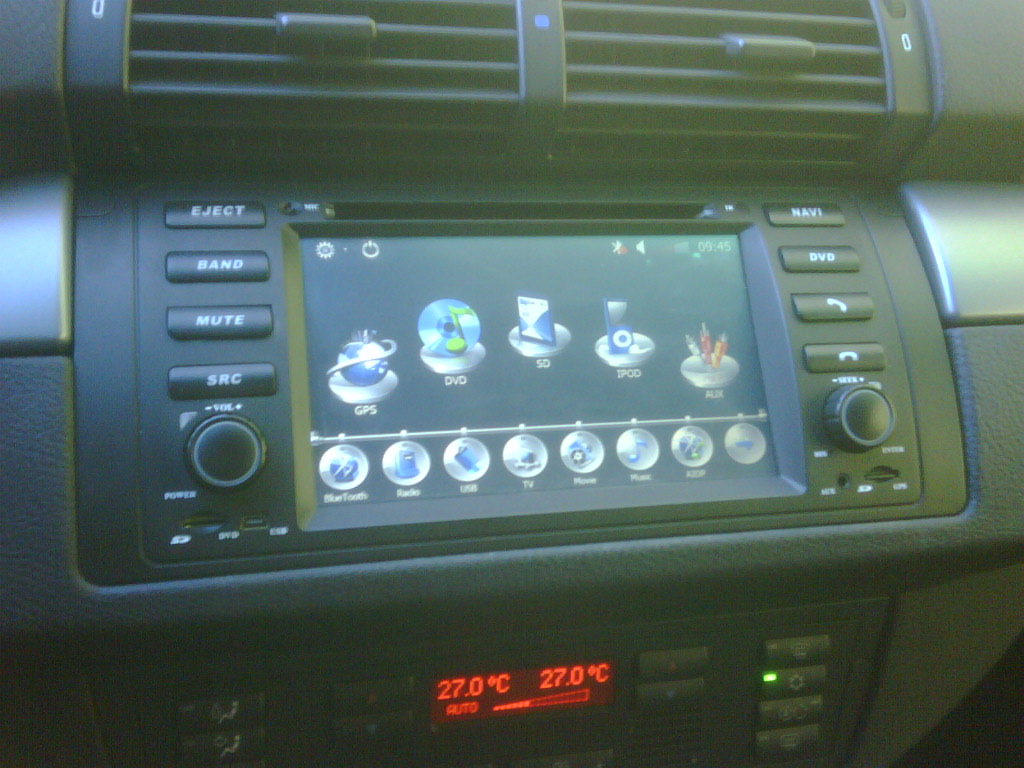
Overall satisfaction is good, It looks much better than the OEM radio, and I was looking for an ipod integration, so it worked for me, but ItŽs no original BMW or high end quality built feeling, it really feels cheaper than a quality brand radio, but it fits just in perfect harmony with the dash:
Reply With Quote
  #165  
Old 11-07-2010, 07:22 AM
Member
 
Join Date: Jul 2010
Location: Manila
Posts: 21
thecount123 is on a distinguished road
received my hualingan , waiting for my back sensor camera to arrive , also looking for a shop to help me install the said unit =)
Reply With Quote
  #166  
Old 11-07-2010, 02:20 PM
Member
 
Join Date: Nov 2010
Location: Mexico
Posts: 4
capmaier is on a distinguished road
Ok Today the GPS guy came, he told me the unit has very low memory to run the destinator or garmin Gps software, and checked my antenna with no results, he said it's a very bad antenna, and that was probably the cause my GPS is not working, so he is going to get me a new Gps antenna with Sirf III chip, he said it's more powerful and will work, (Hope So!)and I posted some pics of my installation and finnish look, besides that the unit is working ok, I also have some interference noise sometimes, does anybody has that??? I checked the noise filter included and it looked good, but still getting some noise from engine???
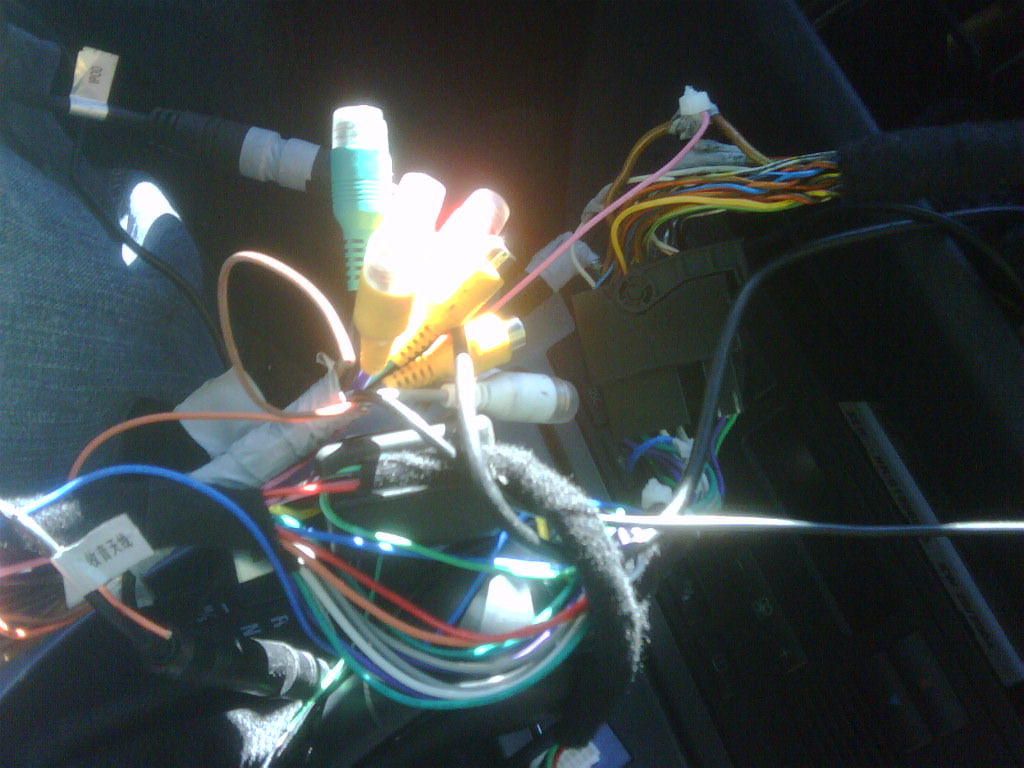
Name:  IMG00195-20101107-0954.jpg
Views: 2086
Size:  179.2 KB

Name:  IMG00192-20101107-0846.jpg
Views: 2105
Size:  169.4 KB

Name:  IMG00186-20101107-0842.jpg
Views: 1917
Size:  174.3 KB
Reply With Quote
  #167  
Old 11-07-2010, 04:22 PM
Member
 
Join Date: Apr 2009
Location: Calgary
Posts: 1,048
fmugur is on a distinguished road
Quote:
Originally Posted by capmaier View Post
Ok Today the GPS guy came, he told me the unit has very low memory to run the destinator or garmin Gps software, and checked my antenna with no results, he said it's a very bad antenna, and that was probably the cause my GPS is not working, so he is going to get me a new Gps antenna with Sirf III chip, he said it's more powerful and will work, (Hope So!)and I posted some pics of my installation and finnish look, besides that the unit is working ok, I also have some interference noise sometimes, does anybody has that??? I checked the noise filter included and it looked good, but still getting some noise from engine???
Attachment 45562

Attachment 45563

Attachment 45564
Mine have no noise and the Nav software works perfect for US and Canada, not sure about Mexico. The GPS antenna works very well on my units. You might have gotten a bad unit. We always test the units before we ship them out. Not all units are perfect. For example, I got an unit that does not save the AM radio stations but everything else works good. So, this unit will never be sent out. In your case hopefully is the antenna. Thanks for sharing.
__________________

4.8is 2004 imola red
4.8is 2005 Black on Black - DINAN/2 sold
4.4 2004 X5
2003 330xi
2008 328xi - sold
4.4 2000 X5 - sold
Reply With Quote
  #168  
Old 11-08-2010, 04:16 PM
Member
 
Join Date: Nov 2010
Location: Toronto, Canada
Posts: 2
Soldo is on a distinguished road
Hey guys,

New to this forum. I stumbled across this thread after I placed an order for my Hualingan unit from Ctobay. It definitely helped reduce some time on the troubleshooting aspect of the fittment of the unit.

Anyways, everything on the unit works great and I haven't had any problems yet although I haven't tried playing a DVD yet, however I am trying to resolve the GPS issue. My headunit never game with a SD card that had the maps preloaded. From what I understood it was supposed to have the maps on it from Ctobay but I have not heard back from them and I sent out an email a couple weeks ago.

Just wondering if any of you had to download the maps yourself and if so where did you get the maps from and how was it setup? I found some downloadable stuff online but I'm not sure if I should try that or upgrade to a more reputable GPS service like Garmin, if that's possible.

Last edited by Soldo; 11-08-2010 at 05:20 PM.
Reply With Quote
  #169  
Old 11-08-2010, 04:35 PM
Member
 
Join Date: Apr 2009
Location: Calgary
Posts: 1,048
fmugur is on a distinguished road
Quote:
Originally Posted by Soldo View Post
Hey guys,

New to this forum. I stumbled across this thread after I placed an order for my Hualingan unit from Ctobay. It definitely helped reduce some time on the troubleshooting aspect of the fittment of the unit.

Anyways, everything on the unit works great and I haven't had any problems yet although I haven't tried playing a DVD yet, however I am trying to resolve the GPS issue. My headunit never game with a SD card that had the maps preloaded. From what I understood it was supposed to have the maps on it from Ctobay but I have not heard back from them and I sent out an email a couple weeks ago.

Just wondering if any of you had to download the maps yourself and if so where did you get the maps from and how was it setup? I found some iGo torrents but I'm not sure if I should try that or upgrade to a more reputable GPS service like Garmin, if that's possible.
I never heard of iGo but I was very impressed with it. When I got the first units I thought I should get Garmin but I didn't see the need. It wokrs very well for Canada and US.
__________________

4.8is 2004 imola red
4.8is 2005 Black on Black - DINAN/2 sold
4.4 2004 X5
2003 330xi
2008 328xi - sold
4.4 2000 X5 - sold
Reply With Quote
  #170  
Old 11-08-2010, 09:16 PM
fullmetaljacket's Avatar
Member
 
Join Date: Jun 2010
Location: Philippines
Posts: 245
fullmetaljacket is on a distinguished road
iPad Privacy Anti-Glare for Hualingan

Quote:
Originally Posted by mrBrigante View Post
worked for me get uncut or ipad privacy screen protector then cut to screen and turn up the screen brightness if needed sand voila no more glare
Got the iPad privacy screen protector, cut it and installed it. Since it's a privacy screen protector and naturally we are on its right or left side when accessing the Hualingan, I'm having trouble viewing the screen (Ofcourse) It's like having astigmatism - double imagery. Sorry but this didn't work for me
Reply With Quote
Reply

Bookmarks


Posting Rules
You may not post new threads
You may not post replies
You may not post attachments
You may not edit your posts

BB code is On
Smilies are On
[IMG] code is On
HTML code is Off
Trackbacks are On
Pingbacks are On
Refbacks are On


All times are GMT -4. The time now is 06:36 AM.
vBulletin, Copyright 2026, Jelsoft Enterprises Ltd. SEO by vBSEO 3.6.0
© 2017 Xoutpost.com. All rights reserved. Xoutpost.com is a private enthusiast site not associated with BMW AG.
The BMW name, marks, M stripe logo, and Roundel logo as well as X3, X5 and X6 designations used in the pages of this Web Site are the property of BMW AG.
This web site is not sponsored or affiliated in any way with BMW AG or any of its subsidiaries.