
|
|
|
|
||||||||||
| Xoutpost server transfer and maintenance is occurring.... |
| Xoutpost is currently undergoing a planned server migration.... stay tuned for new developments.... sincerely, the management |
 |
|
|
LinkBack | Thread Tools | Display Modes |
|
#561
 07-14-2010, 03:47 PM
|
||||
|
||||
|
Quote:
Quote:
Quote:
It dead easy to install, basically disconnect the OEM cd changer and connect the IV, plug the alpine kca-420i in to the IV then plug the ipod in, thats it. You get full ID tags on screen and you can program just about all the buttons on the dash for ipod control. This is the screen from the IV 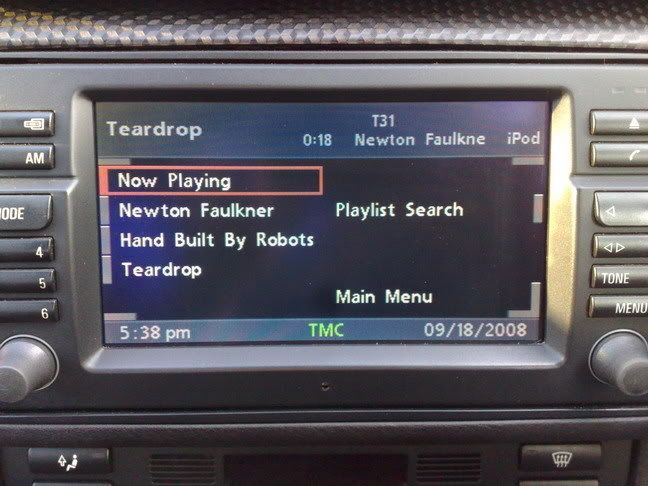 Plus if you get the alpine switch (kca-400c or kca-410c) or the intravee switch, then yiu can have the alpine mp3 cd changer (or any alpine changer) as well. This is my setup,(but i've changed the switch from the 400 to a 410). 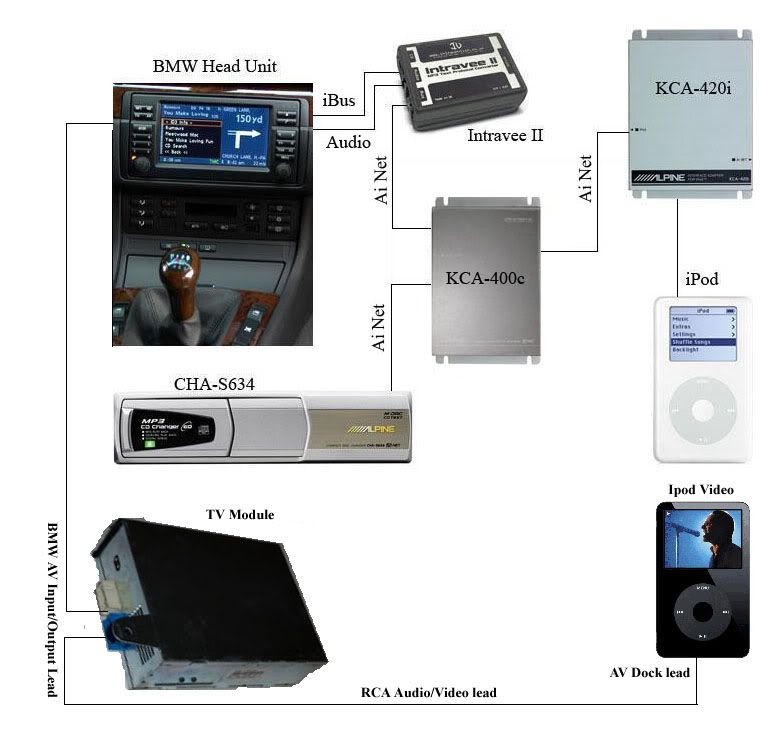 Plus connected like this (with the 410) it will allow movies and videos from the ipod video to be played in stereo. Quote:

__________________
Sept 03, M3, Silver Grey. Retro-fits: Modded Mk4 DVD Drive, OEM Bluetooth, VR Control, Rainbow Speaker Upgrade, Sony SOT Amp, HK Sub, CCFL, Intravee II, NightMode. 
|
| Sponsored Links | |
|
|
|
|
#562
08-12-2010, 08:00 AM
|
|||
|
|||
|
@ccfj1
Hi, I have allready a modified Firmware, which alert me when a speedcamera is coming.... What must I do to have a Menu to switch the alarm off and how can I insert your nightview ? I must do it by myself because I have only german on my DVD so it wont work with your version i think...
|
|
#563
08-13-2010, 12:15 PM
|
||||
|
||||
|
Quote:
Quote:
Quote:
__________________
Sept 03, M3, Silver Grey. Retro-fits: Modded Mk4 DVD Drive, OEM Bluetooth, VR Control, Rainbow Speaker Upgrade, Sony SOT Amp, HK Sub, CCFL, Intravee II, NightMode.
|
|
#564
08-19-2010, 11:31 AM
|
|||
|
|||
|
How to patch with the 2010-01 HIGH DVD ?
Hello great experts, and many thanks for the extremely valuable information that you have made available in this thread !
I have read all the 57 pages of this thread and I am confident I can now proceed to update. However I am a little confused in a couple of points for which I need a clarification. I have a BWM X3 xdrive20d (E83) from 2009, with MK4 and software version 4-1/00, which I understand it is the latest available. The “Set” menu in the Languages has 3 options: GB, F, D and the one I am using and continue to use is GB. I do not mind loosing the French and German languages. Here are my questions: 1) Could you please confirm that the latest modified OS that has the custom splash, patched with POI Sound Alert, with Night Mode is that will work for my car with Language option GB, F, D is the one available at www.megaupload.com/?d=6PSPJSXP (File id= 6PSPJSXP Name=v32_Night_all_ORG_v2.zip) ? Or should I use the one called v32_Night_all.zip ? If not, could you point me to the right one ? 2) In case I an unhappy of the result and I would like to roll back, where can I find the original OS ? Is it the one available at www.megaupload.com/?d=IP0KD0O0 (file id = IP0KD0O0 ) for all language versions ? Or there are more specific versions for each language set ? 3) (AND MOST IMPORTANT QUESTION) I also understand that I need to modify the Map disc DVD (I have the HIGH 2010-01) and add the radars in the “Military base” POI. However I have read that the 2010-1 DVD has some sort of protection and I need then to patch it. Could you point me (or send me a PM) to the patch program ? Many thanks in advance for your dedication and congratulations to all for this excellent forum. Foobar – from Geneva, Switzerland
|
|
#565
08-20-2010, 08:27 AM
|
|||
|
|||
|
John (ccfj1),
many thanks for your PM and the link to the 2010 map disc patch which allows me to patch the the 2010 disc with the radars. All seems to work fine but I have one (hopefully last) question: How can I add my own radars in the military POI of the 2010 disc ? I can burn the poisoned dsc but I am unable to modify it (poison.exe crashes when opening the DB file). Hopefully you can give me a hint. And many thanks for your reply again.
|
|
#566
08-20-2010, 05:13 PM
|
||||
|
||||
|
Quote:
Quote:
Have a look in the POISon thread, there are plenty of answers there Also, always keep the OEM db files safe and use them to make new POISon modded db files, do not mod an already POISon-ed db with POISon, only use a virgin DB file for everytime you make a new update image.
__________________
Sept 03, M3, Silver Grey. Retro-fits: Modded Mk4 DVD Drive, OEM Bluetooth, VR Control, Rainbow Speaker Upgrade, Sony SOT Amp, HK Sub, CCFL, Intravee II, NightMode.
|
|
#568
08-23-2010, 05:01 AM
|
|||
|
|||
|
Yes, all works now, and the solution for me is the following:
To run poison to add your own speed cameras to the original DVD 2010 HIGH on Windows 7 (32 bit) you need the gtk2-runtime-2.14.7 version. it is the file gtk2-runtime-2.14.7-2009-01-13-ash.exe available from: Browse GTK+ for Windows Runtime Environment Files on SourceForge.net Make sure you right click and select "run as administrator" Regards, foobar.
|
|
#569
09-11-2010, 09:38 PM
|
|||
|
|||
|
Thank you!
Just wanted to drop by/register to give thanks to all the information on this board, especially 'ccfj1'.
Just plopped in v31 w/ night mode into my newly acquired '06 X5. Everything went off without a hitch. Excellent work, all you geniuses! :]
|
|
#570
09-14-2010, 04:18 AM
|
||||
|
||||
|
Hello.
Im a new user on this web page,and i need help. Where can get Bmw MK4 firemware V32,with day/night mode+speedcameras? Im searching it in English,because i whant do it in Russian. I have now this SW on hands in Deutch,i can translate it,because i dont know that language.
|
|
| Bookmarks |
|
|
|
|





 Linear Mode


