
|
|
|
|
||||||||||
| Xoutpost server transfer and maintenance is occurring.... |
| Xoutpost is currently undergoing a planned server migration.... stay tuned for new developments.... sincerely, the management |
 |
|
|
LinkBack | Thread Tools | Display Modes |
|
#551
 07-05-2010, 04:08 PM
|
|||
|
|||
|
Quote:
 I made a french voice - wife will slam on the brakes when she hears it I made a french voice - wife will slam on the brakes when she hears it

|
| Sponsored Links | |
|
|
|
|
#552
07-05-2010, 04:51 PM
|
|||
|
|||
|
Quote:
I can't seemed to find instructions for this step.  ehh. Mind to please point to the right direction? ehh. Mind to please point to the right direction?Also , i used to have a link to the instruction on how to mod the main navigation screen, but these are gone now too. And the last but not the least, where do i change the "main" sound - when the NAV boots i think it makes some kind of "noise" .... or, maybe it's my other nav ( Pioneer ) ??? ( it's bad to lose all links damn.. YouTube - Los Links Episode Uno - Bing TV Commercial )
|
|
#553
07-06-2010, 04:14 PM
|
|||
|
|||
|
Quote:
mod main screen - found. main sound - can't find anything.
|
|
#554
07-06-2010, 04:50 PM
|
||||
|
||||
|
__________________
Sept 03, M3, Silver Grey. Retro-fits: Modded Mk4 DVD Drive, OEM Bluetooth, VR Control, Rainbow Speaker Upgrade, Sony SOT Amp, HK Sub, CCFL, Intravee II, NightMode.
|
|
#555
07-14-2010, 11:31 AM
|
|||
|
|||
|
Pleeeeease help!
Ccfj1 you have to be one of the most generous guys out there!!
I have a 2005 330ci sport convertible which has the mk IV DVD sat nav and just downloaded your V31 night mode software. I originally had the 4-1/50 software so it has made a huge difference, particularly in perspective mode! Thank you so much!! Here is where I am about to be incredibly cheeky... I have noticed that near the horizon on night mode (16:9 screen) some of the colours do not feed through and remain with the original colours. I noticed that someone else commented on this but not sure if you posted a fix...? Also, is there anything else you have added to this? Noticed that someone mentioned you can changed the sky? Also, is it possible to change the splash screen to just the ///M badge on a black background? Or even just the Arsenal crest on a black background? Finally, and the most cheeky comment of the lot, you dont happen to have created a software fix where can stream music from your iphone to the car through bluetooth have you? Do you have a paypal account for donations? This would surely be worth a hell of a lot!! I'd be more than happy to donate!!
|
|
#556
07-14-2010, 11:47 AM
|
||||||||||||
|
||||||||||||
|
Quote:
Quote:
Quote:
Quote:
Quote:
Quote:
Quote:
Like so (this is an early development pic, so not finished yet) 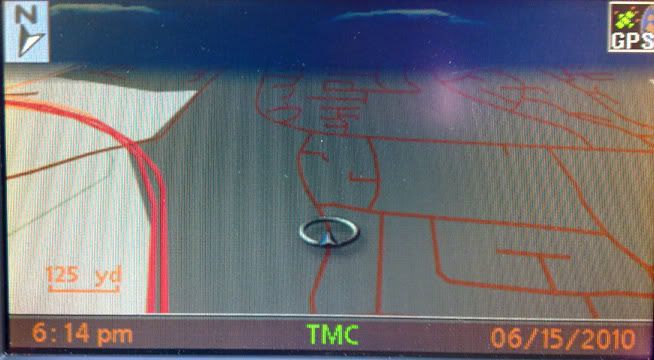 Quote:
 Quote:
Quote:
__________________
Sept 03, M3, Silver Grey. Retro-fits: Modded Mk4 DVD Drive, OEM Bluetooth, VR Control, Rainbow Speaker Upgrade, Sony SOT Amp, HK Sub, CCFL, Intravee II, NightMode.
|
|
#557
07-14-2010, 12:08 PM
|
|||
|
|||
|
Thanks mate, would like an M3 like you but the mortgage doesn't permit ha ha!
Pleeeease pleeeeease pleeeease would you mind posting up the most recent mod you have with the ///M logo as the splash screen  Interested that you mention the bluetooth doesn't support the music because when I play visual voicemails on my iphone it cuts the music out and plays the voicemail. If it does it for those files not sure why not music files like mp3 or aac? Not questioning your knowledge, just curious because I dont know the answer...?
|
|
#558
07-14-2010, 12:09 PM
|
|||
|
|||
|
oh and you really should accept some cash for this!!
|
|
#559
07-14-2010, 03:06 PM
|
||||
|
||||
|
Quote:
Quote:
Quote:
The OEM BT ULF deffo does not do stereo either mate...(and that's a fact). BTW question away mate, I don't know everything and i'm happy when someone points things out, if I'm wrong or mistaken. Quote:
__________________
Sept 03, M3, Silver Grey. Retro-fits: Modded Mk4 DVD Drive, OEM Bluetooth, VR Control, Rainbow Speaker Upgrade, Sony SOT Amp, HK Sub, CCFL, Intravee II, NightMode.
|
|
#560
07-14-2010, 03:33 PM
|
|||
|
|||
|
£200 a month! Taking advantage of a old fixed rate mortgage I guess, guy I work with is paying base rate - 0.1%!
I'll keep a look out for the next update mate, thank you so much :-) Ahh didnt think about the fact the audio was probably mono!! That intravee II thing seems to get the most mentions on the internet and you seem to have it, what do you reckon? Easy to install? Sound quality ok? Is the dock discrete (e.g. in the glovebox) I'm sure i'll have plenty of questions, but judging by your record on here i'm also sure that you'll never be wrong or mistaken ;-)
|
|
| Bookmarks |
|
|
|
|


 Linear Mode


