
|
|
|
|
||||||||||
| Xoutpost server transfer and maintenance is occurring.... |
| Xoutpost is currently undergoing a planned server migration.... stay tuned for new developments.... sincerely, the management |
 |
|
|
LinkBack | Thread Tools | Display Modes |
|
#221
 04-07-2009, 10:23 PM
|
|||
|
|||

|
| Sponsored Links | |
|
|
|
|
#222
04-11-2009, 01:05 PM
|
||||
|
||||
|
Just wanted to give a heads-up.
My time on the forum will be diminished as I just bought a new to us house and I'll be wrapping up all the paperwork on the 27th. So, not sure how much I'll be on the forum until we get settled. However, you KNOW I'll be around ... just won't be able to respond as quickly. Received my charger and will try to give an update with pics later. Happy Easter and have a good weekend! 
|
|
#223
04-11-2009, 07:21 PM
|
||||
|
||||
|
Good luck with the new house and move! (and now we will be expecting pics of that lowered X in front of a new house!)
__________________
"When you do things right, people won't be sure you've done anything at all" (Bender, futurama) You make something idiotproof, they'll make a better idiot You think professional is expensive, just wait until you pay for amateur. Never let your sense of morals prevent you from doing what is right. Examine what is said, not who speaks. X5 pics RIP 4.6is..... 2003 4.6is 
|
|
#224
04-24-2009, 04:59 AM
|
||||
|
||||
|
Just curious, are you able to do retrofit coding? And if so, are there specific retrofits that you can and cannot code?
|
|
#225
06-09-2009, 12:37 PM
|
|||
|
|||
|
hi all,
i bought the GT1 package from Yohotech last month, managed to installl the DIS v55 and SSS v32, followed the instructions on how to configure the yellow diagnostic head but i can't get it recognized by DIS - it's not appearing on the free diag. head list. Mr. Jackey from yohotech could not provide me a solution on how to fix this issue plus their communication is really bad, so i've decided to give it a shot here. can you please help me? i'm desperate! thanks in advance cheers, royemaun
|
|
#228
06-09-2009, 01:16 PM
|
|||
|
|||
|
Did you set your network card to IP specified in ReadMe.txt?
I also found useful to disable other network providers like Firewire and WiFi. I created separate hardware profile on my laptop to use with DIS. I left main network card and VM provider only After you done that open DIS, go to set connection. Then connect head to diag port which will power it up. I found that in order to set connection I have to run software first and then power up head and it will detect it. It may take like 30 second for head to appear on list.
|
|
#229
06-09-2009, 01:22 PM
|
||||
|
||||
|
Quote:
I'll try my best to help you out. First, confirm you were able to: 1 – Set your laptop IP address, Subnet Mask and Default Gateway 2 – Install & Configure VMware Player software If you can go back and verify the IP address for the laptop and the three virtual network connections are set and working properly, then we can continue with: 3 – Configure DIS v55 to recognize DK (yellow diagnostic head) Also, if the diagnostic head is already connected, you will not be able to see it under the Free Diagnostic Heads section. Can you upload a pic of what it looks like now in DIS in the upper right corner like this: 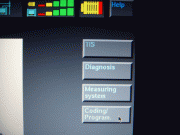 - Jose
|
|
#230
06-09-2009, 01:48 PM
|
|||
|
|||

Quote:
IP address: 192.168.68.1, Subnet Mask: 255.255.255.0 and Default Gateway, 192.168.68.1 and other virtual networks appears to be connected (firewalled) i'm not currently playing with the GT1, but reffering to the image above, the status bar for diagnostic head is grey which i believe has no communication with the GT1 head, but when i run the TIS i get to see 3 bars red/yellow/green(1bar) i really appreciate on helping me out. cheers, royemaun
|
|
| Bookmarks |
| Tags |
| gt1 setup |
|
|
|
|









 Linear Mode


