
|
|
|
|
||||||||||
| Xoutpost server transfer and maintenance is occurring.... |
| Xoutpost is currently undergoing a planned server migration.... stay tuned for new developments.... sincerely, the management |
 |
|
|
LinkBack | Thread Tools | Display Modes |
|
#271
 07-14-2009, 08:43 PM
|
|||
|
|||
|
Twilight Mode?
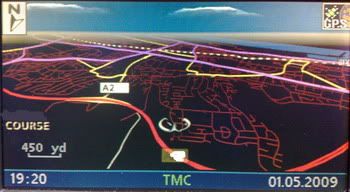
My system is a Mk3, with 4:3 screen, and is running in an MG ZT - the original MG computer was replaced with one from a BMW running version 22 (plug and play) I downloaded Night_all_mods_1010 from page 1, and used the version which was current on 12 June. Apologies for the grainy pics - they were taken on my phone. With screen set to Split and Day/Night set to 1 (Day), I get the following - blue text but "normal" map 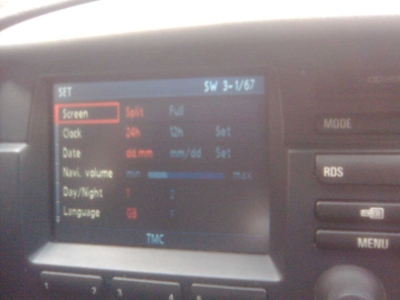   With screen set to Full and Day/Night set to 1 (Day), I get the regular map but with blue text  With screen set to Split and Day/Night set to 2 (Night), I get OEM split screen 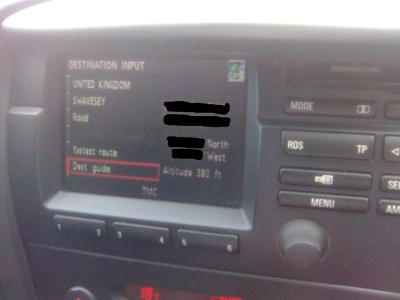  Finally, with screen set to Full and Day/Night set to 2 (Night) I get OEM full screen   What settings do I need to set to give myself the map below ? I realise I can't have perspective mode, but I'm hoping for the black land and glowing roads... Quote:
Finally, can anyone tell me how to add the pointer as above) to a Mk3? Using navtweak, I can't see the standard pointers anywhere, so I can't see how to replace them with these regards Graham 
|
| Sponsored Links | |
|
|
|
|
#272
07-15-2009, 03:30 AM
|
||||
|
||||
|
Hi Graham, and welcome to the forum.
You are running an older version and in a funny setup (BMW mk3 in a rover) so I'm not sure as to which colour schemes are being used in and whatever default state it's in, do you know what colour sets are being used for 1 and 2? an easy way to check is to change the colour of the TMC green (on) to something else (different in all rom_col's), and then the 4 that are seen are the 4 colour sets. I can probably make you up an image with all the 2nd colours sets set to nightmode and you can try that, however in the first instance try the image I posted yesterday, that has a fully configured nightmode 2nd colour scheme, and works in my test MK3. MEGAUPLOAD - The leading online storage and file delivery service I see that you have modded the menu text to had the extra menu item, and you have a 3-1/67 version number, this one should go straight over (to test) then edit with your mods, and reload. BTW you can't have the above pointer in the mk3, it's for the mk4 in 3d only, but you may be able to use a modded one in place of the blue one. HTH
__________________
Sept 03, M3, Silver Grey. Retro-fits: Modded Mk4 DVD Drive, OEM Bluetooth, VR Control, Rainbow Speaker Upgrade, Sony SOT Amp, HK Sub, CCFL, Intravee II, NightMode.
|
|
#273
07-15-2009, 08:08 AM
|
|||
|
|||
|
Hi ccfj1
Thanks very much for the speedy reply! I have downloaded it and will try when I get home tonight/tomorrow (FYI - Default state was that the navcomp came from a BMW M3 with version 3/1-63. Looked absolutely standard to me, no splashscreens or any other changes I changed the splashscreen a couple of times (3/1-64, 3/1-65 and 3/1-66) and edited the menu wording for the last of those) Will let you know the progress Graham
|
|
#274
07-15-2009, 09:51 AM
|
||||
|
||||
|
Quote:
rom_col = OEM blue/orange wide rom_col_1 = OEM blue/orange split rom_col_2 = OEM brown/orange wide rom_col_3 = OEM brown/orange split However you have the unit in a rover, and the unit is still coded for the bmw (unless you have used nav coder to coder it). This means that the defaults no longer apply, it could be...(or any of the 12 combos available) rom_col_5 = OEM blue/orange wide rom_col_6 = OEM blue/orange split rom_col_7 = OEM brown/orange wide rom_col_8 = OEM brown/orange split So you need to find out what the actual colour schemes are being used.
__________________
Sept 03, M3, Silver Grey. Retro-fits: Modded Mk4 DVD Drive, OEM Bluetooth, VR Control, Rainbow Speaker Upgrade, Sony SOT Amp, HK Sub, CCFL, Intravee II, NightMode. Last edited by ccfj1; 07-23-2009 at 03:46 AM.
|
|
#275
07-15-2009, 01:30 PM
|
|||
|
|||
|
Help Master ccfj1!
Quote:

|
|
#276
07-15-2009, 01:36 PM
|
||||
|
||||
|
Quote:
Quote:
Quote:
Or I'll look for one and use that.
__________________
Sept 03, M3, Silver Grey. Retro-fits: Modded Mk4 DVD Drive, OEM Bluetooth, VR Control, Rainbow Speaker Upgrade, Sony SOT Amp, HK Sub, CCFL, Intravee II, NightMode.
|
|
#277
07-16-2009, 10:30 AM
|
||||
|
||||
|
For alpina owners
For mk3 and mk4 mode2/form1, V32, Nightmode, sky, POIsON patched, camera Icon (#216), text and alpina splash. mk3 = 3-1/66 mk4 = 4-1/01 (112) MEGAUPLOAD - The leading online storage and file delivery service
__________________
Sept 03, M3, Silver Grey. Retro-fits: Modded Mk4 DVD Drive, OEM Bluetooth, VR Control, Rainbow Speaker Upgrade, Sony SOT Amp, HK Sub, CCFL, Intravee II, NightMode.
|
|
#278
07-16-2009, 10:31 AM
|
|||
|
|||
|
I've been trying using the original Alpina logo but these two are really nice and I've been trying these. I've tried using imageburn, alcohol and nero to burn the cd (in mode2 of course) but to no success. Maybe I still have to learn some more using nav tweak but I have to say that this forum post has been really educational. I'll get it right when I find the energy after work to play around.

|
|
#279
07-16-2009, 10:33 AM
|
||||
|
||||
|
You would need to rescale them and cut the resolution down on the as they are way too big.
__________________
Sept 03, M3, Silver Grey. Retro-fits: Modded Mk4 DVD Drive, OEM Bluetooth, VR Control, Rainbow Speaker Upgrade, Sony SOT Amp, HK Sub, CCFL, Intravee II, NightMode.
|
|
#280
07-16-2009, 12:19 PM
|
|||
|
|||
|
WOW!
 Ok that did it. Mr. ccfj1, you are the man! Ok that did it. Mr. ccfj1, you are the man! Not only was that fast, it worked! Not only was that fast, it worked!  I'll remember the pointers you mentioned and I will figure out how you programmed the OS cd so that I don't have to keep disturbing you. I know you artists want to see the fruits of your work. Here are the pics. Sorry for the low quality cellphone pics. I'll remember the pointers you mentioned and I will figure out how you programmed the OS cd so that I don't have to keep disturbing you. I know you artists want to see the fruits of your work. Here are the pics. Sorry for the low quality cellphone pics.
|
|
| Bookmarks |
|
|
|
|






 Strangely enough, your previous modified OS with the M logo for the Mark III and Mark IV loaded fine and gave me the insipiration to try and make my own using these pics.


 Linear Mode


